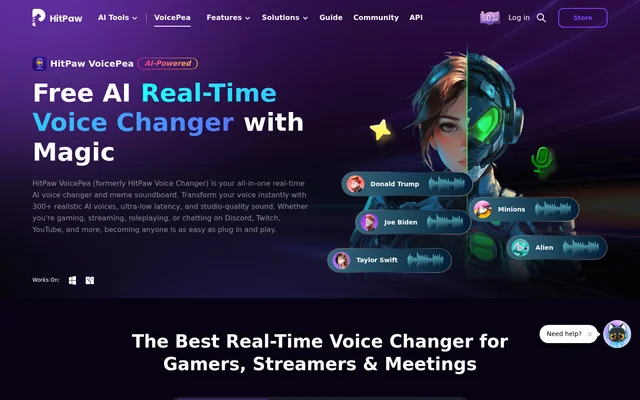
What is HitPaw VoicePea?
HitPaw VoicePea is a real-time AI voice changer and soundboard for Windows and Mac, formerly called HitPaw Voice Changer. It changes the sound of a microphone during games, streams, calls, and meetings. The desktop app also handles recorded material, so creators can apply a voice effect after recording rather than committing to it live.
What HitPaw VoicePea can do
HitPaw VoicePea offers 300+ voice effects for changing how a speaker sounds, with controls for pitch, timbre, and volume. The soundboard plays built-in or uploaded sounds independently of the selected voice effect. Separate tools handle recorded media, spoken narration, and music.
- HitPaw VoicePea applies AI voice effects to live microphone audio.
- HitPaw VoicePea triggers soundboard clips with keyboard shortcuts.
- HitPaw VoicePea changes voices in uploaded audio and video files.
- HitPaw VoicePea reduces background noise and echo and balances volume.
- HitPaw VoicePea converts written text into spoken voiceovers.
- HitPaw VoicePea creates AI song covers from uploaded files or YouTube links.
- HitPaw VoicePea generates background music from a prompt or genre.
How HitPaw VoicePea works
HitPaw VoicePea routes the modified microphone signal through a virtual audio input. Users choose their input and output devices in the app, then select HitPaw Virtual Audio as the microphone input for the game, call, or stream. The product page names Discord, Twitch, YouTube, Zoom, Google Meet, Skype, and Microsoft Teams among the platforms used with the voice changer.
Who HitPaw VoicePea is for
HitPaw VoicePea is designed for gamers and roleplayers who want to speak as a character, streamers who want to switch voices or play reactions without stopping a broadcast, and callers who want to adjust their tone or keep their original voice private. Content creators can also use the app outside a live session, for example to narrate a video from a script.
- Switch character voices during multiplayer games.
- Play reaction sounds during a Twitch or YouTube stream.
- Adjust microphone tone in a Discord call or Zoom meeting.
- Turn a script into narration for a video or podcast.
HitPaw VoicePea strengths and limitations
HitPaw VoicePea combines live voice effects, a customizable soundboard, and tools for editing recorded audio in one desktop app. Keyboard shortcuts make sound clips accessible without leaving a game or stream. Live use depends on the selected audio input and microphone permissions, so a voice effect that works in the app may not be audible to other people until the input is set correctly.
- The page lists desktop downloads for Windows and Mac.
- Live voice changing depends on selecting the virtual microphone and allowing microphone access.
- The page does not explain the billing periods or give a full free-versus-paid feature breakdown.
Getting started with HitPaw VoicePea
HitPaw VoicePea provides separate desktop download options for Windows and Mac. After installing the app, users can select their microphone and output device in Settings, apply a voice effect, and test how it sounds. The page recommends adjusting volume and applying noise reduction during testing. If other people cannot hear the result, the troubleshooting guidance points to the virtual microphone selection, microphone permissions, system volume, and audio drivers.
HitPaw VoicePea FAQ
What is HitPaw VoicePea?
HitPaw VoicePea is a real-time AI voice changer and soundboard for Windows and Mac, formerly called HitPaw Voice Changer. It modifies microphone audio during games, streams, chats, and meetings and can also apply voice effects to recorded audio and video.
Is HitPaw VoicePea free?
HitPaw VoicePea offers a free version with real-time voice changing and AI voices, as well as a paid purchase option. The product page does not give a complete breakdown of which features require purchase.
Does HitPaw VoicePea work with Discord?
HitPaw VoicePea works with Discord for real-time voice changing and soundboard effects. The app uses HitPaw Virtual Audio as the microphone input, and the product page recommends checking that input selection and microphone permissions if other callers cannot hear the modified voice.
Can HitPaw VoicePea change voices in recorded audio or video?
HitPaw VoicePea can apply AI voice effects to existing audio and video files, with uploads in 50+ supported formats. The app also offers audio enhancement tools that reduce background noise and echo and balance recording volume.
Can HitPaw VoicePea turn text into a voiceover?
HitPaw VoicePea converts written text into spoken voiceovers using AI voices. The product page describes text to speech for presentations, videos, podcasts, and audiobooks, alongside separate tools for applying voice effects to existing recordings.
From the community
No reviews yet
Be the first to review this tool. What you write helps the next person choose.