What is Botsheets?
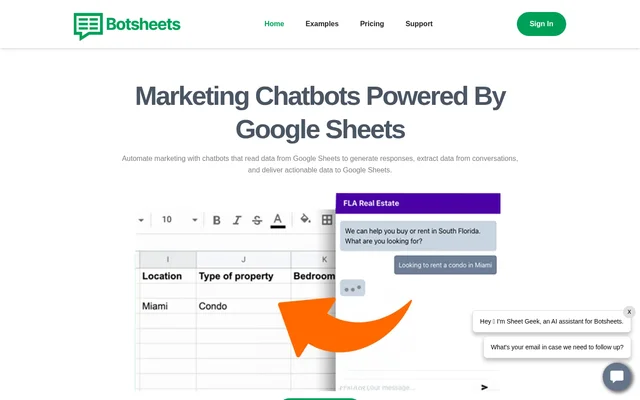
Botsheets is a marketing chatbot tool that uses Google Sheets to generate responses and store information collected during conversations. Botsheets serves agencies, business teams, marketers, product managers, and finance teams that want chatbots connected to business data. The website describes a no-code setup and offers a free trial without requiring a credit card.
Botsheets supports both collecting new information and discussing existing spreadsheet data. Website visitors can answer questions through a chatbot instead of completing a form, while people exploring connected data can ask natural language questions. Botsheets also offers presentation generation through a Google Sheets extension.
What Botsheets can do
Botsheets connects conversational interfaces with spreadsheet data for marketing, reporting, and information collection. Botsheets can read data to produce answers or write information extracted from conversations back to Google Sheets. The website also describes ways to share data chatbots and turn data into editable Google Slides presentations.
- Botsheets reads Google Sheets data to generate chatbot responses.
- Botsheets asks and answers questions to collect information from conversations.
- Botsheets sends collected conversational data to Google Sheets.
- Botsheets generates tables and visualizations in response to natural language messages.
- Botsheets provides direct links and webpage embedding for data chatbots.
- Botsheets generates Google Slides with insights, graphs, and recommendations.
How Botsheets works
Botsheets uses a Google Drive or Google Sheets connection as the starting point for the chatbot workflows described on the website. For conversational data collection, users tell the AI what information to gather. Botsheets then asks and answers questions, extracts the requested information from conversations, and delivers the resulting data to Google Sheets.
Botsheets provides a chatbot after users connect Google Sheets for data conversations. Users can share a direct link or embed the chatbot into a webpage. For presentation generation, the website directs users to install a Google Sheets extension. Generated presentations are saved on the user's Google Drive and can be edited collaboratively in Google Slides.
Who Botsheets is for
Botsheets targets agencies and business teams that want to automate conversations around Google Sheets data. Agencies can access the Botsheets dashboard while their clients only need Google Sheets. The website also identifies marketers, product managers, and finance teams as audiences, with examples covering spreadsheet-based marketing workflows, chatbot creation, and reporting.
- Agencies can manage Botsheets while clients work in Google Sheets.
- Business teams can collect actionable information through chatbots.
- Marketers can use Google Sheets as a database for reading and writing data.
- Product managers can create chatbots by connecting Google Drive.
- Finance teams can use chatbots to discuss data and streamline reporting.
Botsheets strengths and limitations
Botsheets combines conversational data collection, spreadsheet questions, and presentation generation around Google tools. Botsheets supports an agency workflow in which clients use Google Sheets rather than the dashboard, and offers both linked and embedded chatbot access. The listed Manychat plans include unlimited chatbots, although request allowances differ between plans.
- Botsheets Lite and Pro Manychat plans limit requests to their stated allowances.
- Botsheets lists Manychat pricing per Google account.
- Botsheets requires Google Sheets or Google Drive connections for the spreadsheet-based workflows described.
Botsheets FAQ
What is Botsheets?
Botsheets is a marketing chatbot tool connected to Google Sheets. Botsheets reads spreadsheet data to generate responses, collects information from conversations, and writes collected data back to Google Sheets. Additional capabilities include data visualizations and Google Slides generation.
Can Botsheets replace website forms?
Botsheets can replace website forms with chatbots that collect information through conversation. Users tell the AI what data to gather, and Botsheets asks and answers questions, extracts information from the conversation, and delivers the collected data to Google Sheets.
Can Botsheets answer questions about Google Sheets data?
Botsheets creates chatbots that answer natural language messages about connected Google Sheets data. Responses can include tables and a variety of visualizations. Users can share a direct link to the chatbot or embed the chatbot into a webpage.
Can Botsheets generate Google Slides presentations?
Botsheets generates Google Slides presentations from data with insights, graphs, and recommendations through a Google Sheets extension. Presentations are saved on the user's Google Drive, and users can edit and collaborate on the generated presentation in Google Slides.
Who is Botsheets for?
Botsheets is for agencies, business teams, marketers, product managers, and finance teams. The website describes uses including collecting business data, reading and writing spreadsheet information, creating chatbots from a Google Drive connection, and streamlining reporting through conversations about data.
From the community
No reviews yet
Be the first to review this tool. What you write helps the next person choose.