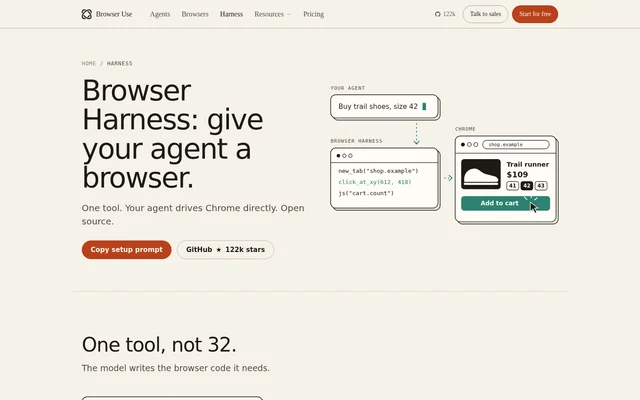
What is Browser Harness?
Browser Harness is an open-source Python tool from Browser Use that lets AI agents drive Chrome directly. It is intended for developers and other agent users who want their model to work in a browser. Browser Harness acts as the connection between the model and Chrome: it gives the agent a single tool that works through the Chrome DevTools Protocol, rather than a separate tool for each kind of browser action.
What Browser Harness can do
Browser Harness lets the model write the browser code it needs for each task. The model can use that approach with a local Chrome session or a hosted browser. A local session can already be signed in, while the hosted option lets browser tasks run without the user's laptop. The same single-tool design is the basis for both options.
- Browser Harness exposes Chrome through a single tool.
- Browser Harness lets the model write task-specific browser code.
- Browser Harness can connect to a signed-in local Chrome session.
- Browser Harness can start a cloud browser with one call.
How Browser Harness works
Browser Harness uses the Chrome DevTools Protocol as its browser interface. The setup described on the site is to paste the provided setup prompt into the agent. Browser Use provides separate guides for Claude Code, Codex, and Cursor, and the site also lists Gemini CLI, Hermes, OpenClaw, and Pi as compatible environments. For users choosing hosted Chrome rather than a local session, the site offers a way to get a cloud API key.
Who Browser Harness is for
Browser Harness is for people who already use an AI agent and want to add browser access. A developer working in Claude Code, Codex, or Cursor can use the setup prompt to give that agent access to Chrome. The choice between local and hosted Chrome depends on the task: the local option can use an existing signed-in session, while the cloud option can run without the user's laptop.
- Add browser access to a coding agent.
- Run a task in a signed-in local Chrome session.
- Run a browser task in the cloud without a laptop.
Browser Harness pricing and plans
Browser Harness is free as an MIT-licensed open-source project, while the hosted browser service is billed by usage. A cloud browser costs $0.06 per hour, and the site offers $1 in free credit per person. The credit does not expire. The hourly charge is for the hosted browser option, not the open-source Python tool. The site links to GitHub for the project and offers an API key for cloud access.
Strengths and limitations
Browser Harness combines a single browser interface with the choice of using an existing Chrome session or starting a hosted one. Its benchmark results are specific to the agent environment and test setup. In the site's comparison with Playwright MCP inside Codex, Browser Use reports no significant score difference when both use the same model and tasks. The page describes Chrome support and gives an hourly rate for hosted browser usage.
- The site does not describe support for browsers other than Chrome.
- Hosted browser usage is billed beyond the free credit.
- The setup described on the site requires adding a prompt to the agent.
Browser Harness FAQ
What is Browser Harness?
Browser Harness is an open-source Python tool that lets AI agents control Chrome through the Chrome DevTools Protocol. It exposes a single tool, and the model writes the browser code it needs for each task.
Is Browser Harness free?
Browser Harness is free as an MIT-licensed open-source project, but the hosted browser service costs $0.06 per hour. Browser Use offers $1 in free cloud credit per person, and that credit does not expire.
Can Browser Harness use my signed-in Chrome session?
Browser Harness can use a local Chrome session where the user is already signed in. The site also offers hosted Chrome browsers for tasks that need to run without the user's laptop.
Which AI agents work with Browser Harness?
Browser Harness works with Claude Code, Codex, Cursor, Gemini CLI, Hermes, OpenClaw, and Pi, according to the product site. The site provides a setup prompt and dedicated guides for Claude Code, Codex, and Cursor.
What can developers use Browser Harness for?
Browser Harness lets developers give an AI agent direct control of Chrome. That can mean running browser tasks in a signed-in local session or starting a hosted browser when the task needs to run without the developer's laptop.
From the community
No reviews yet
Be the first to review this tool. What you write helps the next person choose.