What is Busabase?
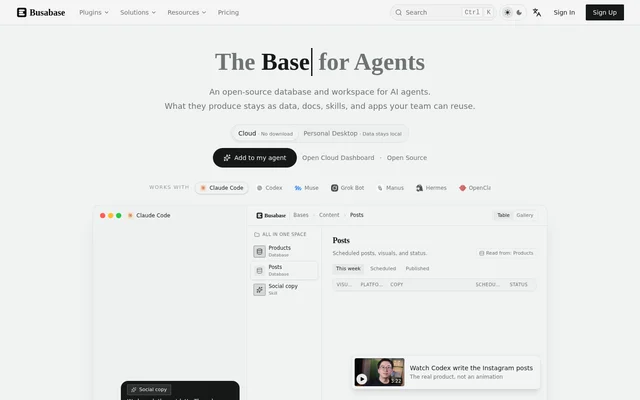
Busabase is an open-source context database and workspace for teams that want to keep the work their AI agents produce. Busabase stores that work as structured records, documents, reusable skills, and internal apps that colleagues and other agents can access. A team can carry decisions, customer information, or procedures into later sessions without digging through an individual chat history.
What Busabase can do
Busabase gives people and agents a common place to read and update information. Tables use fixed fields, while knowledge documents preserve answers and their sources. Internal apps use the same underlying data. Teams can also save workflows as skills and record their operating procedures in playbooks that agents consult before doing a task.
- Busabase stores customer, project, and inventory records in typed tables.
- Busabase keeps checked answers and their sources in shared knowledge documents.
- Busabase runs internal apps on the same data agents update.
- Busabase saves recurring workflows as reusable agent skills.
- Busabase records who made each change and what changed.
How Busabase works
Busabase connects to agents such as Claude Code, Codex, and Cursor through Agent Skills, MCP, OpenAPI, or the CLI. For example, a connected agent can log customer calls and update CRM records in the shared workspace. Each write has an author and change history, and a team can send selected updates to a person for review.
Busabase keeps review decisions attached to the proposed work, including approvals, requests for changes, and rejections. Rejected updates do not enter canonical data. A colleague, another agent, or an internal app can then use the same workspace records rather than starting from a separate copy.
Who Busabase is for
Busabase is designed for AI operations, implementation, consulting, and content teams that need to see what agents have done and hand the work over to someone else. The workspace also supports teams that use agents for customer support, marketing, or research. In support, for example, an agent can draft a reply using stored product facts while a person retains approval.
- AI operations teams can oversee work from multiple agents in one workspace.
- AI consultants can document who owns client work and what is handed off.
- Content teams can track briefs, drafts, and published pieces.
- Research teams can keep verified findings and monitored sources together.
Busabase pricing and plans
Busabase offers a free MIT-licensed engine and an optional hosted service. The free cloud plan includes one owned space, up to 3 seats and 5,000 records per space, plus access to OpenAPI, webhooks, and MCP. The paid cloud plans, Plus and Pro, are billed per seat rather than by metered usage.
Busabase lists Plus at $12 and Pro at $24 per seat on monthly billing. With annual billing, Plus is $10 per seat per month and Pro is $20 per seat per month. Teams that prefer not to use the hosted service can run the same engine on a desktop or deploy it through Docker on their own server.
Busabase strengths and limitations
Busabase combines shared agent context with a change history and optional human review. Teams can keep data in a local folder using Busabase Desktop, which works offline, or deploy the engine inside their own network. Busabase Cloud avoids a local installation, but teams choosing that option need to account for the free plan's space, seat, and record limits.
- The free cloud plan allows one owned space.
- Each free cloud space is capped at 3 seats and 5,000 records.
- Paid cloud plans charge for each seat.
- A private server deployment requires Docker.
Getting started with Busabase
Busabase offers a cloud sign-up for teams that want a hosted workspace and a desktop option for users who want to keep data on their own machines. The setup guide can be passed to an agent that can read a link. Claude Code and Codex users can also install plugins that bundle Agent Skills with the hosted MCP connection, which supports browser OAuth.
Busabase FAQ
What is Busabase?
Busabase is an open-source context database and workspace for AI agents. Busabase stores agent output as structured records, documents, skills, and apps so teammates and future agent sessions can reuse the same work.
Is Busabase free?
Busabase offers a free MIT-licensed engine and a free cloud plan. The free cloud plan includes one owned space, up to 3 seats per space, and 5,000 records per space. Busabase Cloud also offers paid Plus and Pro plans billed per seat.
Can Busabase run locally or on a private server?
Busabase can run locally through Busabase Desktop or on a private server through Docker. The desktop version stores data in a folder on the user's machine and works offline. A Docker deployment can run inside a company's own network.
Does Busabase work with Claude Code and Codex?
Busabase provides plugins for Claude Code and Codex that bundle Agent Skills with access to the hosted MCP server. Busabase also supports connections through OpenAPI and the CLI, and the hosted MCP server supports browser OAuth.
Can a person approve Busabase changes before they are applied?
Busabase lets teams hold selected agent changes for human review before those changes enter canonical data. Approvals, requests for changes, and rejections stay attached to the proposed work, and rejected updates do not enter canonical data.
From the community
No reviews yet
Be the first to review this tool. What you write helps the next person choose.