What is Sim?
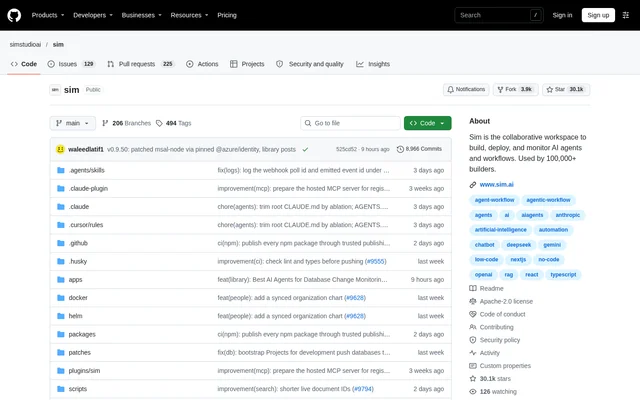
Sim is an open-source collaborative workspace for building, deploying, and monitoring AI agents and workflows. Sim serves builders and teams that want to combine agent creation, application connections, and workflow oversight in one environment. The workspace brings chat and workflows together with tables, files, and knowledge bases, with access through a browser or the macOS desktop application.
Sim publishes its source code on GitHub under the Apache License 2.0. The project offers a cloud-hosted service at sim.ai as well as self-hosted deployment. These access options accompany a shared set of capabilities for creating agents, supplying their data, running workflows, and inspecting workflow activity.
What Sim can do
Sim supports agent construction visually, conversationally, or with code. Sim connects to 270+ integrations covering 5,400+ actions and 520+ triggers, with named connections including Slack, Notion, HubSpot, Salesforce, and databases. Data tools and execution monitoring sit alongside the workflow builder, allowing teams to work with agent inputs and inspect runs in the same workspace.
- Sim builds agents visually, conversationally, or with code.
- Sim ingests files, knowledge bases, and structured table data.
- Sim monitors runs, logs, schedules, and workflow activity.
- Sim provides shared tables, file storage, and knowledge resources.
- Sim supports local models through Ollama and vLLM.
How Sim works
Sim provides cloud access at sim.ai and an interactive self-hosting wizard through npx sim-setup. The wizard provisions a database, generates secrets, writes environment configuration, connects a Chat API key, and starts published Sim images with Docker Compose. This installation path does not clone the repository. A cloned repository also supports source-only local development and Kubernetes modes.
Sim exposes an MCP server that connects Claude, Claude Code, Codex, or another MCP client to Sim Cloud. Authentication uses OAuth or an API key. Connected agents can manage workspaces, run and deploy workflows, and work with tables, knowledge bases, files, and logs. The documentation also covers MCP connections to self-hosted deployments.
Who Sim is for
Sim is intended for builders and teams creating AI agents and workflows, including developers who want code-based construction or self-hosted deployment. Sim also supports visual and conversational building for people working outside a code-first workflow. The shared workspace suits use cases that combine application integrations, agent knowledge, structured data, and ongoing monitoring.
- Sim connects agent workflows to Slack, Notion, HubSpot, Salesforce, and databases.
- Sim supplies agents with files, knowledge bases, and structured table data.
- Sim lets MCP-connected agents run and deploy workflows.
- Sim tracks scheduled workflows, execution logs, and activity.
Sim pricing and access
Sim makes its source code available under the Apache License 2.0 and provides self-hosting instructions. Sim also offers cloud-hosted access and a macOS desktop application, but the supplied product text does not state Sim subscription prices or cloud plan allowances. The GitHub pricing material included with the repository text describes GitHub products rather than Sim plans.
Sim strengths and limitations
Sim combines multiple agent-building approaches, application integrations, shared data resources, and workflow monitoring. Sim also supports cloud and self-hosted deployment, plus local models through Ollama and vLLM. The main access constraints concern technical setup and desktop compatibility: self-hosting requires supporting software, while the listed desktop application is for macOS. Chat remains a Sim-managed service with a Chat API key.
- Sim self-hosting requires Node.js 20+ and Docker.
- Sim desktop requires macOS 12+ with Apple Silicon or Intel.
- Sim Chat uses a Sim-managed service and a Chat API key.
Sim FAQ
What is Sim?
Sim is an open-source collaborative workspace for building, deploying, and monitoring AI agents and workflows. Sim combines visual, conversational, and code-based building with integrations, tables, files, knowledge bases, and workflow monitoring.
Is Sim open source?
Sim is an open-source project licensed under the Apache License 2.0, with source code available on GitHub. Sim supports self-hosting and also offers cloud-hosted access, although the supplied product text does not specify cloud subscription pricing.
How do you self-host Sim?
Sim can be self-hosted using npx sim-setup with Node.js 20+ and Docker. The interactive wizard provisions the database, generates secrets, writes configuration, connects a Chat API key, and starts published Sim images through Docker Compose without cloning the repository.
Does Sim support MCP clients?
Sim provides an MCP server for Claude, Claude Code, Codex, and other MCP clients. Sim supports OAuth or API-key authentication, allowing connected agents to manage workspaces, run and deploy workflows, and access tables, files, knowledge bases, and logs.
Can Sim use local AI models?
Sim supports local models through Ollama and vLLM as part of its self-hosting options. Sim also provides a setup wizard for configuring deployment capabilities and directs users to its self-hosting documentation for local-model details.
Does Sim have a desktop app?
Sim offers a desktop application for macOS 12+ on Apple Silicon and Intel. Sim desktop includes a browser and terminal, and its documentation explains how to connect the application to a self-hosted deployment.
From the community
No reviews yet
Be the first to review this tool. What you write helps the next person choose.