What is ChatBotKit?
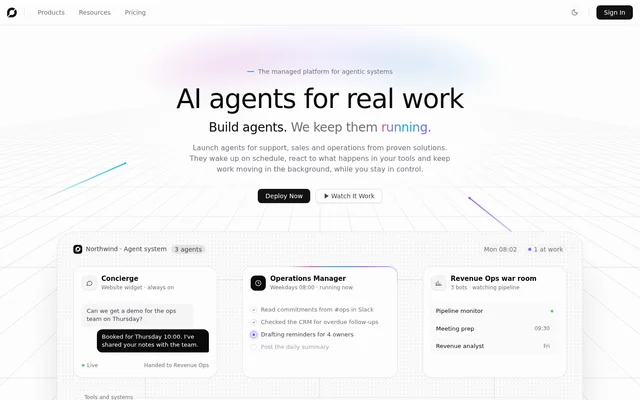
ChatBotKit is a managed platform for building and operating AI agents that handle business conversations and background work. ChatBotKit serves businesses and builders working on support, sales and operations tasks. Agents can answer requests, qualify leads, coordinate follow-ups and produce reports, rather than operating only as a website chat interface.
ChatBotKit combines agent creation with managed execution and oversight. Teams define the work an agent should perform, while ChatBotKit handles scheduling, event responses, deployment and scaling. The service also provides policies, approvals and visibility into conversations and runs so teams can review activity and refine agent behavior.
What ChatBotKit can do
ChatBotKit supports conversational agents and proactive workflows using business knowledge and connected tools. Ready-made solution blueprints combine agents, knowledge, abilities and integrations, while the visual designer supports custom configurations. Examples on the website include an operations manager, a website assistant, a campaign manager and a Zendesk support agent.
- ChatBotKit builds agents in a visual designer without requiring code.
- ChatBotKit adds knowledge, memory and abilities to agents.
- ChatBotKit runs agents on schedules or in response to tool events.
- ChatBotKit deploys agents to websites, Slack, Discord, WhatsApp and Telegram.
- ChatBotKit records conversations and runs for review.
- ChatBotKit requests human approval before sensitive actions.
How ChatBotKit works
ChatBotKit starts with a solution blueprint or a custom agent in the visual designer. Users describe the job, add knowledge and abilities in plain language, and connect tools such as Slack, a CRM, a helpdesk or email. Users can choose platform language models or supply their own language model provider key.
ChatBotKit then runs the configured agent through scheduled execution, tool-triggered events or conversations on supported channels. The managed service handles infrastructure and scaling. Teams can inspect run histories, define actions that require approval and use privilege-separated agents when different responsibilities need different permissions, as illustrated by the WhatsApp commerce blueprint.
Who ChatBotKit is for
ChatBotKit is aimed at teams building production AI agents, including customer support, sales and operations teams. Website owners can use embedded assistants to answer visitors from their own content. Business teams can use agents inside messaging tools to coordinate work, monitor changes and carry out follow-ups without waiting for a new conversation.
- Support teams can monitor Zendesk queues and involve teammates when tickets need attention.
- Sales teams can qualify leads and book meetings.
- Operations teams can track tasks, commitments and overdue follow-ups.
- Marketing teams can review campaigns and receive scheduled change reports.
ChatBotKit strengths and limitations
ChatBotKit combines no-code design, managed execution and multichannel delivery with controls for approvals and agent permissions. Reusable blueprints provide starting points for specific workflows, and run histories support review. The main constraints are plan-based resource allowances and differences in retention, crawling, branding and computing features, which teams need to match to their intended workload.
- ChatBotKit standard plans set allowances for bots, messages, conversations and other resources.
- ChatBotKit Basic retains audit trails and event logs for 30 days, compared with 90 days on Pro and Scale.
- ChatBotKit Basic and Pro do not include persistent Linux computers.
ChatBotKit FAQ
What is ChatBotKit?
ChatBotKit is a managed AI agent platform for building conversational assistants and automated business workflows. ChatBotKit provides a visual designer, knowledge and memory configuration, tool connections, scheduled execution and deployment across websites and messaging channels.
Does ChatBotKit require coding?
ChatBotKit supports agent creation without code through a visual designer. ChatBotKit lets users start from a solution blueprint or design an agent, describe the job, add knowledge and abilities in plain language, and connect business tools.
Which channels and tools does ChatBotKit support?
ChatBotKit deploys agents to websites, Slack, Discord, WhatsApp and Telegram, and supports connections to business tools such as CRM systems, helpdesks and email. ChatBotKit also presents Zendesk support workflows and website widgets that answer questions from business content.
Can ChatBotKit agents run automatically?
ChatBotKit agents can run on schedules or react to events in connected tools. ChatBotKit examples include scheduled campaign reviews, operational follow-ups and responses to new Zendesk tickets, with run histories and human approval requirements available for oversight.
Can ChatBotKit use a custom language model provider key?
ChatBotKit allows users to bring their own language model provider key in addition to using the models provided by the service. ChatBotKit states that every plan includes access to platform language models, naming OpenAI, Anthropic and Mistral among its providers.
From the community
No reviews yet
Be the first to review this tool. What you write helps the next person choose.