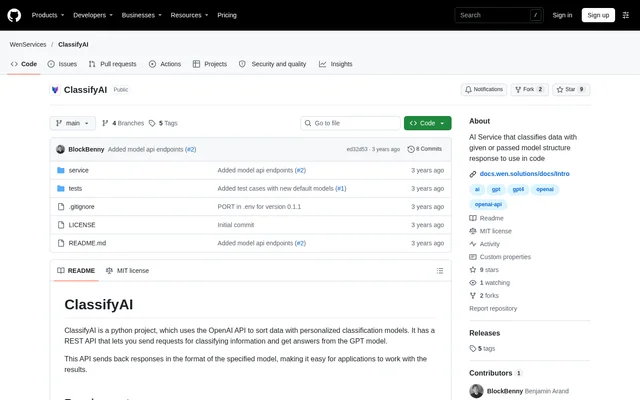
What is ClassifyAI?
ClassifyAI is an open-source Python service for classifying text with the OpenAI API and returning results in a specified model structure. ClassifyAI is designed for application code that needs structured classification results rather than an unrestricted text response. The repository provides a Flask REST API, example model definitions and instructions for running the service.
ClassifyAI uses classification models that describe output fields and the meanings of possible values. These definitions guide how input text is categorized. The examples distinguish questions from statements and classify whether a request concerns a person, product, order or company. The project is distributed under the MIT License.
What ClassifyAI can do
ClassifyAI accepts classification requests containing text and a model specification, then returns JSON results using the requested structure. ClassifyAI supports reusable model files as well as definitions passed directly in a request. Additional request fields provide context and allow an application identifier to appear in the response.
- ClassifyAI classifies input text through the /classify endpoint.
- ClassifyAI loads named JSON models from the /service/models folder.
- ClassifyAI accepts inline model definitions and descriptions.
- ClassifyAI supports classification values that depend on another field.
- ClassifyAI includes optional context in requests to the GPT model.
- ClassifyAI returns reference identifiers using a specified response field name.
- ClassifyAI supports model tests with expected outputs and repeat settings.
How ClassifyAI works
ClassifyAI runs as a Flask API server after the repository is cloned and its dependencies are installed. The documented requirements include Python 3.7 or higher, Flask, the OpenAI Python library and python-dotenv. Configuration uses a .env file containing an OpenAI API key and settings for logging, server port, input length, context length, model selection and response tokens.
ClassifyAI receives a POST request at /classify with input and model fields in the JSON body. A model can be a saved filename or a JSON object containing model and model_description definitions. The usage instructions start the server with python3 app.py. Test instructions allow all model tests or a named model's tests to run.
Who ClassifyAI is for
ClassifyAI is for developers who want to incorporate model-defined text classification into software. The documented examples cover request types, ecommerce subjects and healthcare categories. ClassifyAI also supports developers checking their classification definitions against expected outputs, with named test cases that specify input, expected results and how often a test should repeat.
- ClassifyAI can distinguish a question from a statement.
- ClassifyAI can categorize ecommerce text as product, order, company or other.
- ClassifyAI can classify whether a request concerns a person.
- ClassifyAI can test healthcare categories such as symptom and acute symptom.
ClassifyAI pricing and source access
ClassifyAI is available from its GitHub repository as MIT-licensed source code rather than through a documented subscription plan. The setup instructions require an OpenAI API key. The configuration includes a maximum-token setting described in terms of tokens paid for per response, and the testing instructions warn that running tests makes multiple OpenAI requests.
ClassifyAI strengths and limitations
ClassifyAI combines a defined JSON response format with flexible model delivery: developers can reuse stored definitions or pass a definition with a request. ClassifyAI also documents context fields, reference identifiers and tests. These capabilities support classification workflows in application code, while the installation steps make clear that running the service requires a configured Python environment and access to OpenAI.
- ClassifyAI requires dependency installation and Flask server setup.
- ClassifyAI depends on an OpenAI API key for classification.
- ClassifyAI test runs can generate multiple OpenAI requests.
- ClassifyAI lists the management website and pip package as future work.
ClassifyAI FAQ
What is ClassifyAI?
ClassifyAI is an open-source Python text classification service that uses the OpenAI API. ClassifyAI exposes a Flask REST API and returns classification results in a specified JSON model structure, allowing developers to use the results in application code.
Is ClassifyAI free?
ClassifyAI is available as MIT-licensed source code on GitHub, with no ClassifyAI subscription pricing stated in the repository. ClassifyAI requires an OpenAI API key, and the documentation refers to paid response tokens and warns that tests make multiple OpenAI requests.
How do you define custom models in ClassifyAI?
ClassifyAI accepts custom JSON definitions containing model and model_description objects. ClassifyAI can load a model file from /service/models by name or accept the definition directly in a classification request. Definitions can specify possible values, descriptions and dependencies between fields.
Does ClassifyAI have an API?
ClassifyAI provides a Flask REST API with a POST /classify endpoint for input text and a model name or JSON definition. ClassifyAI also accepts optional context, reference_id and reference_id_name fields so classification responses can include application-specific identifiers.
How do you install ClassifyAI?
ClassifyAI is installed by cloning the GitHub repository, entering the service directory, creating and activating a Python environment, and installing the required dependencies. ClassifyAI then requires a .env configuration with an OpenAI API key before the Flask server is started with python3 app.py.
From the community
No reviews yet
Be the first to review this tool. What you write helps the next person choose.