What is Marvin?
Marvin is a tool for adding structured data conversion and language-model tasks to Python applications. Marvin turns unstructured input into Python values and runs tasks with tools. The documentation presents functions, agents, tasks, and threads as distinct ways to organize this work, depending on whether an application needs a result, reusable instructions, an objective, or conversation history.
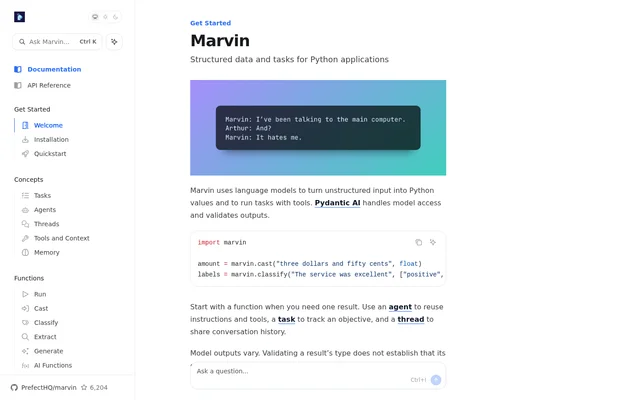
Marvin uses Pydantic AI to handle model access and validate outputs. The examples focus on concrete Python operations: converting a monetary amount written in words into a float and assigning a sentiment label to a service review. These examples illustrate structured results rather than only free-form model responses.
What Marvin can do
Marvin combines input conversion and classification with tools for organizing model-driven work. The documented capabilities cover producing an individual result, reusing instructions and tools, tracking an objective, and sharing conversation history. Marvin’s examples demonstrate casting and classification, while the surrounding guidance explains when to use functions, agents, tasks, and threads.
- Marvin converts unstructured input into Python values.
- Marvin casts a written monetary amount into a float.
- Marvin classifies text against supplied labels.
- Marvin runs language-model tasks with tools.
- Marvin agents reuse instructions and tools.
- Marvin tasks track objectives.
- Marvin threads share conversation history.
How Marvin works
Marvin’s setup begins with installing Marvin and configuring a model provider. The page then points developers to a quickstart and examples. The sample Python code imports Marvin and calls marvin.cast for a typed conversion and marvin.classify for classification. Pydantic AI handles the model-access and output-validation parts of the workflow.
Marvin’s usage guidance starts with a function when a single result is needed. An agent is the documented choice for reusing instructions and tools, while a task tracks an objective. A thread shares conversation history. These choices describe how developers can organize work beyond the individual casting and classification examples.
Who Marvin is for
Marvin is for developers building Python applications that need language models to return Python values or work on tasks with tools. The documented examples apply to converting text into a typed value and labeling text. The agent, task, and thread guidance also addresses applications that need reusable instructions, objective tracking, or shared conversation history.
- Marvin supports converting a monetary amount expressed in words into a float.
- Marvin supports labeling a service review as positive or negative.
- Marvin supports reusing instructions and tools through an agent.
- Marvin supports sharing conversation history through a thread.
Marvin strengths and limitations
Marvin provides concrete conversion and classification examples alongside separate abstractions for results, reusable instructions, objectives, and conversation history. Pydantic AI supplies model access and output validation. The documentation explicitly distinguishes type validation from content correctness, making clear that a result with the expected type can still contain incorrect content.
- Marvin model outputs vary.
- Marvin type validation does not establish that content is correct.
- Marvin setup requires installation and configuration of a model provider.
Marvin FAQ
What is Marvin?
Marvin is a tool for Python applications that uses language models to turn unstructured input into Python values and run tasks with tools. Marvin uses Pydantic AI for model access and output validation.
What can you use Marvin for?
Marvin supports typed data conversion, text classification, and tasks with tools. The examples show converting a written monetary amount into a float and classifying a service review using positive and negative labels.
How do you get started with Marvin?
Marvin’s documentation directs developers to install Marvin and configure a model provider, then follow the quickstart or browse examples. The sample code imports Marvin and demonstrates the marvin.cast and marvin.classify functions.
What is the difference between Marvin functions, agents, tasks, and threads?
Marvin recommends a function for a single result, an agent for reusable instructions and tools, a task for tracking an objective, and a thread for sharing conversation history. Each serves a different workflow need within Python applications.
Does Marvin output validation guarantee correct answers?
Marvin output validation does not guarantee content correctness. Marvin uses Pydantic AI to validate outputs, but the documentation warns that model outputs vary and that validating a result’s type does not establish that its content is correct.
From the community
No reviews yet
Be the first to review this tool. What you write helps the next person choose.