What is context-mode?
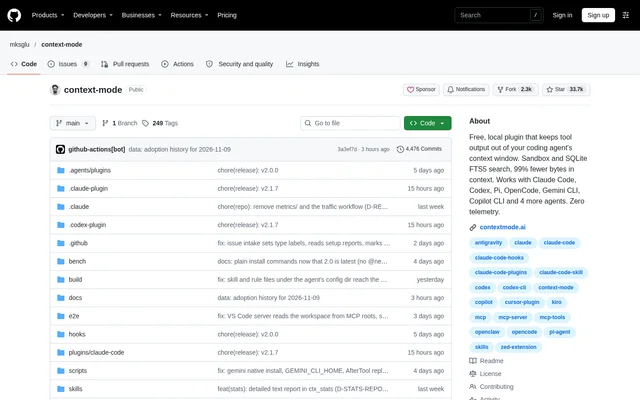
context-mode is a local context-management plugin for developers working with coding agents. Rather than placing every command result, fetched page or file output into the agent’s context window, context-mode stores the full output locally and returns the relevant portions. The repository provides the plugin’s source on GitHub under a source-available licence.
context-mode supports Claude Code, Codex, Gemini CLI, Qwen Code, Pi, OpenCode, Copilot CLI, Kiro, VS Code and ZCode. The plugin runs its hooks, sandbox and search as local processes alongside the agent. Each project has a context.db index stored under ~/.context-mode.
What context-mode can do
context-mode combines sandboxed execution with searchable storage so coding agents can work with large outputs without reading every raw result into the conversation. The supplied examples cover documentation retrieval, structured-data analysis, log inspection and web-page extraction. Reporting tools show how much output reached the context after a task.
- context-mode runs agent-written scripts inside a local sandbox.
- context-mode stores full tool output in a SQLite FTS5 index.
- context-mode retrieves requested information through ctx_search.
- context-mode exposes ctx_execute, ctx_index and ctx_search tools.
- context-mode reports context usage through ctx_stats.
- context-mode provides hooks, MCP support and skills for supported agents.
How context-mode works
context-mode runs commands and other work locally, indexes the resulting output, and gives the agent the part requested. The documented approach lets the agent write a short script to process data instead of reading the entire dataset. Only what the script prints reaches the context, while the full output remains available in the local index.
context-mode installation follows the selected agent’s instructions or the shared npm route. The general route installs the context-mode package globally and runs context-mode setup. Setup shows a plan, saves the existing configuration and restores that configuration if a step ends early. After restarting the agent, users can run /ctx-doctor for checks and suggested fixes.
Who context-mode is for
context-mode serves developers who use supported coding agents to read files, run commands and fetch pages. The examples focus on tasks where the raw material is substantially larger than the answer needed. Home and workplace use are explicitly permitted, and users can inspect a stats report after a task to review context savings.
- Developers can retrieve a documentation example and its associated rules.
- Developers can calculate answers from JSON records using sandboxed code.
- Developers can count authentication failures and identify frequent hosts in logs.
- Developers can extract selected story details from a fetched news page.
context-mode pricing and plans
context-mode is free forever for home and workplace use under a source-available licence. The local plugin is available through the GitHub repository and npm installation paths. Context Mode Gateway is a separate hosted service with its own account and subscription, offering searchable long conversations and shared memory across sessions and tools rather than being part of the free local plugin.
context-mode strengths and limitations
context-mode combines local processing, zero telemetry and support for several coding-agent environments. Sandbox runs, file indexing and search work offline after installation using local SQLite and the user’s runtimes. These capabilities keep usage data on the machine, while installation and troubleshooting remain dependent on the documented runtime requirements and agent-specific setup.
- context-mode requires Node 24.15.0 or later.
- context-mode requires Git for Windows on Windows because shell tools run in Git Bash.
- context-mode uses agent-specific installation and hook configuration paths.
context-mode FAQ
What is context-mode?
context-mode is a free local plugin that keeps coding-agent tool output outside the context window. context-mode runs work in a sandbox, stores full output in a local SQLite index and returns the portions the agent requests.
Is context-mode free?
context-mode is free forever for home and workplace use under a source-available licence. The local plugin is separate from Context Mode Gateway, a hosted service with its own account and subscription.
Which coding agents does context-mode support?
context-mode supports Claude Code, Codex, Gemini CLI, Qwen Code, Pi, OpenCode, Copilot CLI, Kiro, VS Code and ZCode. Each supported agent receives hooks, MCP support and plugin skills through its documented installation path.
Does context-mode work offline?
context-mode supports offline sandbox runs, file indexing and search after installation using local SQLite and the user’s runtimes. context-mode keeps usage data on the user’s machine and states that the plugin has zero telemetry.
How do you install context-mode?
context-mode can be installed using agent-specific commands or by installing the context-mode npm package globally and running context-mode setup. context-mode requires Node 24.15.0 or later, with Git for Windows additionally required on Windows.
What can you use context-mode for?
context-mode can search fetched documentation, process JSON records, analyse logs and extract selected information from web pages. The documented workflow uses sandboxed scripts and searchable output so the agent receives relevant results rather than all raw data.
From the community
No reviews yet
Be the first to review this tool. What you write helps the next person choose.