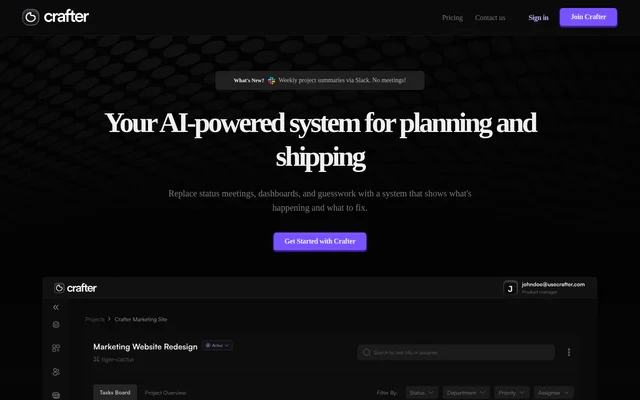
What is Crafter?
Crafter is an AI project management tool for product teams that want to plan work and spot delivery problems before deadlines slip. Crafter is positioned as an alternative to Jira and uses day-to-day activity to show where tasks are stalled, teams are overloaded, or handoffs have been missed.
Crafter connects planning with delivery tracking. Product teams can use ideas and documents as the basis for structured projects, while leaders can view task progress, workload, and delivery risk. The site presents these views and weekly Slack summaries as alternatives to relying on status meetings for updates.
What Crafter can do
Crafter combines project dashboards with an AI project pilot that answers questions about ongoing work. Dashboards show how tasks are distributed by status and priority, how much work is complete, and where blockers affect delivery. The AI project pilot uses project context to explain risks and suggest where leaders should focus.
- Crafter turns product ideas and documents into structured projects.
- Crafter tracks task status, priority, and completion rates.
- Crafter identifies blocked work, missed handoffs, and slipping timelines.
- Crafter shows how work is distributed across team members.
- Crafter answers questions about ongoing projects and delivery risks.
- Crafter sends weekly project summaries via Slack.
How Crafter works
Crafter continuously monitors tasks, conversations, workload distribution, and delivery timelines. Crafter analyzes patterns across these signals to identify bottlenecks and explain where work is slowing down. The site illustrates how seemingly separate delays can be linked to the same backend capacity or to dependence on a single approval owner.
Crafter gives leaders a way to review those signals without waiting for a status meeting. Leaders can ask the AI project pilot which projects might miss deadlines and why, then review the tasks and workload behind those risks. Slack integration provides weekly summaries for teams that share updates asynchronously.
Who Crafter is for
Crafter is built for product teams and leaders managing work that spans functions such as backend, frontend, design, business, and data. Crafter is particularly relevant when teams share dependencies: a delayed review or unclear approval owner can stall work outside the team where the problem first appears.
- Product teams can turn ideas and documents into project plans.
- Project leads can review delivery risks before deadlines slip.
- Cross-functional teams can investigate blocked tasks and missed handoffs.
- Team leaders can review workload distribution and share updates via Slack.
Crafter pricing and plans
Crafter offers a Free plan at $0 for 1 active project and a custom-priced Pilot Plan for design partners. Both plans list access to core features, including AI summaries, risk detection, task tracking, Slack integration, and weekly project summaries. The Pilot Plan also lists unlimited projects and Power Mode insights across multiple projects. Teams apply for pilot access.
Strengths and limitations
Crafter brings task progress, workload, and delivery risk into the same view, which helps leaders see why work is slipping rather than just whether it is late. Weekly Slack summaries provide a way to share updates without a meeting. The main plan difference is project scope: the Free plan covers a single active project, while the Pilot Plan is intended for teams that need to review work across projects.
- The Free plan supports only 1 active project.
- Cross-project Power Mode insights are listed only for the Pilot Plan.
- Pilot access is application-based, with custom pricing.
Crafter FAQ
What is Crafter?
Crafter is an AI project management tool for product teams that tracks work from planning through delivery. Crafter turns ideas and documents into structured projects and monitors tasks, conversations, workloads, and timelines to identify bottlenecks and delivery risks.
Is Crafter free?
Crafter offers a Free plan at $0 for 1 active project, with AI summaries, risk detection, task tracking, Slack integration, and weekly project summaries. Crafter also offers a custom-priced Pilot Plan with unlimited projects and Power Mode insights across multiple projects.
Who is Crafter for?
Crafter is designed for product teams and leaders who need to coordinate work from planning to delivery. Crafter helps teams track shared dependencies, spot missed handoffs, and see where blocked work or uneven workloads could delay a project.
How does Crafter identify projects at risk?
Crafter analyzes task activity, conversations, workload distribution, and delivery timelines to flag risks such as blocked work, overloaded team members, and slipping deadlines. Crafter also lets leaders ask the AI project pilot which projects are at risk and why.
Does Crafter integrate with Slack?
Crafter integrates with Slack and sends weekly project summaries through it. Crafter lists Slack integration and weekly summaries on both the Free plan and the custom-priced Pilot Plan.
From the community
No reviews yet
Be the first to review this tool. What you write helps the next person choose.