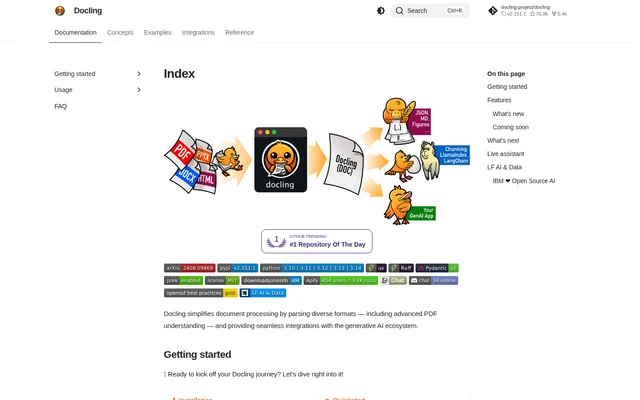
What is Docling?
Docling is an open-source document processing project for developers who need to convert files into structured content for software and generative AI workflows. Docling supports inputs ranging from PDFs and office documents to emails, audio and video. The AI for knowledge team at IBM Research Zurich started the project, which is hosted by the LF AI & Data Foundation.
What Docling can do
Docling extracts document structure as well as text. For PDFs, Docling identifies page layout, reading order and table structure, and can recognize code and formulas. Docling also supports application-specific XML schemas, including JATS for articles and XBRL for financial reports.
- Docling parses PDFs, office documents, HTML and EPUB files.
- Docling applies OCR to scanned PDFs and images.
- Docling exports documents as Markdown, HTML or lossless JSON.
- Docling can produce video transcripts and select representative keyframes.
How Docling works
Docling maps parsed content to a unified representation called DoclingDocument. Developers can serialize that representation to an export format or divide it into chunks for a retrieval workflow. The documentation covers the Python Document Converter, pipeline options and command-line usage. Docling also provides an MCP server for agent connections and documents a REST API for running Docling as a service.
Who Docling is for
Docling is suited to developers working with inputs that range from scanned records to digital documents with tables and figures. Teams building retrieval-augmented generation can use the documented examples for LangChain, LlamaIndex and Haystack. Teams processing sensitive material can run Docling locally, including in air-gapped environments.
- Convert mixed file formats to Markdown or JSON.
- Extract tables and figures from source documents.
- Chunk documents for retrieval-augmented generation.
Docling pricing and plans
Docling is available as a free, open-source project through its project repository, with installation and quickstart instructions in the documentation. The documentation lists local execution and deployment through docling-serve. Docling also lists managed-service documentation, but the project page does not publish prices or describe any paid plans.
Docling strengths and limitations
Docling combines broad input support with PDF layout analysis and OCR, making it possible to work with both digital files and scanned pages. Docling offers several OCR engines and supports vision-language models such as GraniteDocling. Some capabilities are opt-in or are listed on the project page as upcoming rather than available.
- Recovering PDF heading levels is opt-in.
- Metadata extraction for titles, authors, references and language is listed as coming soon.
- Complex chemistry understanding for molecular structures is listed as coming soon.
Getting started with Docling
Docling provides installation instructions and a quickstart for basic conversion. The examples start with simple conversion and extend to custom, batch and multi-format workflows. For scanned documents, the examples cover full-page OCR and automatic OCR language detection. For retrieval workflows, the documentation includes serialization and chunking examples alongside examples for specific AI frameworks.
Docling FAQ
What is Docling?
Docling is an open-source document processing project that turns PDFs, office files, scanned images and other inputs into structured content. Docling stores parsed content in a unified DoclingDocument representation and can export it as Markdown, HTML or lossless JSON.
Is Docling free?
Docling is available as a free, open-source project that developers can install and run locally. Docling lists a managed service in its documentation navigation, but the project page does not state pricing for that service.
Can Docling extract tables and text from scanned PDFs?
Docling supports OCR for scanned PDFs and images and analyzes PDF table structure, page layout and reading order. Docling includes examples for exporting tables, forcing full-page OCR and detecting OCR languages automatically with Tesseract.
Can Docling prepare documents for RAG?
Docling supports retrieval-augmented generation through document parsing, serialization and chunking. Docling provides examples for building RAG workflows with LangChain, LlamaIndex and Haystack, as well as examples for vector search integrations.
Does Docling have an API or MCP server?
Docling provides a Python API, a command-line interface and an MCP server for connecting to agents. Docling can also run as a service through docling-serve, with REST API and deployment documentation.
Can Docling run locally without an internet connection?
Docling supports local execution in air-gapped environments and for sensitive data. Docling documents local and remote model options, so developers can choose a local workflow instead of relying on a remote model.
From the community
No reviews yet
Be the first to review this tool. What you write helps the next person choose.