What is Dzine AI?
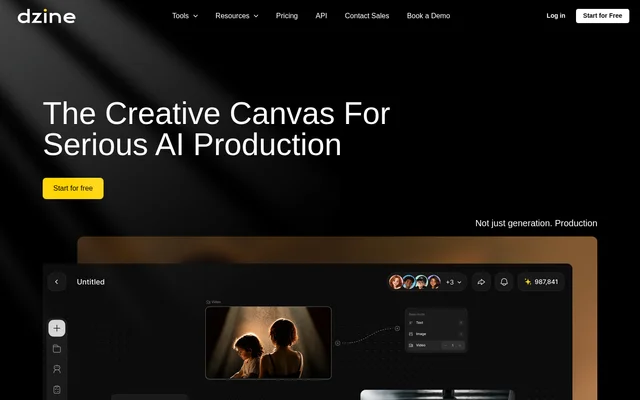
Dzine AI is an AI creative workspace for image and video generation, editing, and production development. Dzine AI is designed for individual creators, creative teams, and professional production workflows. The workspace connects visual exploration with characters, scenes, storyboards, motion, shots, and final edits, rather than treating generation as an isolated task. Directors, designers, producers, and clients can collaborate around shared projects and creative assets.
Dzine AI also provides visual controls for people who want to shape composition directly. Layers, positioning, sketching, and predefined styles complement text prompts, while uploaded images can guide characters, products, style, and other visual details. The source describes tools for beginners as well as professional designers.
What Dzine AI can do
Dzine AI combines media generation with tools for refining assets and organizing production decisions. Image, video, and audio generation are available alongside enhancement, face swapping, and lip sync. Creative teams can also maintain reusable characters and trace the references, edits, approvals, and contributors associated with their work.
- Dzine AI generates videos from text or images.
- Dzine AI turns scripts into structured scenes.
- Dzine AI creates character variations from a single reference.
- Dzine AI separates selected image objects into reusable layers.
- Dzine AI improves image clarity and fixes artifacts with Enhance.
- Dzine AI exports PNG or JPG images up to 6144px × 6144px.
How Dzine AI works
Dzine AI lets users add image, video, and audio generation nodes within the creative workspace. Users can browse saved assets, upload reference images, and arrange visual elements on a layer-based composition board. Predefined styles provide an alternative to complex style prompts, while Dzine AI offers a conversational design assistant for writing prompts through natural language.
Dzine AI supports continued development after the initial generation. Teams can compare reference footage, redrawn versions, shot sizes, and iterations while retaining edit and contributor logs. Character references, variations, and approvals stay together, and collaboration tools allow members to share projects, organize workspaces, and manage credit usage.
Who Dzine AI is for
Dzine AI serves individual image creators and teams working across design and production. The source identifies directors, designers, producers, and clients as collaborators, and includes examples from game character design, creative direction, and fashion design. Shared visual references and version tracking support work that moves from initial exploration through internal review and client feedback.
- Dzine AI supports character concept exploration and approved design variations.
- Dzine AI supports film development from storyboards to final edits.
- Dzine AI supports fashion pattern exploration and mockup preparation.
- Dzine AI supports shared visual reviews across creative teams and clients.
Dzine AI pricing and credit access
Dzine AI offers free access with 100 credits during registration and 30 free credits refreshed daily. Credits are used for AI generations and other creative operations. The source also describes subscription credits, top-up credits, and additional credit purchases, but does not provide plan prices. Team administrators can monitor usage and manage quotas, while team controls cover members, seats, and project resources.
Dzine AI strengths and limitations
Dzine AI brings visual editing, generation, shared assets, and production records into one workspace. Composition controls offer a direct way to shape images, while process records retain references, prompts, model choices, edits, approvals, and contributors. Copyright-related tools identify potential risks using visual matches and supporting evidence, but the source separately advises reviewing applicable terms before commercial delivery.
- Dzine AI consumes credits for generation and other creative operations.
- Dzine AI usage rights depend on the tool, model, plan, and content used.
- Dzine AI copyright detection flags potential issues rather than guaranteeing commercial clearance.
Dzine AI FAQ
What is Dzine AI?
Dzine AI is an AI creative workspace for generating, editing, and developing images and videos. Dzine AI combines visual editing, media generation, shared assets, and collaboration for individual creators, creative teams, and production workflows.
Is Dzine AI free?
Dzine AI offers free access with 100 credits at registration and 30 free credits refreshed daily. Credits are used for AI generations and other creative operations, and additional credits can be purchased. The source does not list plan prices.
Can I use my own images in Dzine AI?
Dzine AI supports uploading personal images and creative references to guide style, composition, characters, products, and other visual details. Dzine AI also provides layers, positioning, sketching, and automatic object selection for adjusting image content and saving selected objects as reusable assets.
Can teams collaborate in Dzine AI?
Dzine AI supports real-time collaboration for directors, designers, producers, and clients. Teams can manage members, share projects and creative assets, organize workspaces, and control credit usage. Creative process records include references, prompts, model choices, edits, approvals, and contributors.
Can Dzine AI be used for commercial work?
Dzine AI is built for professional creative workflows, including production-ready assets, but commercial usage rights vary by tool, model, plan, and content. Dzine AI advises reviewing applicable terms before commercial delivery and provides tools to flag potential copyright, likeness, trademark, or similarity risks.
From the community
No reviews yet
Be the first to review this tool. What you write helps the next person choose.