What is Formulator?
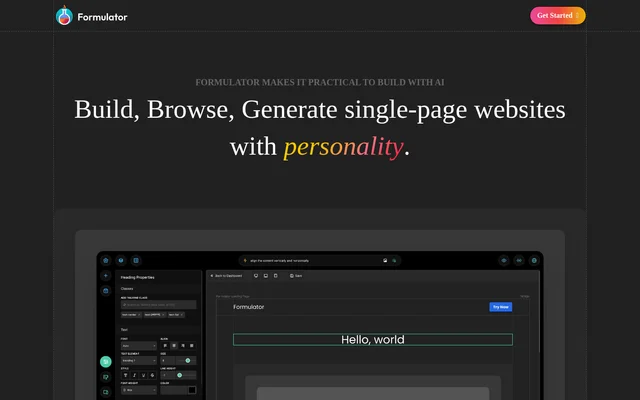
Formulator is a visual builder for single-page websites and user interface components. It gives people who want to design without editing code a canvas for arranging elements and adjusting their appearance. Developers can also use the builder to create components and export HTML and CSS for an existing project. A template library and AI generation offer alternatives to assembling a layout from individual elements.
What Formulator can do
Formulator supports manual building, template customization, and AI-assisted generation. These options can be used together: a layout can start from a library item or an AI-generated design and then be refined on the canvas. The visual tools show changes in real time, so users can see what a styling adjustment does as they make it.
- Formulator builds layouts by dragging individual elements onto a canvas.
- Formulator provides pre-built website templates and UI components.
- Formulator generates pages and components from short prompts or images.
- Formulator allows visual and AI-assisted customization of library items.
- Formulator exports component code as HTML and CSS.
How Formulator works
Formulator lets users build a layout on the canvas by arranging elements or dragging in a pre-built template. For an AI-assisted workflow, users describe the page or component they need in a short prompt or provide an image. They can then adjust the result with the builder tools instead of relying on the initial generation to get the styling right. Component code can be exported for adaptation outside the builder.
Who Formulator is for
Formulator is suited to people creating standalone web pages or individual interface components. Someone who wants to style a page without editing code can work directly on the canvas. Someone working on an existing codebase can use Formulator for the design step and then adapt the exported component code to fit that project.
- Assemble a single-page website with drag-and-drop elements.
- Adapt a pre-built component to a different layout.
- Use an image as the starting point for an AI-generated design.
- Export a component for use in an existing codebase.
Formulator pricing and plans
Formulator lists 10 free Generator AI requests and describes HTML and CSS code exports as free and unlimited. The AI allowance and the export terms apply to different features: the stated number is for Generator AI, while unlimited use is stated for code exports. The page does not specify whether the free AI allowance renews or describe paid plans.
Strengths and limitations of Formulator
Formulator combines real-time visual editing with code export, so a component can be styled on the canvas before its HTML and CSS are adapted elsewhere. Its template library and Generator AI also give users starting points when they do not want to assemble a design element by element. The page describes a focused scope for website building and gives a specific allowance for free AI requests.
- Formulator describes website building in terms of single-page sites.
- Formulator lists 10 free Generator AI requests.
- Formulator lists 3 pre-built templates alongside its component library.
Formulator FAQ
What is Formulator?
Formulator is a visual builder for single-page websites and user interface components. It combines a drag-and-drop canvas with customizable templates and AI generation, so users can start from individual elements, a library item, a short text prompt, or an image.
Is Formulator free?
Formulator offers free, unlimited HTML and CSS code exports and lists 10 free Generator AI requests. The unlimited allowance applies to code exports, while the page gives a specific number of free requests for the AI generator.
Who is Formulator for?
Formulator is for people who want to build single-page websites or UI components without writing or editing code. Developers can also use Formulator to design components visually and export HTML and CSS for adaptation in an existing codebase.
Can Formulator generate a website from an image?
Formulator can use an image to generate or customize a single-page website or a UI component with AI. Short text prompts are also supported, and users can refine an AI-generated result with the visual builder tools.
Can Formulator export HTML and CSS?
Formulator exports component code as HTML and CSS so users can adapt it and integrate it into an existing codebase. The page describes code exports as free and unlimited, separately from the free Generator AI request allowance.
From the community
No reviews yet
Be the first to review this tool. What you write helps the next person choose.