What is heyCLI?
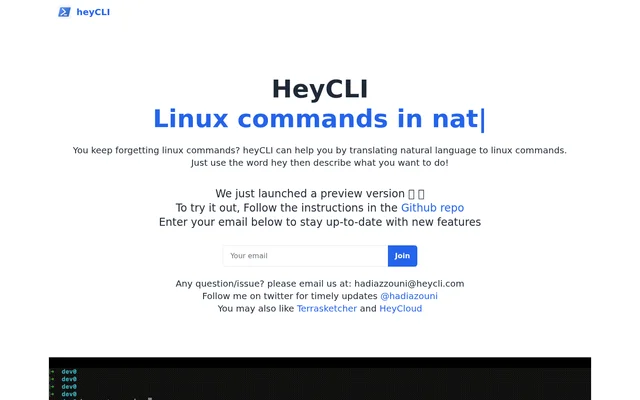
heyCLI is a natural-language tool for translating descriptions of tasks into Linux commands. heyCLI addresses a specific problem stated on its website: forgetting Linux commands. Instead of requiring users to recall the command they need, the described interaction lets them express what they want to do in natural language.
heyCLI is presented as a preview version rather than a finished release. The website points visitors to a GitHub repository for instructions on trying the preview. The homepage focuses on the translation function and request pattern, while the linked repository is the stated starting point for people who want to use heyCLI.
What heyCLI can do
heyCLI turns a natural-language description into a Linux command. The website explains this capability through a short instruction: begin with hey, then describe the desired task. The feature is framed around helping people who forget commands, keeping the focus on expressing an intended action rather than recalling command wording.
- heyCLI translates natural language into Linux commands.
- heyCLI uses the word hey to introduce a task description.
- heyCLI provides a preview that users can try through GitHub instructions.
How heyCLI works
heyCLI uses a request pattern built around the word hey followed by a description of what the user wants to do. The website identifies natural language as the input and Linux commands as the translation output. This is the interaction described for users who need help remembering which Linux command fits a task.
heyCLI directs users to follow the instructions in its GitHub repository to try the preview. The homepage does not supply the setup procedure itself. Following that repository link is therefore the practical next step stated by the website, rather than a specific installation command or configuration process described on the page.
Who heyCLI is for
heyCLI is for Linux users who forget commands and want to describe a task in natural language. The page defines the audience by that practical difficulty, rather than by job title or experience level. The stated use case is command translation: turning a description of an intended action into the corresponding Linux command.
- heyCLI helps users who forget Linux commands.
- heyCLI supports describing a desired task in natural language.
- heyCLI provides a way to request commands using the word hey.
Getting started with heyCLI
heyCLI can be tried by following the instructions in the GitHub repository linked from the website. The available release is described as a preview. For ongoing information, the website offers an email signup for new-feature updates and points to @hadiazouni on Twitter for timely updates. Questions or issues can be sent to [email protected].
Pros and cons
What works
- Lets users describe Linux tasks in natural language
- Provides a simple hey-based request pattern
- Links to GitHub instructions for trying the preview
What to watch
- The available version is described as a preview.
heyCLI FAQ
What is heyCLI?
heyCLI is a tool that translates natural language into Linux commands. heyCLI is presented for people who forget Linux commands and want to describe what they need to do instead.
How do you use heyCLI?
heyCLI uses the word hey followed by a natural-language description of what the user wants to do. heyCLI translates that description into Linux commands, according to the website.
Where can you try heyCLI?
heyCLI is available as a preview version, and the website directs users to follow instructions in its linked GitHub repository to try the tool. The homepage does not provide the setup steps.
How can you get heyCLI updates or support?
heyCLI offers an email signup for updates about new features and lists @hadiazouni on Twitter for timely updates. heyCLI also lists [email protected] as the contact address for questions or issues.
From the community
No reviews yet
Be the first to review this tool. What you write helps the next person choose.