What is Inngest?
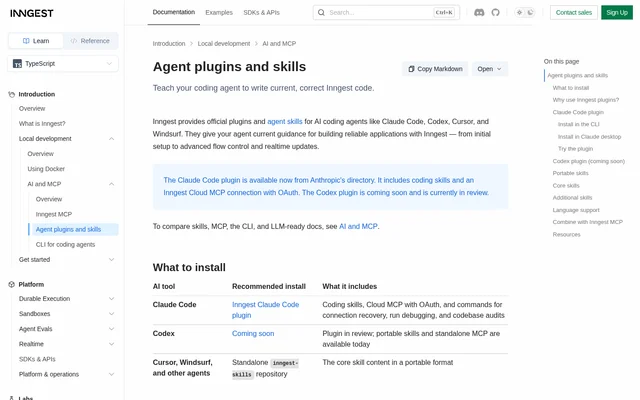
Inngest provides official plugins and agent skills that give AI coding agents current guidance for building Inngest applications. These resources address outdated or incomplete model training data with API details, implementation patterns, and structured development instructions. The documented audience is developers working with agents such as Claude Code, Codex, Cursor, and Windsurf.
Inngest separates coding knowledge from operational access. Skills explain how to write Inngest code, while MCP connections let an agent work with local functions or deployed Cloud resources. The Claude Code plugin bundles coding skills and a Cloud MCP connection with OAuth; other agents can use the shared portable skills.
What Inngest can do
Inngest skills cover application development from initial TypeScript setup through durable execution and realtime updates. The shared core includes event design, function configuration, workflow steps, flow control, and middleware. Additional Claude Code skills address existing codebases, Cloud operations, SDK migration, CLI usage, REST API access, and durable AI agents built with AgentKit.
- Inngest provides guidance for SDK installation, client configuration, environment variables, and the development server.
- Inngest covers event schemas, naming conventions, idempotency, and fan-out patterns.
- Inngest explains retries, cancellation, memoization, and durable step execution.
- Inngest documents concurrency limits, throttling, rate limiting, debounce, priority, and batching.
- Inngest supports codebase audits for durability gaps.
- Inngest provides skills for realtime channels, subscription tokens, React hooks, and SSE consumers.
How Inngest works with coding agents
Inngest combines agent-readable skills with MCP connections for a write, test, and debug workflow. Skills supply implementation guidance, Dev Server MCP lets agents test and debug functions running locally, and Cloud MCP lets agents inspect and operate deployed environments, functions, events, and runs. The local Dev Server connection is optional.
Inngest supports Claude Code installation through the CLI or Claude's directory. After CLI installation, developers start a new Claude Code session, open the MCP menu, select the plugin's Cloud connection, and complete browser-based OAuth. Portable skills can be installed through the documented skills command or referenced from the standalone repository.
Who Inngest is for
Inngest targets developers who use coding agents to build or maintain applications with Inngest. The skills support both initial project setup and work on existing repositories. Developers using Cursor, Windsurf, or other compatible agents can access the portable core skills, while Claude Code users receive additional commands and operational skills in the plugin.
- Inngest helps developers implement background jobs, scheduled tasks, and webhook handlers.
- Inngest guides developers building durable AI agents with model calls, tool calls, and human approval.
- Inngest helps maintainers inspect existing webhooks, queues, cron jobs, and long-running routes before making changes.
- Inngest supports developers investigating a failed run and its failing step.
Inngest strengths and limitations
Inngest brings implementation guidance and operational tools into the coding-agent workflow. Shared core skills provide consistent documentation across compatible agents, while the Claude Code plugin adds account connection recovery, run investigation, and repository audits. The distinction between skills, local MCP, and Cloud MCP makes their respective roles explicit.
- Inngest code examples and setup instructions currently focus on TypeScript.
- Inngest directs Python and Go users to documentation and llms.txt for language-specific guidance.
- Inngest's Codex plugin remains in review, although portable skills and standalone MCP are available.
- Inngest connector setup on Claude Team and Enterprise plans requires an Owner to add the connector before members connect.
Getting started with Inngest
Inngest recommends choosing the installation path for the coding agent in use. Claude Code users can install the published plugin from Anthropic's directory and connect their Inngest account. Cursor, Windsurf, and other compatible agents can use the standalone skills repository. Each portable skill includes its own documentation in a SKILL.md file.
Inngest includes commands to verify account access, recover sign-in, debug a run, and audit a codebase. Developers can begin by asking the plugin to show their account and environments. Because the plugin already includes Cloud MCP, the documentation advises against adding a duplicate manual Cloud connection.
Inngest FAQ
What is Inngest's coding-agent plugin?
Inngest provides an official Claude Code plugin containing coding skills, Cloud MCP with OAuth, and commands for connection recovery, run debugging, and codebase audits. The skills give coding agents current guidance for building applications with Inngest.
Which AI coding agents does Inngest support?
Inngest offers a published Claude Code plugin and portable skills for Cursor, Windsurf, and other agents that support skills. Codex users can use portable skills and standalone MCP while the dedicated Codex plugin remains in review.
Does Inngest support Python and Go coding guidance?
Inngest plugins and skills currently focus on TypeScript, including code examples and setup instructions. Core concepts apply across Inngest SDKs, but the documentation directs Python and Go users to language-specific documentation and llms.txt.
How does Inngest use MCP with coding agents?
Inngest uses Dev Server MCP for testing and debugging local functions and Cloud MCP for inspecting and operating deployed environments, functions, events, and runs. The Claude Code plugin includes Cloud MCP with OAuth, while the local Dev Server connection is optional.
Can Inngest audit an existing codebase?
Inngest includes a Claude Code audit command and a codebase audit skill for finding durability gaps before changes. The skill covers framework detection, existing Inngest usage, webhooks, cron jobs, queues, long-running routes, polling loops, and AI agents.
From the community
No reviews yet
Be the first to review this tool. What you write helps the next person choose.