What is Instant AI for Google Slides?
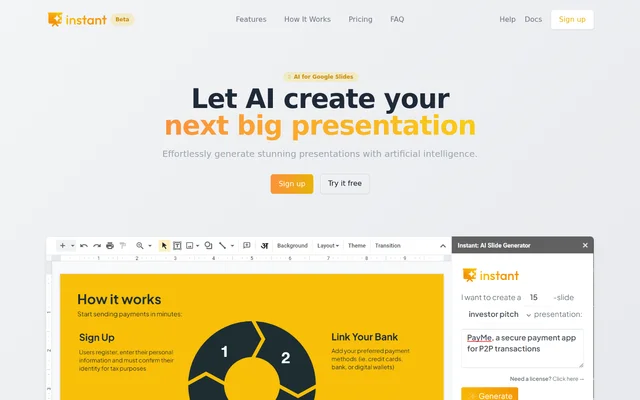
Instant AI for Google Slides is an AI presentation maker that produces fully editable slides directly inside Google Slides. The tool combines generated presentation content with expert-designed slide templates, including layouts for visual material rather than text alone. Instant AI for Google Slides supports users preparing presentations such as investor and sales decks within their existing Google Slides workflow.
Instant AI for Google Slides was built by presentation designers, according to the product website. The stated approach combines AI generation with a template library to create slides containing diagrams, graphics, flowcharts and infographics. Users can adjust the presentation outline and choose suggested layouts during the creation process.
What Instant AI for Google Slides can do
Instant AI for Google Slides handles several stages of presentation drafting, from an initial topic description to slide content and layout suggestions. The tool also provides styling controls for presentation branding. Paid plans list a broader built-in template selection than the free option, while the generated slides remain editable in Google Slides.
- Instant AI for Google Slides generates an outline from a presentation topic.
- Instant AI for Google Slides allows users to revise the generated outline.
- Instant AI for Google Slides drafts content for individual slides.
- Instant AI for Google Slides suggests slide layouts.
- Instant AI for Google Slides supports flowcharts, diagrams and infographics.
- Instant AI for Google Slides lets users choose presentation colors and fonts.
How Instant AI for Google Slides works
Instant AI for Google Slides is installed as an extension from Google Workspace. After installation, users open a Google Slides document and access the app through the Extensions menu. The documented workflow starts with choosing colors and fonts, followed by selecting a presentation length and type and briefly describing the topic.
Instant AI for Google Slides then generates an outline that users can update to fit their needs. After outline review, the tool drafts content for each slide and offers suggested layouts. The website provides documentation and a detailed guide for this workflow, as well as a video demonstration of the product.
Who Instant AI for Google Slides is for
Instant AI for Google Slides is aimed at people who want to create presentations without leaving Google Slides. Investor and sales presentations are explicit examples of supported presentation types. The styling controls also serve users who need slides to match their branding, while diagram and infographic support addresses presentations that need visual explanations.
- Instant AI for Google Slides supports drafting investor decks from a topic description.
- Instant AI for Google Slides supports creating sales presentations with selected colors and fonts.
- Instant AI for Google Slides supports visualizing processes through flowcharts and infographic layouts.
Instant AI for Google Slides pricing and plans
Instant AI for Google Slides offers Lite at $44 for up to 60 slides per month, Pro at $99 for up to 150 slides per month, and Premium at $199 per month with unlimited slides. The comparison table lists 40 monthly rewrites for Lite, 90 for Pro and unlimited rewrites for Premium. Enterprise pricing and bulk licenses are available by custom quote.
Instant AI for Google Slides also offers limited free access without registration or credit card details. The free allowance is inconsistent across the page: the table lists 15 slides, 10 rewrites and 15 templates, while the FAQ describes a trial allowing up to 30 slides. The website instructs users to use their Google account email when first signing up.
Instant AI for Google Slides strengths and limitations
Instant AI for Google Slides combines native Google Slides editing with AI-generated outlines, content and visual layout suggestions. Outline revision and branding controls provide opportunities to shape the result before completing a deck. The main constraints are the extension-based workflow, restricted free access and usage quotas on the Lite and Pro subscriptions.
- Instant AI for Google Slides requires extension installation for the documented Google Slides workflow.
- Instant AI for Google Slides limits free access to a subset of features and templates.
- Instant AI for Google Slides publishes inconsistent free slide limits.
- Instant AI for Google Slides applies monthly slide and rewrite quotas to Lite and Pro.
Instant AI for Google Slides FAQ
What is Instant AI for Google Slides?
Instant AI for Google Slides is an AI presentation maker that creates fully editable slides inside Google Slides. The tool generates outlines and slide content, suggests layouts, and supports visual elements such as diagrams, flowcharts and infographics.
Is Instant AI for Google Slides free?
Instant AI for Google Slides offers limited free access without registration or credit card details, alongside paid subscriptions. The website gives inconsistent free limits: the comparison table lists 15 slides, while the FAQ describes a trial of up to 30 slides.
How do you use Instant AI for Google Slides?
Instant AI for Google Slides is installed from Google Workspace and opened through the Extensions menu in a Google Slides document. Users choose styling, presentation length and type, describe a topic, edit the generated outline, and select layouts for drafted slides.
How much does Instant AI for Google Slides cost?
Instant AI for Google Slides lists Lite at $44 for up to 60 slides per month, Pro at $99 for up to 150 slides per month, and Premium at $199 per month for unlimited slides. Enterprise pricing and bulk licenses require a custom quote.
Can you cancel an Instant AI for Google Slides subscription?
Instant AI for Google Slides subscriptions can be canceled or paused through the billing management page at ai.vip.graphics/billing. The website states that this stops future billing and separately describes refund conditions involving unused quota, credits and generated slides.
From the community
No reviews yet
Be the first to review this tool. What you write helps the next person choose.