What is IntelliBar?
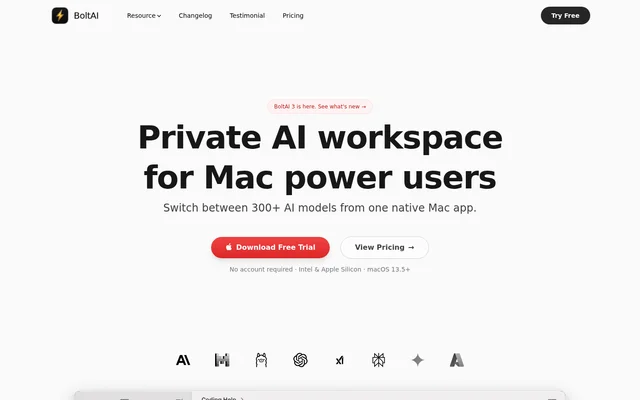
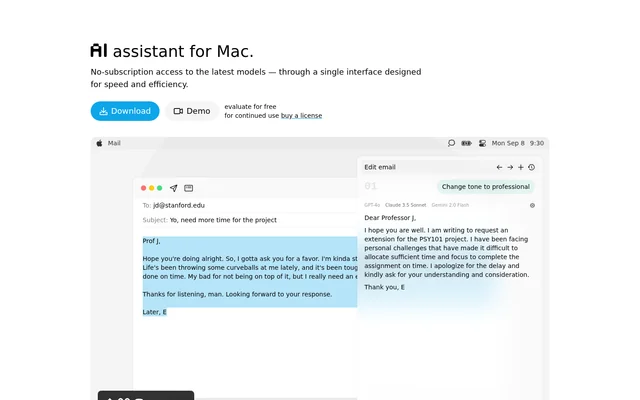
IntelliBar is an AI assistant for Mac that provides a single interface for remote and local language models. IntelliBar is aimed at users who want to work with different models without moving between separate service apps. The website describes uses including searching, proofreading, writing and changing an email's tone.
IntelliBar lists models from families including GPT, Claude, Gemini, Llama and DeepSeek, alongside support for local models through Ollama. The app combines model access with conversation management and prompt tools. Access follows a license model rather than an app subscription, while remote model providers charge separately for usage.
What IntelliBar can do
IntelliBar combines model selection with tools for comparing answers, composing prompts and navigating past conversations. IntelliBar can send a shared prompt to different models, making their responses available side by side. Reusable instructions and prompt completion support tasks that involve repeating the same requests or preferred response formats.
- IntelliBar compares responses from multiple models side by side.
- IntelliBar autocompletes prompts as users type.
- IntelliBar saves common prompts as reusable slash commands.
- IntelliBar provides a command menu with keyboard shortcuts.
- IntelliBar searches conversations in local chat history.
- IntelliBar supports local models through Ollama.
How IntelliBar works
IntelliBar connects to users' preferred model providers or to local models. Remote prompts go directly to the chosen provider without passing through an intermediary. Chat history stays on the user's device. For questions that users do not want to send to a remote provider, IntelliBar supports a local-model workflow.
IntelliBar exposes commands for actions such as reading aloud, asking with voice, editing the last prompt and finding text in a chat. Saved instructions can specify a language, a concise response style or a code-only answer. Conversation search and keyboard navigation help users return to earlier work without manually browsing every chat.
Who IntelliBar is for
IntelliBar is for Mac users who use AI across writing, searching and everyday assistance tasks. The website demonstrates turning an informal email into a professional request and includes user feedback about proofreading and writing. Model comparison also supports users who want to review alternative answers before choosing a response.
- IntelliBar helps users rewrite emails with a professional tone.
- IntelliBar supports writing and proofreading workflows.
- IntelliBar lets users compare different models' answers to one request.
- IntelliBar supports reusable instructions for recurring tasks.
- IntelliBar offers local models for questions kept away from remote providers.
IntelliBar pricing and plans
IntelliBar offers a downloadable demo for free evaluation and requires a license for continued use. IntelliBar does not require an app subscription. Users connect the app to their preferred model providers and pay those providers for actual usage, or connect local models without paying a remote provider for model usage.
IntelliBar presents example usage costs alongside subscription costs for separate AI services, rather than stating a license price in the supplied page text. IntelliBar describes its access as having no usage limits. The stated funding model is user-funded, with no advertising, data sales or investors.
IntelliBar strengths and limitations
IntelliBar brings multiple models, reusable prompts and local conversation storage into a Mac workflow. Direct provider connections avoid an additional intermediary for remote requests, while local models offer a way to avoid sending questions to a remote provider. These privacy arrangements distinguish chat storage from the processing required for remote model responses.
IntelliBar still sends prompts to the selected provider when users choose remote models. The website says API data is usually not used for training and directs users to provider policies for details, rather than making an unconditional guarantee. Continued app use also requires a license, and remote model usage remains a separate expense.
- IntelliBar is offered as a Mac app.
- IntelliBar requires a license after the free evaluation.
- IntelliBar remote-model users pay their chosen providers for usage.
- IntelliBar remote-model data handling depends on provider policies.
IntelliBar FAQ
What is IntelliBar?
IntelliBar is an AI assistant for Mac that brings remote and local models into one app. IntelliBar supports response comparison, prompt autocompletion, reusable slash commands and conversation search for tasks such as writing, proofreading and searching.
Is IntelliBar free?
IntelliBar offers a free evaluation demo, but continued use requires a license. IntelliBar has no app subscription. Users pay remote model providers for usage, while local models can be connected without remote provider usage charges.
Does IntelliBar work with local models?
IntelliBar supports local models through Ollama. IntelliBar presents local models as an option for questions users do not want to send to an AI provider, allowing those requests to stay off remote provider services.
Can IntelliBar compare different AI models?
IntelliBar can send the same prompt to multiple AI models and show their responses side by side. IntelliBar also provides access to models from different providers within a single interface, alongside support for local models.
How does IntelliBar handle privacy?
IntelliBar stores chat history on the user's device and sends remote prompts directly to the selected AI provider without intermediaries. IntelliBar states that API data is usually not used for training, but refers users to individual provider policies for details.
What can you use IntelliBar for?
IntelliBar supports writing, proofreading, searching and email editing, including changing an informal message to a professional tone. IntelliBar also supports repeated workflows through reusable slash commands, prompt autocompletion and searchable conversation history.
From the community
No reviews yet
Be the first to review this tool. What you write helps the next person choose.