What is Knotr?
Knotr is a workspace for individuals and teams that want AI tools to use the same writing rules, reference material, and workflows. A profile defines how an assistant should sound and exercise judgment, while a knowledgebase supplies material to draw on. Knotr also gives users a place to keep finished documents and pages without relying on the chat where they were created.
What Knotr can do
Knotr separates the instructions and sources that shape AI responses from the work users choose to keep. Profiles and style guides help define how an output should read, while skills describe how to carry out a recurring task. Finished work can use a reusable artifact type when the same fields need to appear each time.
- Profiles capture tone, judgment, and standards for AI tools.
- Style guides turn prose guidelines into rules that can be checked.
- Knowledgebases make notes and source documents searchable.
- Skills package reusable prompts and inputs for recurring tasks.
- Artifacts give finished work shareable links and version history.
- Collections present related artifacts in a chosen order.
How Knotr works
Knotr users can edit knowledgebase notes in a browser, define a profile, and connect an AI tool from the Integrations area. The site provides setup instructions for ChatGPT, Claude, Cursor, Gemini, GitHub Copilot, and other clients. Setup varies by tool: GitHub Copilot uses a remote MCP server, while Gemini uses a custom Connected App.
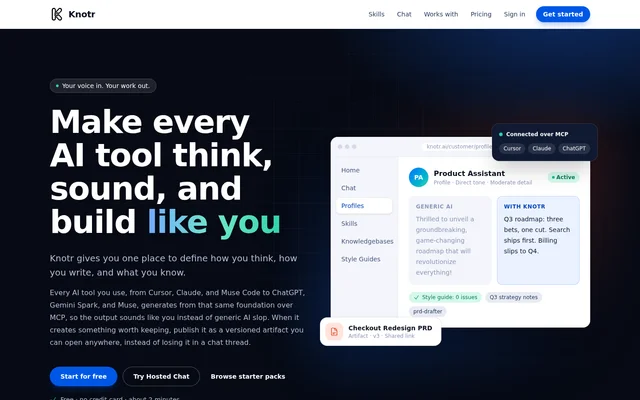
Knotr also offers Hosted Chat in beta for users who want to work directly with profiles, skills, knowledgebases, and artifacts without switching to an external client. The page illustrates this with a product requirements document workflow in which a Product Assistant profile uses a knowledgebase and a drafting skill.
Who Knotr is for
Knotr offers role-based starter packs for software development, product management, operations, writing, sales, and other activities. The workspace also supports teams that want to share reference material and working standards without giving everyone the same voice. Team members can refine skills before marking them as shared, and built-in changelogs show who changed what and when.
- Product managers can draft requirements and stakeholder updates using shared strategy notes.
- Developers can give coding assistants architecture context and review standards.
- Operations teams can reuse escalation paths and runbook formats.
- Writers can apply shared audience, voice, and document standards.
- Sales and marketing teams can reuse messaging and proof points across campaigns.
Knotr strengths and limitations
Knotr reduces the need to re-upload the same documents or rewrite instructions for each connected tool. Shareable artifact links also make work accessible without reopening the original chat. Integration capabilities vary by client, though: the Muse app supports persona instructions only, while skills and saved work are available through Muse Code.
- Hosted Chat is currently in beta.
- Free and Pro have caps on profiles, skills, documents, and artifacts.
- Direct publishing to Confluence and Jira is planned rather than available today.
Getting started with Knotr
Knotr users can create a free account and apply a starter pack for their role. From there, they can edit knowledgebase notes in the browser, browse the skills catalog, and use Integrations to connect a preferred AI tool. For work that needs to be kept, users can publish a document, page, or custom artifact type and share its link.
Knotr FAQ
What is Knotr?
Knotr is a web workspace that supplies AI tools with shared profiles, writing rules, source documents, and reusable workflows. Knotr connects to compatible tools through MCP and lets users publish finished work as versioned artifacts with shareable links.
Which AI tools work with Knotr?
Knotr supports ChatGPT, Claude, Claude Code, Cursor, Gemini, GitHub Copilot, OpenAI Codex, and other tools listed on its site. Knotr provides setup instructions for individual clients and supports compatible MCP clients. The available features and connection method can vary by tool.
Can teams use Knotr without sharing the same AI profile?
Knotr lets team members keep their own profiles while sharing knowledgebases, skills, and style guides in a common library. Team members can refine skills before making them available to others, and built-in changelogs show who made changes and when.
Can Knotr publish AI-generated documents?
Knotr lets users and connected AI tools publish versioned documents, pages, and custom artifact types to shareable links inside Knotr. Related artifacts can be grouped into an ordered collection. Direct publishing to destinations such as Confluence and Jira is described as planned.
From the community
No reviews yet
Be the first to review this tool. What you write helps the next person choose.