What is koharu?
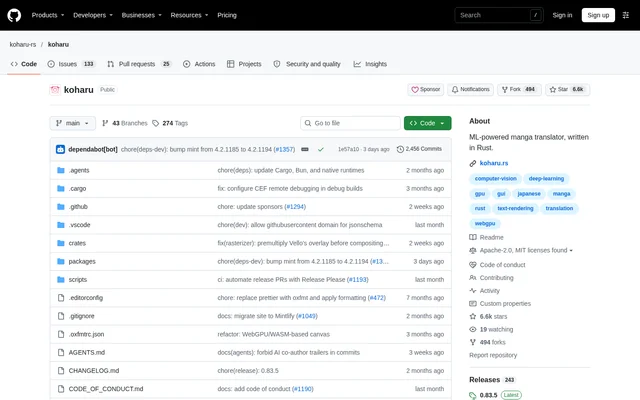
koharu is an open-source manga translation application written in Rust. koharu brings text detection, optical character recognition, language-model translation, inpainting, and page composition into a local-first workflow for manga translators and editors. The project provides desktop builds for Windows, macOS, and Linux, with source code available through its repository.
koharu runs vision models and LLMs locally to keep translation data on the user's machine. Translation can also use remote APIs, so local execution is an option rather than a requirement for every workflow. Separate settings cover vision, inpainting, translation, and generation, allowing different models to handle different parts of a project.
What koharu can do
koharu combines automated page processing with manual correction and composition tools. Projects can contain raster images, archives, or PDFs, with page sequencing and selective processing at page or project scope. The editing workflow includes proofreading, artwork cleanup, translated text placement, and export for delivery or continued layered editing.
- koharu detects text regions, speech bubbles, and cleanup regions.
- koharu reads dialogue, captions, and general page text with multimodal OCR.
- koharu translates through local GGUF models or hosted providers.
- koharu reconstructs artwork behind removed source text with generative inpainting.
- koharu supports proofreading of OCR results and translated text.
- koharu fits multilingual text with font fallback, vertical CJK, and right-to-left layout.
- koharu exports layered PSD files.
How koharu works
koharu lets users select detection, OCR, and inpainting models separately, then run the required stages on a page or across a project. The WebGPU canvas provides manual cleanup, text placement, and page composition after automated processing. An agent-based workflow also supports project inspection, editing, and pipeline control.
koharu supports local language models alongside OpenAI, Gemini, Claude, Grok, MiniMax, DeepSeek, and OpenRouter. Machine-translation options include DeepL, Google Cloud Translation, and Caiyun, while OpenAI-compatible endpoints are also supported. Hardware acceleration options include CUDA, ROCm / HIP, Metal on Apple silicon, and Vulkan, subject to the documented operating-system and hardware requirements.
Who koharu is for
koharu is suited to manga translators and editors who need text recognition, translation, artwork cleanup, and typesetting in the same workflow. Local model execution supports users who want to keep page content on their own machines. Manual proofreading and composition tools support workflows where automated output needs correction before export.
- koharu can translate dialogue and captions across manga projects.
- koharu can remove original lettering and reconstruct the artwork underneath.
- koharu can prepare translated pages with vertical CJK or right-to-left text.
- koharu can export layered pages for continued editing.
koharu licensing and access
koharu is distributed as an open-source project under a choice of the MIT License or the Apache License, Version 2.0. Release builds are available for Windows, macOS, and Linux. Windows users can install through WinGet, and macOS users can install through Homebrew. The repository also documents development prerequisites and commands for building the application locally.
koharu strengths and hardware limitations
koharu combines local inference, hosted-provider choices, multilingual text layout, and layered export within a manga-focused editor. These capabilities cover both automated processing and manual finishing. Hardware requirements remain important: acceleration support varies by GPU, operating system, and driver, and model-specific guidance determines which workloads a machine can run.
- koharu requires a current graphics driver for its WebGPU canvas, including during CPU inference.
- koharu CPU inference is substantially slower and supports only certain workloads.
- koharu Metal acceleration is available on Apple silicon Macs.
- koharu ROCm / HIP support depends on the exact AMD GPU, operating system, and driver combination.
koharu FAQ
What is koharu?
koharu is an open-source, ML-powered manga translator written in Rust. koharu combines text detection, OCR, translation, inpainting, proofreading, and page composition, with local model execution and optional hosted translation providers.
Is koharu open source?
koharu is an open-source project dual-licensed under the MIT License or the Apache License, Version 2.0, at the user's option. koharu provides downloadable release builds and documents how to build the application from source.
Does koharu run locally?
koharu supports local execution of vision models and LLMs to keep data on the user's machine. koharu also supports hosted LLM providers, machine-translation services, and OpenAI-compatible endpoints when remote translation is preferred.
Which operating systems does koharu support?
koharu provides release builds for Windows, macOS, and Linux. koharu can be installed with WinGet on Windows or Homebrew on macOS. Hardware acceleration options vary by operating system, GPU, and driver compatibility.
Which translation providers does koharu support?
koharu supports OpenAI, Gemini, Claude, Grok, MiniMax, DeepSeek, and OpenRouter for hosted LLM translation. koharu also supports DeepL, Google Cloud Translation, Caiyun, OpenAI-compatible endpoints, and local GGUF inference for translation workflows.
Can koharu run without a supported GPU?
koharu offers CPU inference for supported workloads, but the repository states that CPU inference is substantially slower. koharu still requires a current graphics driver for the WebGPU editor canvas, even when inference runs on the CPU.
From the community
No reviews yet
Be the first to review this tool. What you write helps the next person choose.