What is Lazyeyefix?
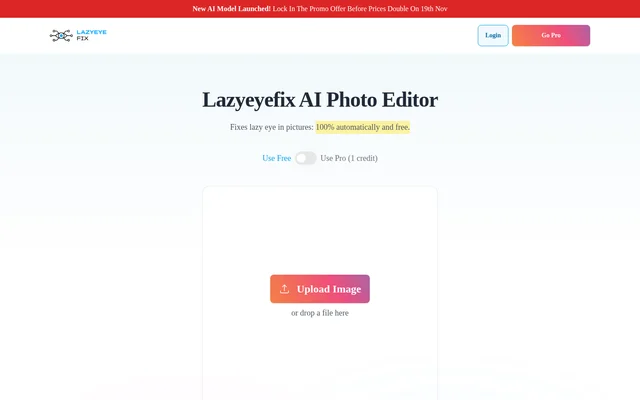
Lazyeyefix is an AI photo editor for automatically correcting lazy or misaligned eyes in pictures. Lazyeyefix serves people with strabismus who want to change eye alignment in photographs without learning manual retouching. The browser-based editor offers a free option and a paid Pro model accessed through credits.
Lazyeyefix was created by Florian, who describes having strabismus since being born prematurely. The founder presents the editor as a way to help people feel more comfortable sharing photographs online or sending pictures to friends. The stated purpose is photo editing rather than changing how a person looks outside a photograph.
What Lazyeyefix can do
Lazyeyefix combines automatic eye detection with photo correction, while the Pro option adds a proprietary AI model and additional editing capabilities. The page describes Pro as providing enhanced detail, natural eye alignment, and faster processing for difficult photographs. Upload support covers common image formats rather than requiring a specialised file type.
- Lazyeyefix detects faces and eyes automatically.
- Lazyeyefix identifies the misaligned eye for correction.
- Lazyeyefix accepts JPG, JPEG, PNG, and WEBP files.
- Lazyeyefix Pro supports batch photo uploads.
- Lazyeyefix Pro works with glasses and all head angles.
- Lazyeyefix lets users select which face to edit in group photographs.
How Lazyeyefix works
Lazyeyefix starts with an image uploaded or dropped into the browser interface. The described process detects the face and eyes, or just the eyes in a closely cropped face. Lazyeyefix then identifies misalignment by examining the proportion of visible sclera, the white part of the eye.
Lazyeyefix describes its eye-cloning step as copying the non-misaligned eye, flipping that copy horizontally, and placing it over the misaligned eye. This method works best when the person looks at the camera. Most photos finish within a few seconds, with processing potentially reaching 30 seconds for large files or heavy traffic.
Who Lazyeyefix is for
Lazyeyefix is intended for people who want to correct visible eye misalignment in photographs without Photoshop skills or retaking the picture. Personal sharing and social media are explicit uses on the page. Group-photo selection and Pro batch uploads also support editing photographs that contain several people or processing multiple images.
- Lazyeyefix can adjust personal photos before sharing with friends.
- Lazyeyefix can prepare corrected pictures for social media posts.
- Lazyeyefix can edit a selected face in a group photograph.
- Lazyeyefix Pro can process batch photo uploads.
Lazyeyefix pricing and plans
Lazyeyefix offers free editing and Pro editing that uses 1 credit per picture. Paid packages are described as one-time purchases. The listed Early Bird prices are €6.99 EUR for Starter with 20 credits, €12.99 EUR for Pro with 50 credits, and €17.99 EUR for Premium with 100 credits.
Lazyeyefix lists the same core Pro capabilities across these packages, including batch uploads, glasses support, all head angles, group-shot detection, and photos saved for later download. The page also lists a 30-Day Money-Back Guarantee and a contact option for customers who need more credits or a custom plan.
Lazyeyefix strengths and limitations
Lazyeyefix provides a focused photo-editing workflow with no installation and no requirement for manual retouching skills. A free option allows access without purchasing Pro credits, while paid packages add capabilities for more varied photographs. The practical constraints concern the described correction method, credit consumption, and processing delays under some conditions.
- Lazyeyefix works best with camera-facing subjects in the described eye-cloning workflow.
- Lazyeyefix Pro requires credits for photo corrections.
- Lazyeyefix may take up to 30 seconds with large files or heavy traffic.
Lazyeyefix FAQ
What is Lazyeyefix?
Lazyeyefix is a browser-based AI photo editor that automatically corrects lazy or misaligned eyes in photographs. Lazyeyefix detects faces and eyes and adjusts eye alignment without requiring manual photo-editing skills or installed software.
Is Lazyeyefix free?
Lazyeyefix offers free editing alongside a paid Pro option that uses 1 credit per photo. Paid credits are sold as one-time packages, with listed Early Bird prices of €6.99 for 20 credits, €12.99 for 50 credits, and €17.99 for 100 credits.
How does Lazyeyefix correct a lazy eye in a photo?
Lazyeyefix describes detecting the eyes, identifying misalignment using the visible proportion of sclera, and copying the non-misaligned eye. The copied eye is flipped horizontally and placed over the misaligned eye. The page says this process works best when the person looks at the camera.
Does Lazyeyefix work with group photos?
Lazyeyefix supports group photos by detecting multiple faces and allowing users to choose which face to edit. The paid Pro packages also list automatic detection in group shots among their included capabilities.
What image formats does Lazyeyefix support?
Lazyeyefix accepts JPG, JPEG, PNG, and WEBP images through its browser-based upload interface. If an upload fails, the page recommends converting the image to one of these supported formats and trying again.
How long does Lazyeyefix take to edit a photo?
Lazyeyefix processes most photographs within a few seconds. Very large files or heavy traffic can increase processing time to 30 seconds, according to the page. Pro also includes priority processing.
From the community
No reviews yet
Be the first to review this tool. What you write helps the next person choose.