What is lencx ChatGPT Desktop?
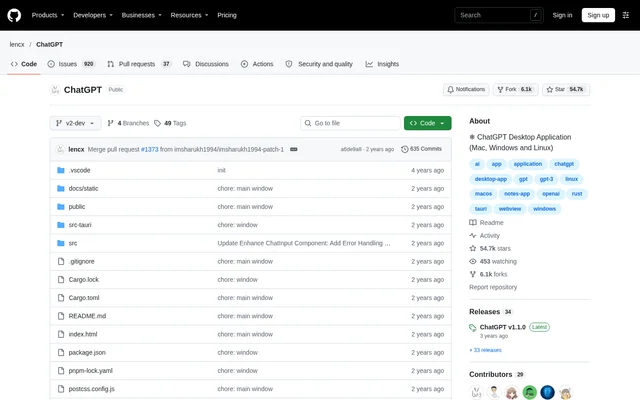
lencx ChatGPT Desktop is an open-source desktop application for ChatGPT, with support stated for Mac, Windows and Linux. The project is published in a public GitHub repository containing application source files and a README. The stated desktop focus makes the project relevant to people seeking a ChatGPT application on those operating systems.
lencx ChatGPT Desktop is distinct from OpenAI's official application. The README acknowledges OpenAI's application and directs people who prefer the official option to OpenAI for updates. The maintainer also points to Noi as a successor to the ChatGPT desktop application concept, providing context for the project's direction without describing Noi's capabilities in detail.
What lencx ChatGPT Desktop can do
lencx ChatGPT Desktop provides a desktop application format for ChatGPT across the operating systems named in the repository. The supplied README emphasizes platform availability, access to the previous version and development direction. The supported capabilities described on this page are therefore limited to those concrete statements rather than an extensive list of chat features.
- lencx ChatGPT Desktop supports Mac.
- lencx ChatGPT Desktop supports Windows.
- lencx ChatGPT Desktop supports Linux.
- lencx ChatGPT Desktop provides a link to information and downloads for v1.1.0.
How lencx ChatGPT Desktop is accessed
lencx ChatGPT Desktop is accessed through its GitHub repository, where the README links to the previous v1.1.0 version for learning about or downloading that release. The repository also exposes source files, including application directories and configuration files. Rust, Tauri and WebView appear among the repository topics, giving developers context about the project.
lencx ChatGPT Desktop separates the available previous-version link from discussion of future development. The maintainer says differentiating features are being considered for version 2.0. That statement describes development intent, not a confirmed release or feature set, so the previous-version link is the concrete download path identified in the supplied text.
Who lencx ChatGPT Desktop is for
lencx ChatGPT Desktop is relevant to ChatGPT users seeking a desktop application on Mac, Windows or Linux. The public repository also serves developers who want to inspect the project's files or follow its development. People comparing this project with an official application can use the README's explicit distinction and its reference to OpenAI.
- lencx ChatGPT Desktop serves users seeking ChatGPT in a desktop application.
- lencx ChatGPT Desktop gives developers a public source repository to inspect.
- lencx ChatGPT Desktop helps returning users locate the previous release.
lencx ChatGPT Desktop strengths and limitations
lencx ChatGPT Desktop combines stated support for Mac, Windows and Linux with publicly accessible project files and a previous-version download link. The main qualification is release context: the README directs readers to an earlier version while the maintainer explores future differentiation. The supplied page does not establish a completed feature set for the proposed update.
- lencx ChatGPT Desktop directs downloads to the previous v1.1.0 version.
- lencx ChatGPT Desktop describes version 2.0 as an area of ongoing feature exploration.
- lencx ChatGPT Desktop is separate from the official OpenAI application.
lencx ChatGPT Desktop FAQ
What is lencx ChatGPT Desktop?
lencx ChatGPT Desktop is an open-source ChatGPT desktop application for Mac, Windows and Linux. The project is hosted in a public GitHub repository, and its README links to information and downloads for the previous v1.1.0 version.
Which operating systems does lencx ChatGPT Desktop support?
lencx ChatGPT Desktop lists support for Mac, Windows and Linux. The repository identifies the project as a ChatGPT desktop application, but the supplied text does not specify minimum operating system versions or hardware requirements.
Where can you download lencx ChatGPT Desktop?
lencx ChatGPT Desktop provides a link in its GitHub README to learn about or download the previous v1.1.0 version. The same README discusses future version 2.0 development without presenting that update as a completed release.
Is lencx ChatGPT Desktop the official OpenAI app?
lencx ChatGPT Desktop is separate from OpenAI's official application. The README acknowledges OpenAI's application and tells readers who prefer the official option to follow OpenAI's updates, while separately linking to this project's previous release.
What is the development status of lencx ChatGPT Desktop?
lencx ChatGPT Desktop describes version 2.0 as a development direction for which the maintainer is seeking differentiating features. The README also points to Noi as a successor to the desktop application concept and links to the previous v1.1.0 release.
From the community
No reviews yet
Be the first to review this tool. What you write helps the next person choose.