What is llama.cpp?
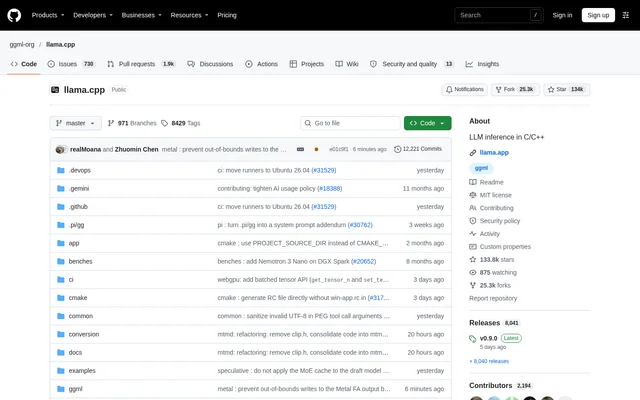
llama.cpp is an open-source project for large language model and vision-language model inference in C/C++. Built on the ggml library, llama.cpp targets execution across a range of hardware, both locally and in the cloud. Developers can use command-line tools or expose models through an API server, depending on how they want to run and access inference.
llama.cpp describes its core implementation as plain C/C++ without dependencies and publishes its source under the MIT licence. The repository includes documentation for building, Docker execution, Android builds, multi-GPU usage and performance troubleshooting. These resources support developers who want to install the tools directly or work with the source code.
What llama.cpp can do
llama.cpp combines model execution tools with hardware-specific inference backends. The project supports language and vision-language workloads, integer quantization for faster inference and lower memory use, and hybrid CPU+GPU execution. Apple silicon optimizations include ARM NEON, Accelerate and Metal, while other backends address NVIDIA, AMD, Intel and additional hardware targets.
- llama.cpp downloads and runs models directly from Hugging Face.
- llama.cpp launches an OpenAI-compatible API server.
- llama.cpp provides a built-in web UI for the server.
- llama.cpp supports vision-language model sessions through the CLI.
- llama.cpp uses integer quantization to reduce memory use.
- llama.cpp combines CPU and GPU inference for models exceeding total VRAM capacity.
How llama.cpp works
llama.cpp offers installation through curl or PowerShell scripts, instructions at llama.app, Docker, pre-built release binaries or a source build. After installation, the documented quick start uses the llama cli command to download and run a Hugging Face model. The llama serve command launches the OpenAI-compatible API server with a model from Hugging Face.
llama.cpp separates command-line model use from server-based access. The README shows a vision-language session in the CLI and a built-in web interface connected to the server. Developers can consult the linked lib llama API and llama-server REST API documentation, alongside guides covering supported backends, multi-GPU execution and performance troubleshooting.
Who llama.cpp is for
llama.cpp is suited to developers who need to execute language or vision-language models on local machines or cloud hardware. The command-line workflow supports direct model use, while the server supports API-based applications. Hardware backends and quantization options also make llama.cpp relevant to developers adapting inference to different processors, GPUs and memory capacities.
- Developers can use llama.cpp to run Hugging Face models locally.
- Application developers can use llama.cpp to expose an OpenAI-compatible inference endpoint.
- Developers can use llama.cpp for vision-language model sessions.
- Developers can use llama.cpp to partially accelerate models that exceed GPU memory.
llama.cpp pricing and access
llama.cpp is available as an open-source project under the MIT licence, with access through the public repository and its documented installation routes. The supplied project text does not list subscription tiers or usage charges for llama.cpp. Users can obtain pre-built binaries, run Docker or clone the repository and follow the build guide.
llama.cpp strengths and limitations
llama.cpp provides several access methods and supports a broad set of hardware backends rather than a single device family. Quantization and hybrid inference address memory use and GPU capacity constraints. Setup still involves installing the software and running a model, and backend availability is not uniform: the repository explicitly marks OpenVINO support as in progress.
- llama.cpp requires installation before the documented CLI and server workflows can run.
- llama.cpp lists its OpenVINO backend as in progress.
- llama.cpp provides build and performance troubleshooting documentation for technical setup.
llama.cpp FAQ
What is llama.cpp?
llama.cpp is an open-source C/C++ project for running large language models and vision-language models locally or in the cloud. Built on ggml, llama.cpp includes command-line tools, hardware acceleration and an OpenAI-compatible API server.
Is llama.cpp free?
llama.cpp is available as an open-source project under the MIT licence. The repository provides source code and links to installation scripts, pre-built binaries and Docker instructions; the project text does not list paid llama.cpp plans.
How do you install llama.cpp?
llama.cpp can be installed using curl or PowerShell scripts, through instructions at llama.app, with Docker, from pre-built release binaries or by building from source. The repository links to Docker documentation and a source build guide.
Does llama.cpp have an OpenAI-compatible API?
llama.cpp includes an OpenAI-compatible API server launched with the llama serve command. The quick start shows loading a model directly from Hugging Face, and the repository also presents a built-in web UI connected to the server.
What hardware does llama.cpp support?
llama.cpp supports Apple silicon, x86 and RISC-V architectures, along with GPU backends including CUDA for NVIDIA and HIP for AMD. The repository also lists Metal, Vulkan, SYCL and other backends, while marking OpenVINO support as in progress.
Can llama.cpp run models larger than GPU memory?
llama.cpp supports hybrid CPU+GPU inference to partially accelerate models larger than total VRAM capacity. The project also supports integer quantization for faster inference and reduced memory use, providing another way to address model memory requirements.
From the community
No reviews yet
Be the first to review this tool. What you write helps the next person choose.