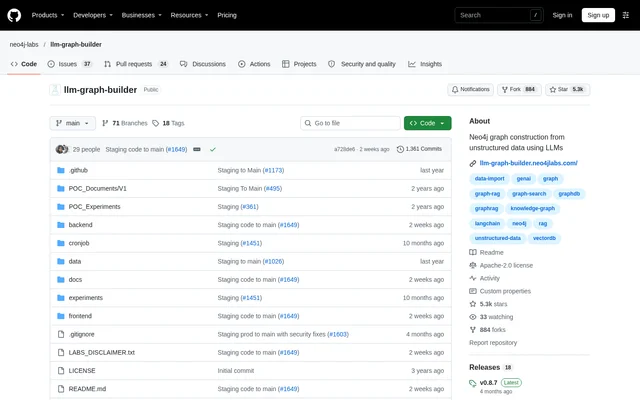
What is LLM Graph Builder?
LLM Graph Builder is an open-source application for constructing Neo4j knowledge graphs from unstructured data using large language models and LangChain. LLM Graph Builder extracts nodes, relationships and their properties from content such as documents, YouTube videos and web pages. The resulting graph is stored in a connected Neo4j database.
LLM Graph Builder comes from Neo4j Labs and is explicitly described as experimental, not part of Neo4j’s supported product lineup. The repository includes backend and frontend code, deployment configuration and setup instructions. The documented workflows suit developers and data teams working on knowledge graph construction and conversational access to source material.
What LLM Graph Builder can do
LLM Graph Builder combines content ingestion, structured extraction, graph inspection and conversational retrieval. Users can choose models and schemas rather than relying on a single extraction configuration. LLM Graph Builder also exposes embedding settings and optional usage tracking, allowing graph processing and query workflows to be configured for the connected database.
- LLM Graph Builder extracts nodes, relationships and properties from unstructured content.
- LLM Graph Builder accepts local files, YouTube, Wikipedia, AWS S3 and web sources, with additional configuration for GCS.
- LLM Graph Builder supports custom schemas and existing schemas configured in settings.
- LLM Graph Builder displays graphs for individual or multiple sources in Neo4j Bloom.
- LLM Graph Builder answers conversational queries and retrieves response source metadata.
- LLM Graph Builder supports embedding providers including OpenAI, Gemini, Amazon Titan and Sentence Transformers.
- LLM Graph Builder optionally tracks daily and monthly token usage by user and database connection.
How LLM Graph Builder works
LLM Graph Builder starts with a Neo4j connection supplied through backend environment variables, a login dialog or a dropped credentials file. Users choose a content source, select an LLM and optionally define node and relationship labels in the extraction settings. Selected files, or files with New status, can then be processed to generate graphs.
LLM Graph Builder lets users inspect completed extractions through individual graph views or a preview covering selected files. Users can then ask the chatbot questions about processed sources and inspect information about generated answers. Deployment options include Docker Compose, separate backend and frontend processes, and Google Cloud Platform; local Ollama extraction is also documented.
Who LLM Graph Builder is for
LLM Graph Builder fits technical users who need to turn source collections into connected, queryable data. The documented configuration and deployment paths are relevant to developers and data teams working with Neo4j, language models and embeddings. LLM Graph Builder supports both graph inspection and question answering, covering extraction workflows as well as exploration of processed content.
- LLM Graph Builder can structure document collections into connected entities and relationships.
- LLM Graph Builder can apply defined node and relationship labels during extraction.
- LLM Graph Builder can support question answering over processed documents with source metadata.
- LLM Graph Builder can visualize graphs from multiple sources together.
LLM Graph Builder pricing and access
LLM Graph Builder is available as an open-source project under the Apache-2.0 license. The repository provides instructions for obtaining and deploying the application rather than a commercial subscription plan. LLM Graph Builder supports Neo4j Aura databases, including the free tier, while model and service configuration depends on the selected providers and deployment.
LLM Graph Builder strengths and limitations
LLM Graph Builder combines configurable extraction, graph visualization and source-aware chat in a single documented workflow. Multiple input sources, embedding providers and deployment paths offer configuration choices. These capabilities come with explicit setup requirements and support boundaries: LLM Graph Builder remains an experimental Neo4j Labs project, and several integrations require additional environment configuration.
- LLM Graph Builder requires Neo4j Database 5.23 or later with APOC installed.
- LLM Graph Builder requires Python 3.12 or higher for local or separate backend deployment.
- LLM Graph Builder does not support Docker Compose deployment with Neo4j Desktop.
- LLM Graph Builder enables only OpenAI and Diffbot by default in Docker Compose; Gemini needs additional GCP configuration.
- LLM Graph Builder requires backend embedding configuration when user tracking is disabled.
LLM Graph Builder FAQ
What is LLM Graph Builder?
LLM Graph Builder is an open-source Neo4j Labs project that transforms unstructured content into knowledge graphs using LLMs and LangChain. LLM Graph Builder extracts nodes, relationships and properties, stores the graph in Neo4j, and supports conversational queries over processed sources.
Is LLM Graph Builder free?
LLM Graph Builder is available as open-source software under the Apache-2.0 license. The repository does not list subscription pricing. LLM Graph Builder requires a compatible Neo4j database and model configuration, and supports Neo4j Aura databases including the free tier.
What data sources does LLM Graph Builder support?
LLM Graph Builder supports PDFs, DOCs, TXTs, YouTube videos and web pages, with uploads from local machines, GCS, S3 and web sources. The default deployment enables local, YouTube, Wikipedia, AWS S3 and web inputs; GCS requires additional configuration.
Can LLM Graph Builder use local LLMs?
LLM Graph Builder documents local LLM extraction through Ollama. The setup involves running Ollama in Docker, loading a model, configuring the model endpoint and backend URL, and selecting the Ollama model in the application.
What does LLM Graph Builder require to run?
LLM Graph Builder requires Neo4j Database 5.23 or later with APOC installed, plus Python 3.12 or higher for local or separate backend deployment. Neo4j Aura is supported. Neo4j Desktop users must deploy the backend and frontend separately rather than using Docker Compose.
Can LLM Graph Builder answer questions about documents?
LLM Graph Builder supports conversational queries about processed sources stored in Neo4j and retrieves metadata about the sources of responses. LLM Graph Builder also provides a dedicated chat interface through the /chat-only route and configurable vector, graph and full-text retrieval modes.
From the community
No reviews yet
Be the first to review this tool. What you write helps the next person choose.