What is Magic Eraser?
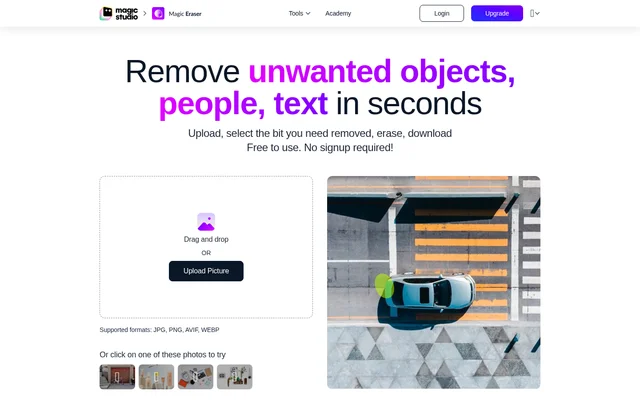
Magic Eraser is an AI-assisted photo editor from Magic Studio that removes unwanted objects, people and text from images. Magic Eraser uses a brush-based selection process rather than requiring users to perform detailed manual retouching. The page presents the tool for everyday photo cleanup as well as work by professional designers, photographers and editors.
Magic Eraser supports practical image preparation across real estate photography, fashion, auto listings, e-commerce, social media and comics. The property photography example specifically describes removing people, furniture, cars, trashcans and plants. These examples focus on cleaning existing photos so that unwanted elements no longer distract from the subject.
What Magic Eraser can do
Magic Eraser combines AI-assisted erasing with controls for selecting the area to edit. Magic Eraser lets users adjust brush size and zoom, then erase a marked area and review the result. The page also advertises bulk editing for multiple pictures, alongside individual photo editing and downloadable results.
- Magic Eraser removes unwanted objects, people and text from photos.
- Magic Eraser provides adjustable brush size and image zoom.
- Magic Eraser accepts JPG, PNG, AVIF and WEBP uploads.
- Magic Eraser allows users to undo changes and erase selected areas again.
- Magic Eraser offers bulk editing for 50 pictures at once.
- Magic Eraser saves edited images to a computer or phone gallery.
How Magic Eraser works
Magic Eraser starts with an image uploaded by dragging and dropping a file or selecting one through the upload control. Magic Eraser also provides sample photos to try. After uploading, users brush over the unwanted area, adjust the brush size or zoom as needed, and select erase to generate an edited result.
Magic Eraser recommends covering both an object and its shadow with the brush. For multiple objects, the instructions recommend separate erasing steps; for long, thin objects, the instructions recommend shorter sections. If an erased area contains unwanted replacement content, users can select that area and erase again. An undo option supports correcting selection mistakes before downloading.
Who Magic Eraser is for
Magic Eraser is intended for people who need photo cleanup without prior editing skill, as well as professional designers, photographers and editors. Magic Eraser lists several commercial and creative contexts, including property photography and product images. The page's examples show how object removal can support cleaner listing photos and other visual content.
- Magic Eraser helps prepare property photos by removing furniture, people or cars.
- Magic Eraser supports image cleanup for fashion and e-commerce.
- Magic Eraser can remove unwanted elements from auto listing photos.
- Magic Eraser supports photo editing for social media and comics.
Magic Eraser pricing and plans
Magic Eraser is free to use without signup, and Magic Studio offers upgrades to unlock PRO features. The free version includes ads, adds the Magic Studio logo, provides low-resolution downloads and edits one picture at a time. The page also promotes bulk editing, but the supplied text does not give a paid subscription price.
Magic Eraser strengths and limitations
Magic Eraser provides accessible brush-based editing with no signup required for free use. Selection controls, repeat erasing and undo give users ways to refine a removal rather than accept the first result. Magic Eraser states that uploads have no resolution limit, although the free download restriction remains separate from the size of the uploaded image.
- Magic Eraser includes ads and a Magic Studio logo in free use.
- Magic Eraser restricts free downloads to low resolution.
- Magic Eraser limits free editing to one picture at a time.
- Magic Eraser may require several erase attempts to achieve the desired result.
Magic Eraser FAQ
What is Magic Eraser?
Magic Eraser is an AI-assisted photo editing tool from Magic Studio that removes unwanted objects, people and text. Magic Eraser uses brush selections, adjustable zoom and an erase action to clean up existing photos.
Is Magic Eraser free to use?
Magic Eraser is free to use without signup. Magic Eraser's free version includes ads, the Magic Studio logo, low-resolution downloads and editing for one picture at a time. PRO upgrades are also offered.
How do you remove objects with Magic Eraser?
Magic Eraser removes objects after users upload a photo, brush over the unwanted area and select erase. Magic Eraser recommends covering the object's shadow too, then repeating the erase operation when the result needs further refinement.
What image formats does Magic Eraser support?
Magic Eraser lists JPG, PNG, AVIF and WEBP beside the upload control. Magic Eraser's detailed upload instructions also name JPEG, HEIC and TIFF, and state that uploaded images have no resolution limit.
Can Magic Eraser edit multiple photos at once?
Magic Eraser advertises bulk editing for 50 pictures at once. Magic Eraser's free version is limited to editing one picture at a time, and the page offers upgrades to unlock PRO features.
Who is Magic Eraser for?
Magic Eraser is for users without editing experience as well as professional designers, photographers and editors. Magic Eraser lists real estate photography, fashion, auto listings, e-commerce, social media and comics as application areas.
From the community
No reviews yet
Be the first to review this tool. What you write helps the next person choose.