What is Media.io AI Object Remover?
Media.io AI Object Remover is an online photo editing tool that removes selected distractions and reconstructs the affected image area with AI. The tool serves travel photographers, ecommerce teams, real estate agents, social content creators, and people cleaning personal photographs. Editing happens in a browser rather than a desktop photo editor.
Media.io AI Object Remover focuses on localized cleanup rather than layered editing or detailed manual compositing. The same brush-based process handles people, embedded lettering, logos, visible watermark overlays, background clutter, and small defects. The page also describes applications for food photography and scanned family photographs.
What Media.io AI Object Remover can do
Media.io AI Object Remover lets users paint directly over an unwanted element instead of cropping the entire photograph. AI then rebuilds the selected region using surrounding visual context. The page describes several cleanup tasks, including removal of visible distractions and correction of small damaged areas in older scans.
- Media.io AI Object Remover removes strangers, tourists, and photobombers from photos.
- Media.io AI Object Remover erases captions, date stamps, labels, and embedded text.
- Media.io AI Object Remover removes visible watermarks and logos from authorized images.
- Media.io AI Object Remover clears wires, signs, props, and other background clutter.
- Media.io AI Object Remover retouches cracks, dust, blemishes, glare, and small reflections.
- Media.io AI Object Remover exports cleaned images without adding a Media.io watermark.
How Media.io AI Object Remover works
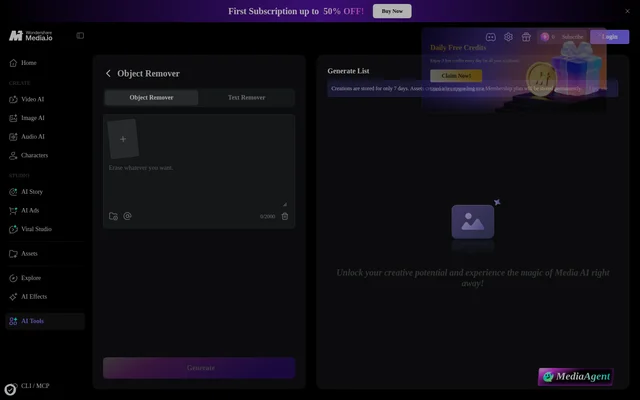
Media.io AI Object Remover starts with an image upload in JPG, PNG, JPEG, or WEBP format, within the stated 50 MB and 3840×2160 limits. Users select the object remover or text remover, adjust the brush size, and paint over the unwanted area. Selecting Generate produces a reconstruction that users can preview and download.
Media.io AI Object Remover supports refinement by brushing an imperfect region again. The page recommends including visible shadows, zooming in for thin wires or small text, and removing large objects in smaller passes. For broader scene changes, the page directs users to Media.io Image to Image, where natural-language prompts describe the intended edit.
Who Media.io AI Object Remover is for
Media.io AI Object Remover serves users who need focused photo cleanup without opening a full desktop editor. The examples cover commercial image preparation as well as personal photography. The page describes removing distractions around a subject, clearing unwanted overlays before reuse, and repairing small defects while leaving the rest of an image untouched.
- Travel photographers can remove crowds around landmarks.
- Ecommerce teams can clean props, hangers, and wires from product shots.
- Real estate agents can remove hoses, signs, and driveway clutter from listing images.
- Social creators can remove old captions or badges from images they own.
- Family photo editors can clear cracks and scratches from scanned photographs.
Media.io AI Object Remover pricing and access
Media.io AI Object Remover offers welcome credits so new users can try uploading, brushing, and generating a cleaned image before deciding whether to continue with paid credits. The supplied page does not specify paid credit prices or allowances. Browser access is available on desktop, tablet, and mobile without installing a desktop application or APK.
Media.io AI Object Remover strengths and limitations
Media.io AI Object Remover combines direct selection control, repeatable regional edits, and watermark-free export in a browser workflow. The page notes that nearby visible background helps reconstruction and that consistent backgrounds suit watermark removal. Results may need refinement, especially when an object occupies much of the frame or sits against detailed textures.
- Media.io AI Object Remover limits uploads to the stated file formats, size, and resolution.
- Media.io AI Object Remover may require repeated brushing when generated areas look unnatural.
- Media.io AI Object Remover directs complex scene edits to the separate Image to Image workflow.
- Media.io AI Object Remover specifies that watermark removal should involve owned or authorized content.
Media.io AI Object Remover FAQ
What is Media.io AI Object Remover?
Media.io AI Object Remover is a browser-based AI photo cleanup tool that removes selected people, text, watermarks, logos, and background objects. Users brush over unwanted areas, generate a reconstructed image region, and download the cleaned photograph.
Is Media.io AI Object Remover free?
Media.io AI Object Remover provides welcome credits for new users to try the cleanup workflow before continuing with paid credits. The page does not state paid credit prices or how many edits the welcome credits cover.
What image formats does Media.io AI Object Remover support?
Media.io AI Object Remover supports JPG, PNG, JPEG, and WEBP uploads up to 50 MB and 3840×2160 resolution. The page also states that cleaned images can be exported up to 3840×2160 without an added Media.io watermark.
Can Media.io AI Object Remover remove text and watermarks?
Media.io AI Object Remover can remove date stamps, captions, labels, embedded text, logos, and visible watermark overlays using brush selections. The page specifies that users should remove watermarks only from images they own or have permission to edit.
Does Media.io AI Object Remover work on mobile?
Media.io AI Object Remover works in a modern browser on mobile, tablet, and desktop devices. The workflow does not require installing Photoshop, an APK, or a desktop application.
How can users improve Media.io AI Object Remover results?
Media.io AI Object Remover supports smaller brush selections, zooming, and repeated regional edits to refine results. The page recommends covering visible shadows, removing large objects in smaller passes, and using Media.io Image to Image for complex scene changes.
From the community
No reviews yet
Be the first to review this tool. What you write helps the next person choose.