What is oh-my-openagent?
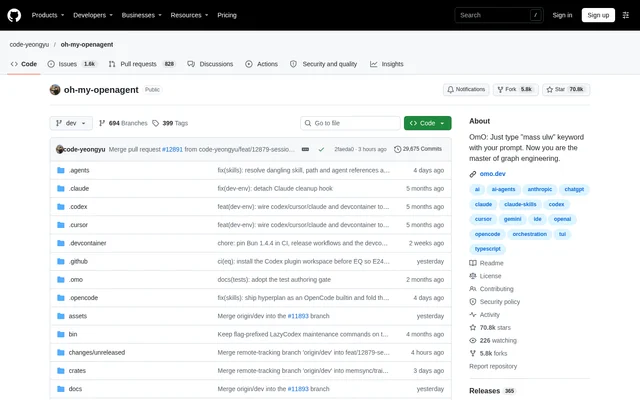
oh-my-openagent is an open-source AI agent project for coding, research and other work described through a command-line session. The project supplies the omo command and runs on senpi, a fork of pi. Its stated tasks include building backends and frontends, researching sources and producing presentation decks. The repository describes the project as a personal side project supported by sponsors.
oh-my-openagent combines a main agent with supporting models, persistent memory and task-specific skills. Rather than treating every request as a single model interaction, the project can divide work among agents and select models for different parts. The documented workflow emphasizes reading the codebase, planning changes, checking intermediate steps and verifying the result.
What oh-my-openagent can do
oh-my-openagent provides prompt-driven workflows for individual tasks and larger coordinated jobs. Adding ultrawork or ulw requests a workflow that inspects the codebase, plans and verifies work. Adding mass ulw turns the job into a graph of agents, with parts running in parallel on models selected for the work.
- oh-my-openagent coordinates parallel agents for research, migrations and machine-learning pipelines.
- oh-my-openagent stores memory in a Git repository of Markdown files.
- oh-my-openagent loads task-specific skills, including browser use.
- oh-my-openagent resumes earlier sessions and continues the last session from the shell.
- oh-my-openagent runs independent tool calls together and repairs malformed tool arguments.
- oh-my-openagent reloads configuration, skills and prompts live.
How oh-my-openagent works
oh-my-openagent starts with installation through the provided shell or PowerShell script, or through the omo-ai package using Bun or npm. Users then open a project, run omo and describe the job. The native installer checks release checksums and falls back to GitHub Releases when the mirror cannot be reached.
oh-my-openagent supports provider sign-in through /login for Claude, ChatGPT, Kimi and GLM subscriptions. Session commands adjust thinking levels, set reasoning effort and reopen previous work. Users migrating from the OpenCode edition or LazyCodex can run omo setup to carry across provider keys, custom providers, MCP servers, skills and model selections.
Who oh-my-openagent is for
oh-my-openagent serves developers working on software projects and users assigning research or presentation tasks to an agent. The repository names backends, frontends, code migrations and machine-learning pipelines as examples. Its command-line workflow and project configuration files make the documented experience oriented toward users comfortable working in a project directory.
- oh-my-openagent can develop backend and frontend code.
- oh-my-openagent can coordinate research across many sources.
- oh-my-openagent can organize a migration as a graph of agents.
- oh-my-openagent can work on presentation decks.
oh-my-openagent pricing and access
oh-my-openagent is distributed as an open-source project through its public repository, native installers and the omo-ai package. The supplied project text does not list paid editions or project-specific subscription prices. Supported model subscription sign-ins are described separately from installation. The accompanying GitHub pricing material describes GitHub services, not pricing for oh-my-openagent.
oh-my-openagent strengths and limitations
oh-my-openagent combines persistent memory, parallel task execution and model-specific system prompts in a command-line workflow. Configuration can be set globally or per project, with the closest configuration file taking precedence. The repository also documents migration tools and model diagnostics. Practical constraints include terminal-based setup and the experimental status of computer use.
- oh-my-openagent requires installation and command-line interaction in its documented workflow.
- oh-my-openagent identifies computer use as experimental.
- oh-my-openagent uses the omo-ai package name; the npm package named omo is unrelated.
oh-my-openagent FAQ
What is oh-my-openagent?
oh-my-openagent is an open-source AI agent project that provides the omo command for research, coding and presentation work. Running on senpi, a fork of pi, oh-my-openagent combines model routing, task-specific skills, persistent memory and workflows that plan and verify work.
How do you install oh-my-openagent?
oh-my-openagent can be installed with the project's shell or PowerShell script, or through Bun or npm using the omo-ai package. After installation, users open a project, run omo and describe the task. The repository warns that the npm package named omo is unrelated.
What does mass ulw do in oh-my-openagent?
oh-my-openagent uses the mass ulw prompt keyword to turn a job into a graph of agents. Parts of the job run in parallel on models selected for their tasks, with checks before completion. Listed examples include research, machine-learning pipelines and migrations.
Which model subscriptions does oh-my-openagent support?
oh-my-openagent supports signing in to Claude, ChatGPT, Kimi and GLM subscriptions through /login. The repository also describes combining models for different tasks and supplying model-specific system prompts. Migration tools can carry over provider keys, custom providers and existing model selections.
How does oh-my-openagent remember previous work?
oh-my-openagent stores memory in a Git repository of Markdown files. A smaller companion model reads previous work and provides guidance to the main agent. Separate session commands let users reopen past sessions or continue the most recent session from the shell.
From the community
No reviews yet
Be the first to review this tool. What you write helps the next person choose.