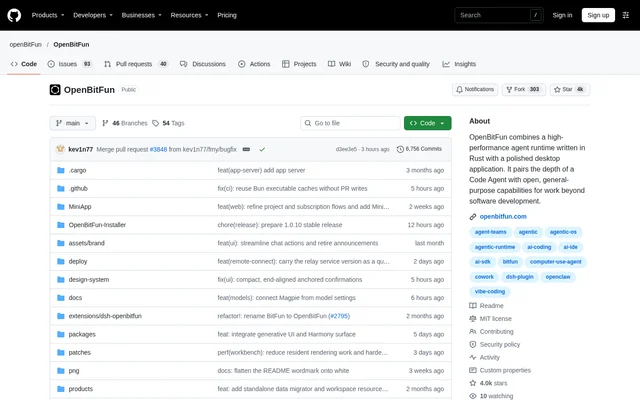
What is OpenBitFun?
OpenBitFun is an open-source agent workspace for software development and work beyond coding. OpenBitFun combines a Rust agent runtime with a desktop application, supporting users who want to run coding tasks, build specialized tools, or customize agent workflows. The repository describes a workspace that can be extended through agents, Mini Apps, interface changes, and source-code modifications.
OpenBitFun uses an Agent Harness to plan steps, manage context, call tools, coordinate agents, and combine results. The available modes distinguish direct collaboration from everyday multistep work, demanding tasks, and creation or customization. This gives users different execution approaches within the same workspace rather than a single fixed task workflow.
What OpenBitFun can do
OpenBitFun supports task execution, workspace customization, and reusable app creation. OpenBitFun maintains session state and tool execution through its Rust runtime, with persistent sessions, interruption recovery, and long-term memory for extended work. Context compression and cache reuse help manage resource consumption during longer runs.
- OpenBitFun offers Minimal, Standard, Ultimate, and Creative task modes.
- OpenBitFun builds Mini Apps from descriptions and refines them through chat.
- OpenBitFun connects external tools through MCP.
- OpenBitFun packages repeatable processes as Skills and customizes execution through Hooks.
- OpenBitFun supports specialist agents with chosen models, roles, tools, and workflows.
- OpenBitFun allows modifications to its interface, tools, and runtime source.
How OpenBitFun works across devices and remote hosts
OpenBitFun lets desktop users select another connected computer and switch to that device's sessions, workspaces, files, and task status. OpenBitFun also accepts instructions, progress checks, and approval responses from a phone or browser. Tasks execute on the selected host and continue when the controller disconnects or changes views.
OpenBitFun uses the official Relay by default for same-account device control, without requiring server deployment. Devices sign in through an OpenBitFun account using GitHub or an email verification code where supported. SSH connections can target remote hosts, jump hosts, or containers; file access and commands target that environment while the Agent Runtime remains on the OpenBitFun host.
Who OpenBitFun is for
OpenBitFun serves developers and users building specialized workflows beyond software development. OpenBitFun names code review, visual design, and motion comic production as examples for specialist agents. Mini Apps address more focused needs by combining a dedicated interface with an agent conversation, allowing users to operate a tool and continue changing it through chat.
- OpenBitFun can create a Git insights panel for a repository.
- OpenBitFun can build a workspace for presentations.
- OpenBitFun can turn routine actions into a dedicated form.
- OpenBitFun can divide demanding tasks among agents and combine their results.
OpenBitFun licensing and installation
OpenBitFun provides desktop packages for Windows, macOS, and Linux through its official download page. OpenBitFun setup consists of installing the package, configuring a model, and opening a workspace. The core code uses the MIT License, while third-party dependencies and assets retain their own licenses. The repository does not state product subscription prices.
OpenBitFun can also run from source after installing Node.js, pnpm, the Rust toolchain, and Tauri prerequisites. The documented development workflow is to clone the repository, run pnpm install, and then run pnpm run desktop:dev. Desktop development supports frontend hot reload and automatic Rust rebuilds, with a separate guide covering the CLI workflow.
OpenBitFun strengths and limitations
OpenBitFun combines source-level customization, multiple task modes, and cross-device control with features for sustained execution. OpenBitFun also documents important deployment and privacy boundaries: sessions and files are read from the owning online device on demand, while the Relay handles account, device, and routing metadata. Device-to-device payload encryption does not extend to every external service.
- OpenBitFun requires online identity sign-in for both official Relay and LAN control.
- OpenBitFun requires a matching client build for a private Relay.
- OpenBitFun excludes model-provider traffic, messaging bots, and published Pages from its device-to-device encryption coverage.
OpenBitFun FAQ
What is OpenBitFun?
OpenBitFun is an open-source AI agent workspace combining a Rust agent runtime with a desktop application. OpenBitFun supports coding and general-purpose tasks through configurable agents, task modes, Mini Apps, persistent sessions, and cross-device control.
Is OpenBitFun free and open source?
OpenBitFun provides open-source core code under the MIT License and offers desktop downloads and a source-based setup workflow. OpenBitFun does not state product subscription prices in the repository text. Third-party dependencies and assets retain their own licenses.
Which operating systems does OpenBitFun support?
OpenBitFun provides desktop packages for Windows, macOS, and Linux through its official download page. OpenBitFun also documents running from source with Node.js, pnpm, the Rust toolchain, and Tauri prerequisites, plus a separate command-line workflow.
Can OpenBitFun be controlled from a phone?
OpenBitFun supports phone and browser control for sending instructions, checking progress, and responding to approval requests. OpenBitFun tasks run on the selected host and continue when the controller disconnects. Same-account device control uses the official Relay by default.
Does OpenBitFun support MCP and custom workflows?
OpenBitFun connects tools through MCP, turns repeatable processes into Skills, and uses Hooks to customize task execution. OpenBitFun also supports specialist agents with selected models, roles, and tools, alongside interface customization and changes to its runtime source.
Does OpenBitFun work offline for local device control?
OpenBitFun does not offer offline login for LAN device control. OpenBitFun uses its online identity service for sign-in with both the official Relay and local Relay paths. Desktop can run a local Relay for same-network mobile control.
From the community
No reviews yet
Be the first to review this tool. What you write helps the next person choose.