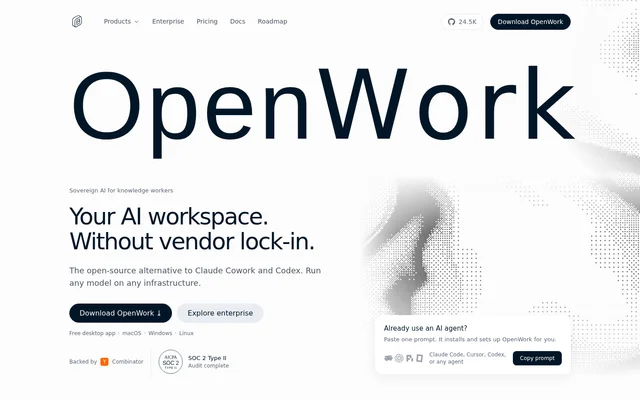
What is OpenWork?
OpenWork is an open-source AI workspace for knowledge workers who want agents to work with their own files and tools. Built on OpenCode, OpenWork is presented as an alternative to Claude Cowork and Codex. The desktop app runs on macOS, Windows, and Linux, while cloud and self-hosted options support teams that need centralized administration. OpenWork separates the workspace from a single model vendor by supporting multiple providers and local models.
What OpenWork can do
OpenWork brings chat, a library, and automations into a workspace for files and connected tools. OpenWork supports Anthropic-compatible plugins and skills, alongside browser automation and scheduled tasks labeled alpha. Team sharing extends beyond prompts: users can package skills, MCP servers, plugins, and configurations into a link that colleagues import.
- OpenWork lets users chat with AI agents on their files and tools.
- OpenWork supports OpenAI, Anthropic, Google, and local models through OpenCode.
- OpenWork shares team skills and MCP tools across agents.
- OpenWork provides an MCP Gateway usable from any client.
- OpenWork offers browser automation and alpha scheduled tasks.
How OpenWork works
OpenWork desktop users download the app and connect their own LLM provider keys, without needing an account to start. OpenWork uses a point-and-click interface, and shared skills, MCP servers, and plugins import without terminal setup. Desktop files stay on the user's machine, while prompts go directly to the chosen LLM provider. Optional hosted cloud workers run on sandboxed infrastructure, and cloud plans can use a managed provider.
Who OpenWork is for
OpenWork serves individual knowledge workers and teams that want AI assistance with files, recurring work, and shared tools. OpenWork's illustrated weekly-update workflow combines closed Linear issues with revenue information from Google Drive, writes a draft, and asks for approval before posting to Slack. Organizations can also use shared configurations and centralized controls to make agent capabilities available across a team.
- OpenWork can draft weekly updates from connected work information.
- OpenWork lets teammates reuse shared skills, plugins, and MCP servers.
- OpenWork supports organizations that need self-hosting or private inference.
- OpenWork provides desktop policies and provisioning through Enterprise.
OpenWork pricing and plans
OpenWork offers a free MIT-licensed desktop app and a Free organizational plan for up to 5 users. Team costs $10 per user per month and includes unlimited users, SSO / SAML, the Extension Marketplace, cloud automations, and basic usage analytics. Enterprise uses custom pricing and adds SCIM, desktop policies, audit logs, white-labeling, and bring-your-own inference. Team pricing is the same for cloud and self-hosted deployments.
OpenWork offers optional add-ons for Team and Enterprise. OpenWork Cloud Computer costs $50 per member per month for a browser-accessible cloud computer, while OpenWork models costs $10 per user per month for managed inference without provider keys. Prices exclude taxes. Team is billed monthly and can be canceled anytime; Enterprise uses an annual contract with a 60-day opt-out.
OpenWork strengths and limitations
OpenWork combines an open-source desktop app, provider choice, and local file handling with optional team administration. OpenWork also supports sharing agent configurations through an importable link, reducing setup steps for teammates. These capabilities come with distinct boundaries: desktop users bring provider keys, organizational free use has a user limit, and some advertised workflow features are not yet generally available.
- OpenWork limits the Free organizational plan to 5 users.
- OpenWork labels scheduled tasks as alpha.
- OpenWork lists phone task assignment and live artifacts as coming soon.
- OpenWork reserves Enterprise features such as SCIM and desktop policies for its Enterprise offering.
OpenWork FAQ
What is OpenWork?
OpenWork is a free, open-source desktop app that lets knowledge workers use AI agents on their own files. Built on OpenCode, OpenWork runs on macOS, Windows, and Linux and is presented as an alternative to Claude Cowork and Codex.
Is OpenWork free?
OpenWork provides a free, MIT-licensed desktop app, with users supplying their own LLM provider keys. OpenWork's Free organizational plan covers up to 5 users. Team costs $10 per user per month, while Enterprise has custom pricing.
Which AI models does OpenWork support?
OpenWork supports any model supported by OpenCode, including models from OpenAI, Anthropic, Google, and local models across 50+ providers. OpenWork users connect their own API keys or use a managed provider on cloud plans.
Does OpenWork send files to the cloud?
OpenWork keeps files on the user's machine in desktop mode and sends prompts directly to the selected LLM provider. OpenWork also offers optional hosted cloud workers that run on sandboxed infrastructure.
Do you need technical skills to use OpenWork?
OpenWork is a point-and-click desktop app that does not require technical expertise according to its website. OpenWork lets users import skills, MCP servers, and plugins shared by teammates in one click, without a terminal or setup guide.
Does OpenWork support self-hosting and API access?
OpenWork supports self-hosting, and its Team plan includes API access. OpenWork allows free control-plane self-hosting for organizations with up to 5 users, excluding Enterprise features, and also permits free development, testing, and a 30-day evaluation at any size with all features.
From the community
No reviews yet
Be the first to review this tool. What you write helps the next person choose.