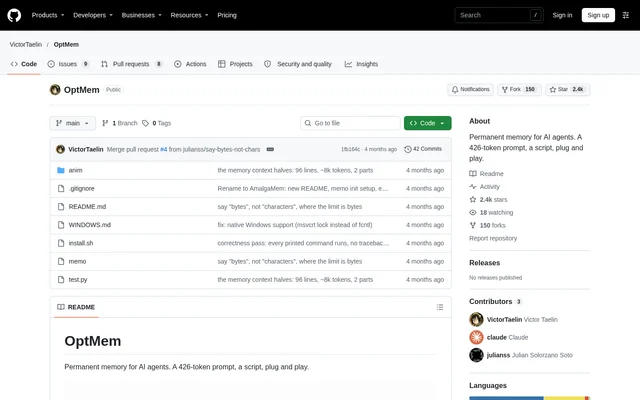
What is OptMem?
OptMem is an open-source project for persistent AI agent memory, built around a short instruction prompt and a Python command-line script. OptMem is intended for developers configuring agents that can execute commands and read instructions from AGENTS.md or CLAUDE.md. The repository describes memory that survives sessions, context compaction, model changes and vendor changes.
OptMem separates original memories from compressed summaries. The original records remain in an append-only log, while a separate summary tree acts as a rebuildable cache. This distinction lets agents consult the underlying records rather than depending entirely on a compressed account of earlier work.
What OptMem can do
OptMem provides commands for reading, recording, searching and inspecting agent memory. The command set covers both routine session activity and correction of summary errors. Original records remain searchable word for word, while tree navigation lets agents move from broader summaries toward the raw memories beneath them.
- OptMem reads session memory with memo wake.
- OptMem records a single-line memory with memo note.
- OptMem searches every recorded memory with memo recall and a regular expression.
- OptMem opens a summary node into its halves with memo zoom.
- OptMem drops an incorrect summary with memo forget so the next nap rebuilds it.
- OptMem exposes the startup reading budget through memo config.
How OptMem works
OptMem installs through the repository's shell command, which prints a Memory block for the agent's instruction file. The script is placed at ~/.optmem/memo. Adding ~/.optmem to PATH makes the memo command available without its full path. Running the installation command again updates the tool.
OptMem instructs the agent to run memo wake before other tool calls in each session and record new information with memo note. Compression requests arrive individually in note output and must be handled before the agent continues. Nothing runs in the background. The tool is a single Python 3 file with no dependencies.
Who OptMem is for
OptMem serves developers who want their AI agents to retain useful information beyond the current conversation or session. The supplied instructions identify substantial tasks, user-provided facts, insights and events with lasting effects as candidates for memory. Parallel sessions on the same machine may write memories, but subagents must not run the tool.
- OptMem can retain decisions and lessons from completed tasks.
- OptMem can record user facts and insights for later sessions.
- OptMem can retrieve earlier information through search or summary-tree navigation.
- OptMem can keep its memory directory in a synced folder or Git repository.
OptMem pricing and access
OptMem is distributed as an open-source project through its public GitHub repository, with installation and update instructions in the README. The supplied OptMem documentation does not describe paid tiers or a subscription. The accompanying GitHub pricing material concerns GitHub services rather than an OptMem product plan.
OptMem strengths and limitations
OptMem combines a dependency-free script with an append-only record of memories and rebuildable summaries. The startup reading budget can change without recomputing memory, and the MEMORY_DIR environment variable can relocate storage. These controls separate how much memory an agent reads at startup from where the underlying records are kept.
- OptMem requires shell installation and an agent instruction-file change.
- OptMem restricts each memory entry to one line and 280 bytes.
- OptMem relies on the agent to complete requested compression work.
- OptMem prohibits subagents from running memo to avoid duplicated or incorrect notes.
OptMem FAQ
What is OptMem?
OptMem is an open-source persistent memory project for AI agents. OptMem combines a 426-token instruction prompt with a Python script to retain information across sessions, context compaction, model changes and vendor changes.
How do you install OptMem?
OptMem installs through a shell command provided in the GitHub README. The installer prints a Memory block to paste at the top of AGENTS.md or CLAUDE.md and places the tool at ~/.optmem/memo. Running the same installation command again updates OptMem.
How does OptMem store and search agent memories?
OptMem stores original memories in an append-only LOG.txt file and summaries in a rebuildable TREE directory. OptMem supports regular-expression searches across all original memories and navigation from summary nodes down to their underlying records.
Does OptMem require dependencies or background processes?
OptMem uses a single Python 3 file with no dependencies and does not run anything in the background. OptMem presents pending merges in command output, and the agent must handle requested compression before continuing.
Can OptMem be used by parallel agents and subagents?
OptMem allows parallel sessions on the same machine to write memories, but explicitly prohibits subagents from running memo. The supplied instructions explain that subagents cannot judge what is already known and could introduce duplicated or incorrect notes.
Can OptMem store memory in a different folder?
OptMem supports relocating its memory directory through the MEMORY_DIR environment variable. The README specifically identifies a synced folder or a Git repository as possible locations, while keeping the original log and rebuildable summaries together under the memory directory.
From the community
No reviews yet
Be the first to review this tool. What you write helps the next person choose.