What is Photoroom?
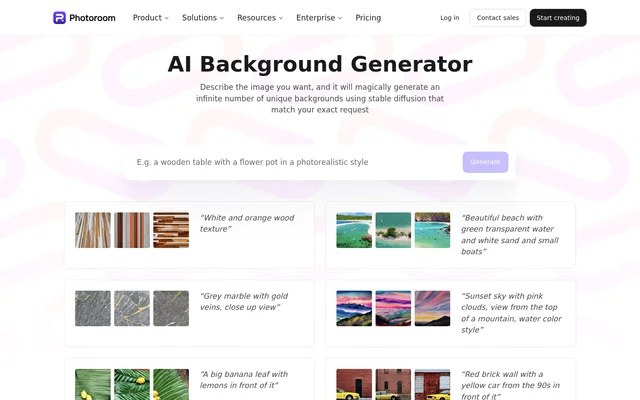
Photoroom is an AI-powered photo editor with a text-based background generator for product displays, wallpapers and creative images. Photoroom uses Stable Diffusion to generate backgrounds from written descriptions. Users can specify the scene they want rather than selecting only from existing background images.
Photoroom also describes its broader application as a photo editor for product images, social posts and ads. The application includes background removal, AI backgrounds, instant shadows and batch editing. Photoroom is available on iOS, Android and the web, while the supplied background page focuses on describing, generating and downloading backgrounds.
What Photoroom can do
Photoroom translates background descriptions into generated image choices. Prompts can include colors, textures, lighting and an artistic style, such as digital art or impressionist painting. The page illustrates the range with examples including wood textures, marble, beaches, foliage and watercolor-style skies, then lets users choose and download preferred results.
- Photoroom generates backgrounds from written prompts using Stable Diffusion.
- Photoroom accepts descriptions of colors, textures and lighting.
- Photoroom supports prompts specifying artistic styles.
- Photoroom lets users review generated backgrounds and download their selections.
- Photoroom provides AI Backgrounds through its Plus and Enterprise API plans.
How Photoroom works
Photoroom presents a describe, generate and download workflow. Users first write the background they want, adding visual details or a preferred art style. Photoroom then generates backgrounds from that description, which the page says takes a few seconds. Users review the choices, select their favorites and download the backgrounds for their intended use.
Photoroom offers a separate API route for developers building image-editing workflows. API subscriptions are available through the API dashboard, and the sandbox supports building and prototyping with free images. The Image Editing API supports PNG, JPEG, WEBP and AVIF for input and result images, with PNG as the default result format.
Who Photoroom is for
Photoroom addresses people creating product visuals, personalized wallpapers and playful images with friends. The background page specifically describes generating scenery to showcase products and creating wallpapers from a short description. The broader photo editor also targets product images, social posts and ads, while API access supports developers working with image-editing capabilities.
- Photoroom creates scenery for showcasing products.
- Photoroom generates personalized wallpaper designs from descriptions.
- Photoroom supplies backgrounds for creative images with friends.
- Photoroom supports photo editing for social posts and ads.
Photoroom pricing and plans
Photoroom advertises free wallpaper generation on the background page. The separate API pricing page lists Basic, Plus and Enterprise plans and offers 1,000 free images in sandbox mode for building and prototyping. AI Backgrounds is included in Plus and Enterprise but is not included in Basic.
Photoroom lists free trials and cancellation at any time for Basic and Plus API plans. Enterprise uses a contact-sales route and requires an annual commitment. Enterprise also includes volume-based discounts and eligibility for onboarding and enterprise support. The supplied pricing text does not provide subscription prices for these plans.
Photoroom strengths and limitations
Photoroom combines descriptive background generation with a selection-and-download workflow. Support for prompts about materials, lighting and artistic styles gives users concrete ways to describe a desired result. Free wallpaper generation and API sandbox access offer ways to explore the tools, although API background generation depends on the selected plan.
- Photoroom excludes AI Backgrounds from the Basic API plan.
- Photoroom requires an annual commitment for Enterprise API access.
- Photoroom limits Image Editing API files to 30MB and resizes larger resolutions to 5,000 pixels on the widest side.
Photoroom FAQ
What is Photoroom?
Photoroom is an AI-powered photo editor with a background generator that uses Stable Diffusion to create backgrounds from text descriptions. Photoroom supports product images, wallpapers, social posts and ads, with applications available on iOS, Android and the web.
Is Photoroom free?
Photoroom advertises free wallpaper generation on its background page. Photoroom also offers 1,000 free sandbox images for API prototyping, while separate Basic, Plus and Enterprise API plans provide different capabilities. AI Backgrounds is included in Plus and Enterprise, not Basic.
How do you generate backgrounds with Photoroom?
Photoroom generates backgrounds after a user describes the desired scene, including details such as colors, textures, lighting or artistic style. Photoroom then presents generated choices for review, allowing users to select and download their preferred backgrounds.
What can you use Photoroom backgrounds for?
Photoroom backgrounds can be used for personalized wallpapers, product displays and creative images with friends. Photoroom accepts descriptions of scenery, materials and art styles, with page examples including beaches, wood textures, marble and watercolor-style skies.
Does Photoroom have an API for AI backgrounds?
Photoroom includes AI Backgrounds in its Plus and Enterprise API plans, but not in Basic. Photoroom provides an API dashboard for subscriptions and a sandbox for prototyping. The Image Editing API supports PNG, JPEG, WEBP and AVIF input and result images.
From the community
No reviews yet
Be the first to review this tool. What you write helps the next person choose.