What is Postly?
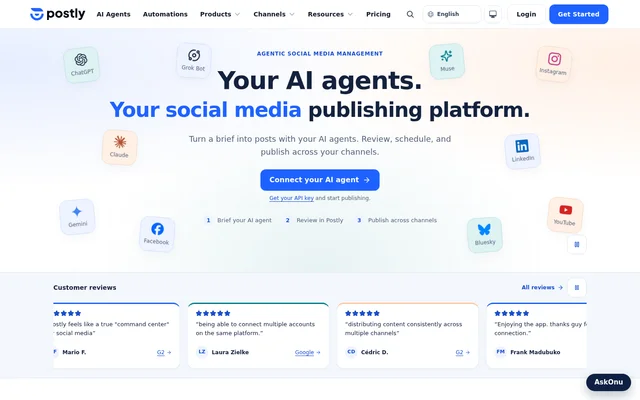
Postly is a web-based social media management and scheduling tool for creators, teams, and agencies. Postly combines content creation, campaign planning, publishing approvals, scheduling, customer conversations, and reporting. Users can work with connected AI assistants or directly with the editor, calendar, and built-in AI tools.
Postly extends publishing beyond social networks to supported blogs, email services, and messaging channels. Supported destinations include Instagram, LinkedIn, YouTube, Facebook, TikTok, WordPress, Ghost, Telegram, and Discord. Available formats and publishing controls depend on the destination and connected account, so support does not mean identical capabilities across every channel.
What Postly can do
Postly supports the content workflow from an initial brief through review, scheduling, delivery checks, and performance reporting. Postly also offers reusable publishing workflows for prepared batches, evergreen posts, and source-based content. Built-in writing assistance and AI Studio images and videos support content preparation alongside the publishing tools.
- Postly schedules content across supported social, blog, email, and messaging destinations.
- Postly organizes campaigns with related posts, feedback, and approvals.
- Postly imports prepared posts from CSV or Google Sheets.
- Postly repeats evergreen posts on eligible channels.
- Postly prepares ongoing content from supported sources through Auto Post.
- Postly brings supported messages, comments, and reviews into a social inbox.
- Postly reports delivery status and available channel performance.
How Postly works
Postly supports an agent-led workflow in which users brief an AI assistant, prepare channel-specific drafts, and review content and publishing schedules in Postly. Agent workflows require Postly API access, and setup varies by assistant. The page provides workflow guidance for ChatGPT, Claude, Gemini, and other supported assistants.
Postly also supports direct content preparation in the editor and calendar without an external AI agent. Users review captions, media, destinations, and publishing times before approval. Connected automation options include Zapier in beta, Make by invitation, and n8n through its HTTP Request node and the Postly API.
Who Postly is for
Postly serves creators, marketing teams, agencies, and enterprises managing content across connected channels. Shared workspaces, drafts, team notes, and approvals support collaborative publishing. Separate workspaces keep brands and clients apart, while campaigns group related posts around a launch, promotion, or content series without requiring an advertising budget.
- Creators can prepare and schedule channel-specific content.
- Marketing teams can coordinate product launches and promotional sequences.
- Agencies can review client content through shared approval workflows.
- Commerce teams can prepare recurring campaigns from supported product catalogs.
Postly pricing and plan requirements
Postly identifies plan requirements for selected capabilities but does not provide subscription prices in the supplied page text. Google Ads management is available on Pro, with advertising spend billed separately. WhatsApp Business template campaigns require Pro or Enterprise, while managed sending through Postly Mail is a separate add-on.
Postly states that features depend on the subscription plan and connected platform permissions. Agent publishing additionally requires API access. These conditions matter when assessing a workflow that combines social publishing, ads, WhatsApp, or managed email, because access to a connected destination does not establish access to every associated feature.
Postly strengths and limitations
Postly combines multi-channel publishing, collaborative review, recurring content, and reporting with a choice of assistant-led or direct editing workflows. Postly also connects publishing to supported customer conversations and external automation tools. The main constraints concern channel-specific support, API setup, plan restrictions, and the availability status of particular integrations.
- Postly publishing formats and controls vary by channel and connected account.
- Postly metrics depend on the connected platform.
- Postly assistant setup varies and requires API access.
- Postly Make connectivity is invitation-only, with public directory review pending.
Postly FAQ
What is Postly?
Postly is an agentic social media management and scheduling tool for creators, teams, and agencies. Postly supports content creation, multi-channel scheduling, campaigns, approvals, customer conversations, and reporting through connected AI assistants or built-in editing tools.
Which platforms can Postly publish to?
Postly supports Instagram, Facebook, LinkedIn, TikTok, YouTube, Pinterest, X, Threads, Bluesky, Google Business Profile, Telegram, and other destinations. Postly also supports selected blog, email, and messaging services. Formats and controls vary by channel and connected account.
Does Postly require an external AI assistant?
Postly does not require an external AI assistant. Postly provides an editor, calendar, and built-in AI tools for direct use. Users who choose connected assistant workflows need Postly API access, and setup varies by assistant.
Can teams approve posts in Postly before publishing?
Postly supports shared workspaces, drafts, team notes, and approval workflows. Teams can review captions, media, selected channels, and schedules before approving content for publication. Postly also provides separate workspaces for different brands and clients.
How do Postly bulk posting, recurring posts, and Auto Post differ?
Postly bulk posting imports prepared posts from CSV or Google Sheets, while recurring posts repeat evergreen content on eligible channels. Postly Auto Post uses supported sources such as feeds, articles, videos, documents, or products to prepare ongoing content.
Does Postly have an API and automation integrations?
Postly provides a Publishing API and MCP connectivity for supported AI agent workflows. Postly connects with Zapier in beta, Make by invitation, and n8n through the HTTP Request node and Postly API. Assistant-specific setup guides are available.
From the community
No reviews yet
Be the first to review this tool. What you write helps the next person choose.