What is SheetAI?
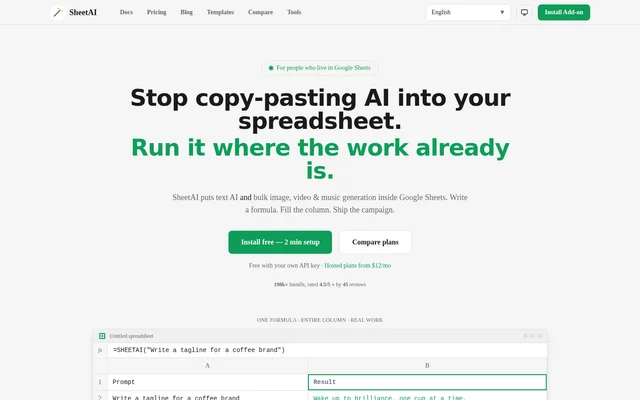
SheetAI is a Google Sheets add-on that brings text AI and bulk media generation into spreadsheets. SheetAI is designed for people whose campaign briefs, catalogs, leads, and research data already live in Sheets. Rather than moving prompts and results between separate applications, users write formulas beside their data and fill them down a column.
SheetAI combines text generation and data tasks with Replicate-powered images, video, and music. SheetAI supports marketers, data analysts, content creators, researchers, sales teams, and recruiters. Access is available through a free bring-your-own-key option, paid hosted subscriptions, or one-time credit packs for bulk work.
What SheetAI can do
SheetAI uses spreadsheet formulas to apply AI tasks across rows of existing data. SheetAI supports both written outputs and generated media, allowing campaign copy, classifications, summaries, and creative assets to sit alongside the prompts or records that produced them. The website describes the following capabilities:
- SheetAI generates ad copy, taglines, social posts, and product descriptions.
- SheetAI classifies, tags, and cleans spreadsheet datasets.
- SheetAI summarizes papers and extracts key findings.
- SheetAI generates product images, ad creatives, and thumbnails through Replicate.
- SheetAI generates short video clips, product reels, and music through Replicate.
- SheetAI provides a sidebar formula generator.
How SheetAI works in Google Sheets
SheetAI installs from Google Workspace Marketplace and opens inside an existing Google Sheet. SheetAI users can connect their own OpenAI, Claude, Gemini, Grok, or Replicate key, or choose a hosted plan without managing keys. Users then describe the task in plain English within a formula and drag the cell down to process additional rows.
SheetAI demonstrates text generation with the SHEETAI function and image generation with SHEETAI_IMAGE. SheetAI uses prompts stored in spreadsheet cells to generate outputs row by row. For media workflows, the website describes connecting Replicate to generate images, video, and music directly from the same spreadsheet.
Who SheetAI is for
SheetAI targets teams and individuals who perform repeatable work in Google Sheets. SheetAI's stated audiences include marketing, analytics, content creation, research, sales, and recruitment. The use cases range from turning campaign briefs into copy and media to organizing research findings and preparing personalized messages from lead records.
- SheetAI helps marketers produce bulk ad copy and product creatives.
- SheetAI helps analysts classify and clean messy datasets.
- SheetAI helps content creators brainstorm topics, titles, and outlines.
- SheetAI helps researchers summarize papers and organize sources.
- SheetAI helps sales teams draft follow-ups and personalize outreach.
- SheetAI helps recruiters draft job descriptions and screen resumes.
SheetAI pricing and plans
SheetAI offers a free bring-your-own-key plan with unlimited SHEETAI calls and unlimited formula generation; users pay their AI or Replicate provider bills separately. SheetAI Starter costs $12 per month and includes hosted AI without an API key, up to approximately 500 AI runs per month, a sidebar formula generator, and email support.
SheetAI Pro costs $29 per month, with higher usage described as soft unlimited, bulk media workflows, and priority support. SheetAI Pro Yearly costs $290 per year. One-time credit packs start at $29 and do not require a subscription. Team or domain licensing inquiries are directed to [email protected].
SheetAI strengths and limitations
SheetAI's main strength is combining spreadsheet data, text generation, and media generation in an existing Google Sheets workflow. SheetAI supports formula fill-down for bulk tasks and offers a choice between provider keys and hosted usage. The distinction between free add-on access and separately billed model usage matters when comparing the available plans.
- SheetAI's free option requires users to supply keys and pay provider charges.
- SheetAI Starter limits hosted usage to up to approximately 500 AI runs per month.
- SheetAI operates as a Google Sheets add-on.
- SheetAI's image, video, and music generation uses Replicate.
SheetAI FAQ
What is SheetAI?
SheetAI is a Google Sheets AI add-on for bulk text, image, video, and music generation. SheetAI uses spreadsheet formulas and fill-down workflows to generate content, classify data, summarize information, and create media alongside existing spreadsheet records.
Is SheetAI free?
SheetAI offers a free bring-your-own-key plan with unlimited SHEETAI calls and formula generation. SheetAI users on this plan pay their AI or Replicate providers separately. Hosted subscriptions start at $12 per month, and one-time credit packs start at $29.
Which AI providers does SheetAI support?
SheetAI supports users' own OpenAI, Claude, Gemini, Grok, and Replicate keys. SheetAI uses Replicate for bulk image, video, and music generation. Hosted plans also provide AI usage without requiring users to manage an API key.
How do you use SheetAI in Google Sheets?
SheetAI installs through Google Workspace Marketplace and opens inside an existing Google Sheet. SheetAI users connect a supported provider key or choose hosted access, write a formula describing the task, and fill down the column to generate outputs across rows.
Can SheetAI generate images, video, and music?
SheetAI supports image, video, and music generation through Replicate inside Google Sheets. SheetAI's listed media uses include product shots, ad creatives, thumbnails, short clips, product reels, background tracks, and jingles generated row by row from spreadsheet prompts.
Who is SheetAI for?
SheetAI is for marketers, data analysts, content creators, researchers, sales teams, and HR or recruitment teams working in Google Sheets. SheetAI supports campaign production, dataset cleanup, research summaries, personalized outreach, job descriptions, and resume screening.
From the community
No reviews yet
Be the first to review this tool. What you write helps the next person choose.