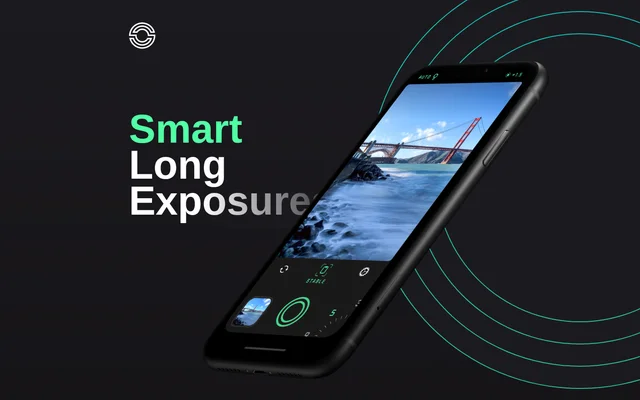
What is Spectre?
Spectre is an iPhone camera app for computational long-exposure photography, developed by the team behind Halide. Spectre combines machine learning-based scene detection with computer vision-aided stabilization to simplify capturing scenes over time. The app is intended for photographs such as crowded tourist locations, nighttime city views, and moving water.
Spectre treats an exposure as more than a finished photograph. Spectre saves the exposure process as a Live Photo so the photographer can replay the changes that produced the result. This supports both a final still image and a moving record of subjects such as passing cars or water.
What Spectre can do
Spectre combines exposure controls, automated scene handling, and motion capture in a long-exposure workflow. Spectre can make moving crowds disappear from a location or turn vehicle lights into trails at night. The app also includes capture and processing technologies such as DCI-P3 wide color, HEIC, and Metal graphics acceleration.
- Spectre removes crowds using a medium or long exposure duration.
- Spectre automatically switches modes at night to capture light trails.
- Spectre records the entire exposure process as a Live Photo.
- Spectre shares results as a still, a video, or both.
- Spectre uses computer vision to aid image stabilization.
- Spectre includes tripod detection and intelligent exposure.
How Spectre works
Spectre uses a selected exposure duration to capture a scene over time. For crowd removal, the website instructs photographers to choose a medium or long duration and take a shot. At night, AI scene detection automatically changes modes to draw light trails, supporting city photography and light painting.
Spectre stores the exposure process as a Live Photo rather than retaining only the final image. Spectre lets photographers replay that process and choose a still image, a video, or both for sharing. Automatic stabilization and tripod detection form part of the app's computational photography tools.
Who Spectre is for
Spectre is for iPhone photographers who want to capture the effects of movement or reduce the appearance of moving crowds. Spectre's examples focus on tourist destinations, nighttime city scenes, and water. The dark interface and one-handed controls also support photographers working at night or using larger iPhones.
- Spectre helps travelers photograph crowded tourist locations without the crowd.
- Spectre helps city photographers capture passing vehicle lights as trails.
- Spectre supports light painting during nighttime photography.
- Spectre captures water becoming smooth during an exposure.
Spectre strengths and interface design
Spectre combines automated photography features with controls designed for handheld interaction. Spectre's dark interface is intended to be gentle on the eyes during nighttime shooting, while the controls support one-handed use even on larger iPhones. Live Photo recording provides another way to view and share an exposure beyond the finished still.
Getting started with Spectre
Spectre's described crowd-removal workflow begins with choosing a medium or long duration and photographing the location. For nighttime scenes, Spectre automatically switches modes to capture light trails. After taking a photograph, the photographer can replay the saved Live Photo exposure and share the result as a still, a video, or both.
Spectre FAQ
What is Spectre?
Spectre is a long-exposure camera app for iPhone from the team behind Halide. Spectre uses machine learning-based scene detection and computer vision-aided stabilization to simplify photographs of crowds, nighttime light trails, and moving water.
How does Spectre remove crowds from photos?
Spectre can remove crowds from a location using a medium or long exposure duration. Spectre's website describes selecting one of those durations and taking a shot to photograph crowded tourist places without the crowd.
Can Spectre capture light trails at night?
Spectre captures nighttime light trails by using AI scene detection to switch modes automatically. Spectre supports nighttime city photography and light painting, including exposures that show passing cars forming ribbons of light.
Does Spectre save photos or videos?
Spectre saves the entire exposure process as a Live Photo and supports sharing the shot as a still, a video, or both. Spectre also lets photographers replay the exposure to watch how movement shaped the image.
What stabilization features does Spectre include?
Spectre includes automatic stabilization aided by computer vision, alongside tripod detection. Spectre lists these features with intelligent exposure and machine learning-based scene detection as technologies used to simplify long-exposure photography.
From the community
No reviews yet
Be the first to review this tool. What you write helps the next person choose.