What is Ssemble?
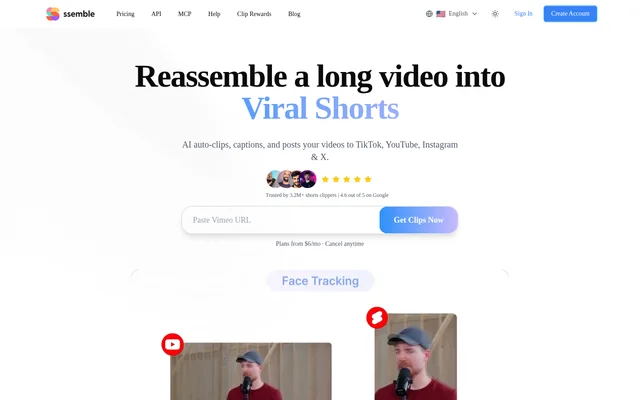
Ssemble is a web-based AI video clipping and social publishing tool for turning longer footage into short-form content. Ssemble serves creators, streamers, and publishers working with podcasts, interviews, gaming streams, and other videos. The workflow combines moment selection, captions, vertical reframing, and distribution to TikTok, YouTube Shorts, Instagram Reels, and X.
Ssemble also offers ongoing YouTube channel automation rather than requiring every video to be submitted individually. A selected public channel can become a source for automatic clipping and publishing when new uploads appear. The website describes Ssemble as suitable for beginners, with AI handling most editing work and users making minor adjustments.
What Ssemble can do
Ssemble combines video editing assistance with tools for preparing and distributing social clips. Editing features cover captions, framing, hooks, and optional gameplay footage, while publishing features cover scheduling and generated post metadata. Language options include translated captions and selection of an existing YouTube audio track when the original video provides multiple tracks.
- Ssemble selects moments from longer videos and creates short clips.
- Ssemble adds automatic captions and translates captions while retaining the original audio.
- Ssemble tracks faces to keep subjects centered in vertical videos.
- Ssemble uses Sports Mode to follow balls, players, and fighting action.
- Ssemble generates hook titles, calls to action, descriptions, and hashtags.
- Ssemble schedules and publishes clips across supported social networks.
- Ssemble monitors public YouTube channels and automatically processes new uploads.
How Ssemble works
Ssemble accepts a video link or an uploaded file as the starting point. Supported link sources include public YouTube videos, public and unlisted Vimeo videos, and Kick or Twitch stream VODs. File uploads support MP4, MOV, and WEBM. Ssemble then selects moments, creates clips, and applies features such as captions, face tracking, and hooks.
Ssemble provides a calendar for scheduling clips across connected social accounts over multiple days. For Channel Automation, users supply a YouTube channel URL, and Ssemble monitors new uploads, scores moments, and publishes qualifying clips. The source also lists API access in Pro, although the supplied page does not explain API endpoints or implementation details.
Who Ssemble is for
Ssemble is aimed at people publishing short-form video from existing longer content. The source specifically describes podcasts, interviews, gaming streams, sports footage, and educational content. Ssemble also addresses clippers who publish creator highlights and people seeking an automated workflow for turning recurring YouTube uploads into posts across connected social accounts.
- Podcast and interview publishers can extract short clips from longer recordings.
- Gaming creators can turn Kick and Twitch VODs into highlights.
- Sports publishers can reframe clips around play rather than faces.
- YouTube publishers can automate clipping and distribution of new uploads.
Ssemble strengths and limitations
Ssemble combines multiple source formats, automated editing, and social publishing within the same workflow. Caption translation, alternate YouTube audio tracks, and sports-specific framing support different content types. The main practical constraints are subscription costs, credit-based processing, and plan-dependent social account allowances. The supplied page also presents different pricing figures in its structured data and visible annual pricing table.
- Ssemble processing consumes video credits.
- Ssemble unused credits do not carry into the next billing cycle.
- Ssemble Pro and Expert restrict the number of connected social accounts.
Ssemble FAQ
What is Ssemble?
Ssemble is a web-based AI video clipping tool that transforms longer videos into short-form clips with captions, reframing, and generated hooks. Ssemble also schedules and publishes clips to TikTok, YouTube Shorts, Instagram Reels, and X.
Is Ssemble free?
Ssemble is advertised through paid subscription plans, and the supplied page does not list a free tier. Ssemble offers monthly and yearly billing, with video credits and social account allowances varying by plan.
Which video sources does Ssemble support?
Ssemble supports public YouTube videos, public and unlisted Vimeo videos, Kick VODs, Twitch VODs, and uploaded MP4, MOV, and WEBM files. Ssemble can also monitor a public YouTube channel to process new uploads automatically.
Can Ssemble automatically post clips to social media?
Ssemble can schedule and automatically publish clips to TikTok, YouTube Shorts, Instagram Reels, and X. Ssemble provides a calendar for scheduling multiple posts, while Channel Automation publishes qualifying clips generated from new YouTube uploads.
What languages does Ssemble support?
Ssemble supports over 30 languages for AI clipping, including English, Spanish, Portuguese, Russian, German, French, Italian, Dutch, and Polish. Ssemble also translates captions and can use an alternative language audio track when the source YouTube video provides one.
Do Ssemble video credits roll over?
Ssemble video credits reset each billing cycle and do not roll over. Ssemble keeps previously created videos available, and canceled subscriptions retain access to current plan features until the billing period ends, with account and video access available for data export.
From the community
No reviews yet
Be the first to review this tool. What you write helps the next person choose.