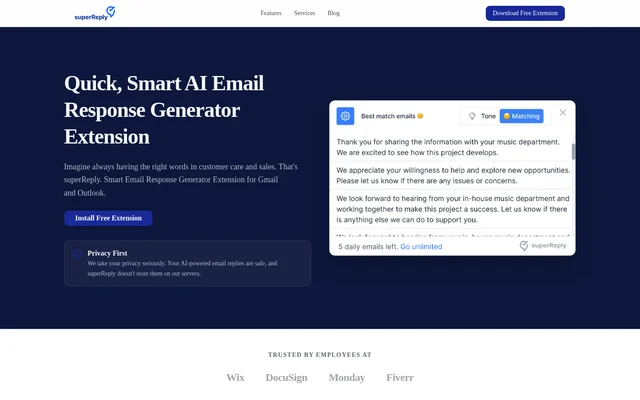
What is superReply?
superReply is an AI email response generator delivered through a Google Chrome extension for Gmail and Outlook. superReply helps people write replies for customer care, sales, professional correspondence, and casual conversations. The assistant provides personalized response suggestions and tone matching within supported inboxes rather than requiring a separate writing workflow.
superReply combines reply generation with a free monthly allowance and paid options for additional usage. The website also describes privacy controls: superReply accesses only emails selected by the user, does not store automated responses on its servers, and uses industry-standard encryption to protect data.
What superReply can do
superReply generates response options with a click and suggests wording for different conversational situations. The writing assistant supports both professional and casual replies, with tone-matching suggestions for customer queries and sales pitches. Paid plans add advanced tone controls alongside unlimited replies.
- superReply generates AI-powered email reply options.
- superReply suggests personalized wording for professional and casual conversations.
- superReply matches reply tone to customer queries and sales pitches.
- superReply works inside Gmail and Outlook web inboxes.
- superReply lists WhatsApp, Slack, LinkedIn, Upwork, and Fiverr integrations.
- superReply provides advanced tone controls on paid plans.
How superReply works
superReply is installed from the Chrome Web Store. For Gmail, users add the extension and refresh Gmail so the assistant appears inside the inbox. For Outlook, users install the extension and sign in, after which the assistant appears automatically inside the Outlook web inbox.
superReply operates on the emails users choose to use with the assistant. Users can request response options with a click and receive personalized suggestions. Each individual needs a browser installation and a separate account; team plans are available for organizations that need to manage multiple seats.
Who superReply is for
superReply is intended for people handling customer care and sales conversations, as well as those writing everyday professional or personal emails. The website also addresses agencies, freelancers, and teams. Separate user accounts keep replies personalized, while team plans provide an option for managing multiple seats.
- superReply helps customer care staff draft responses to customer queries.
- superReply helps sales professionals prepare tone-matched email responses.
- superReply supports professional correspondence and casual conversations.
- superReply offers team plans for agencies and teams managing multiple seats.
superReply pricing and plans
superReply is free to start, with up to 90 AI-powered replies each month. Paid plans unlock unlimited replies and advanced tone controls, with monthly or annual billing. The website also confirms that team plans are available for users who need to manage multiple seats.
superReply subscriptions can be canceled through account billing settings at any time. A canceled plan remains active until the current billing period ends. Customer support is available by email at [email protected], and the website says the support team typically responds within one business day.
superReply strengths and limitations
superReply combines inbox-based reply assistance, personalized suggestions, and tone matching with a recurring free allowance. The stated privacy measures include access only to selected emails, no server storage of generated replies, and industry-standard encryption. Usage limits, paid feature access, and individual account requirements remain important considerations.
- superReply limits free usage to 90 replies per month.
- superReply reserves unlimited replies and advanced tone controls for paid plans.
- superReply requires each individual to install the extension and use a separate account.
superReply FAQ
What is superReply?
superReply is an AI email response generator available as a Google Chrome extension for Gmail and Outlook. superReply suggests personalized replies and tone-matched wording for customer care, sales, professional emails, and casual conversations.
Is superReply free?
superReply is free for up to 90 AI-powered replies each month. Paid plans unlock unlimited replies and advanced tone controls, with monthly or annual billing. Team plans are also available for managing multiple seats.
How do I add superReply to Gmail or Outlook?
superReply can be installed from the Chrome Web Store. For Gmail, add the extension and refresh the inbox to display the assistant. For Outlook, install the extension and sign in so the assistant appears automatically inside the Outlook web inbox.
Does superReply store email replies?
superReply states that generated email replies are not stored on its servers. superReply accesses only the emails users choose to use with the assistant and uses industry-standard encryption to protect data.
Can a team share a superReply account?
superReply requires each individual user to install the extension in their own browser and use their own account so replies stay personalized and secure. Team plans are available for managing multiple seats.
Which integrations does superReply support?
superReply lists Google Chrome, Gmail, Outlook, WhatsApp, Slack, LinkedIn, Upwork, and Fiverr in its integrations section. The website provides specific installation instructions for Gmail and Outlook web inboxes through the Chrome Web Store.
From the community
No reviews yet
Be the first to review this tool. What you write helps the next person choose.