What is TensorFlow?
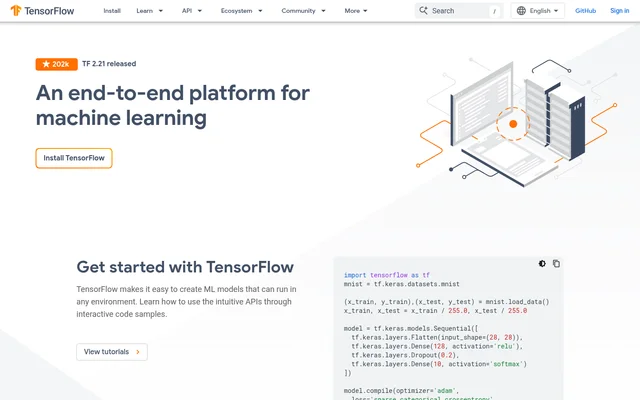
TensorFlow is an end-to-end machine learning platform for creating models and running them in different environments. TensorFlow provides APIs for model development, libraries for production workflows, and resources for learning machine learning. The website illustrates that range with a Python example for training and evaluating a handwritten digit classifier, alongside examples of research and application development involving graph neural networks and reinforcement learning.
What TensorFlow can do
TensorFlow supports model development from data preparation through deployment. TensorFlow pairs a high-level model-building API with libraries for specific runtimes and tools for tracking development. The ecosystem also includes production pipeline tooling, so preparing data for training and organizing a production workflow are distinct tasks with their own tools.
- TensorFlow uses tf.keras to define and train machine learning models.
- TensorFlow uses tf.data to preprocess data and build input pipelines.
- TensorBoard visualizes and tracks machine learning model development.
- TensorFlow.js trains and runs models in browsers or Node.js.
- LiteRT deploys models to mobile and edge devices.
- TFX supports production machine learning pipelines.
How TensorFlow works
TensorFlow demonstrates its Python workflow with the MNIST quickstart. The example loads training and test data, normalizes pixel values, and defines a sequential model with tf.keras. TensorFlow then compiles the model with an optimizer, loss function, and accuracy metric, fits the model on the training set, and evaluates the result on the test set. The example shows how those steps fit together before a project adds more specialized tooling.
Who TensorFlow is for
TensorFlow serves developers building machine learning applications, researchers exploring relationships in data, and learners getting started with model training. TensorFlow GNN is relevant to work where relationships between objects matter, while the TensorFlow Agents example shows how Spotify uses reinforcement learning to generate playlists. For learners, the website pairs executable examples with curated curricula and a library of books, courses, and videos.
- Classify handwritten digits with the MNIST quickstart.
- Analyze relationships for traffic forecasting or medical discovery.
- Train reinforcement learning agents for playlist recommendations.
- Run models client-side in a web browser.
TensorFlow pricing and plans
TensorFlow provides installation instructions and links to a runnable quickstart and tutorials. The TensorFlow page does not state a price, describe a free tier, or list paid plans. It presents installation and hands-on examples as the route to getting started, but does not provide the information needed to verify pricing or compare plan terms.
Strengths and limitations of TensorFlow
TensorFlow covers several parts of a machine learning project, from preparing training data to tracking model development and building a production pipeline. That breadth comes with choices: the Python quickstart uses tf.keras, while the website presents TensorFlow.js for browser and Node.js projects and LiteRT for mobile and edge deployment. Knowing the target runtime helps narrow down which part of the ecosystem to use.
- The Python quickstart assumes familiarity with reading code.
- Browser and Node.js projects use a different library from mobile and edge projects.
- Production pipelines use a separate tool from the model-building API.
Getting started with TensorFlow
TensorFlow provides installation instructions, interactive tutorials, and a Python quickstart as starting points. The quickstart is useful for seeing how training and evaluation fit together in one example. For a new project, TensorFlow Datasets provides standard datasets for initial training and validation, while Kaggle Models offers pretrained models that can be fine-tuned and deployed. The TensorFlow learning resources also cover machine learning fundamentals.
TensorFlow FAQ
What is TensorFlow?
TensorFlow is an end-to-end machine learning platform for creating, training, evaluating, and deploying models. The TensorFlow ecosystem includes tf.keras for model creation, tf.data for input pipelines, TensorBoard for tracking model development, and TFX for building production machine learning pipelines.
Who is TensorFlow for?
TensorFlow is for developers building machine learning applications, researchers applying machine learning to problems such as relational data analysis, and learners getting started with model development. The TensorFlow website offers interactive code samples, tutorials, and curated machine learning curricula.
Can TensorFlow run models in a web browser?
TensorFlow supports browser-based model training and execution through TensorFlow.js. The same library also supports Node.js, so a JavaScript project can use the TensorFlow ecosystem in either a browser or a Node.js environment.
Can TensorFlow deploy models on mobile and edge devices?
TensorFlow supports mobile and edge deployment through LiteRT. The TensorFlow website names Android, iOS, Raspberry Pi, and Edge TPU as deployment targets for LiteRT, separate from the browser and Node.js environments supported by TensorFlow.js.
How do you get started with TensorFlow?
TensorFlow provides installation instructions, tutorials, and a runnable Python quickstart. The quickstart demonstrates how to load and preprocess MNIST data, build a model with tf.keras, train the model, and evaluate its performance on test data.
From the community
No reviews yet
Be the first to review this tool. What you write helps the next person choose.