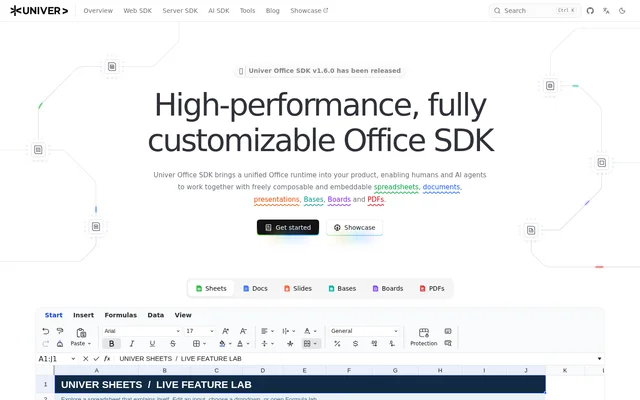
What is Univer?
Univer is an Office SDK for adding office editing and document processing to another application. Developers can compose spreadsheet, document, and presentation editors alongside table-driven Bases, visual Boards, and PDFs in a shared runtime. The SDK supports workflows where people edit content directly and AI agents interact with document data through an API.
What Univer can do
Univer covers everyday office editing as well as workflows that involve structured records and visual collaboration. Developers can combine the editors and plugins their application needs. The Server SDK can add document synchronization and file conversion together, or provide file conversion on its own.
- Univer spreadsheets support cross-sheet references, array formulas, and named ranges.
- Univer documents support rich text, tables, headers, footers, and comments.
- Univer presentations support editable SmartArt, charts, and tables.
- Univer Bases support record management, multiple views, and low-code workflows.
- Univer Boards provide an infinite canvas and export to PNG or JPEG.
- Univer can create and edit PDFs with text, images, and annotations.
How Univer works
Univer offers preset mode for package-based integration and plugin mode for manually selecting and registering components. Developers initialize the Web SDK, load the required plugins and locale resources, and mount the editor to a DOM element. The documentation lists integrations for React, Vue, Angular, Next.js, Astro, Web Components, and plain JavaScript.
Univer can also run on a server in Node.js without a browser. A headless setup can leave out the UI plugins while retaining data processing and computation. The Facade API gives automated workflows and AI agents a way to read, write, and analyze document data.
Who Univer is for
Univer is for developers who want office editing inside their own product or need to process documents on a server. Application teams can use the Web SDK for interactive editing and add server capabilities as needed. The Server SDK can connect to an application's existing authentication, permissions, and data storage.
- Product teams can embed spreadsheet editing in an application.
- Collaboration teams can synchronize documents and resolve editing conflicts.
- Automation developers can process documents in Node.js without rendering an editor.
Univer pricing and access
Univer provides Web SDK installation instructions for npm, yarn, and pnpm. The documentation page does not state prices or describe which features are included in free or paid plans. Preset mode and plugin mode are presented as two ways to integrate the SDK, not as pricing tiers.
Univer strengths and limitations
Univer lets developers reuse code across browser and server workflows and choose which capabilities to include. Spreadsheet features such as custom functions, pivot tables, and conditional formatting support both calculation and analysis. In exchange for that control, developers configure and embed the editors themselves, and plugin mode adds the work of registering individual components.
- Web integration requires SDK initialization and a DOM mount point.
- Plugin mode requires manual plugin registration.
- An application using the Server SDK connects its own authentication, permissions, and storage.
Univer FAQ
What is Univer?
Univer is an Office SDK for embedding spreadsheets, documents, presentations, Bases, Boards, and PDFs in applications. Univer provides a shared runtime and a plugin architecture, so developers can choose which editing and processing capabilities to include.
Can Univer run without a browser?
Univer can run headlessly in Node.js without a browser. Developers can exclude UI plugins and focus on document data and computation, while automated workflows and AI agents can use the Facade API to read, write, and analyze documents.
Does Univer support real-time collaborative editing?
Univer supports real-time collaborative editing through its Server SDK, which provides document synchronization and conflict resolution. Developers can also add collaboration extensions for history, comments, and Worktree according to the needs of their application.
What file formats does Univer support for import and export?
Univer supports common file formats including XLSX, CSV, TSV, DOCX, PPTX, and PDF for import and export. The Server SDK can convert between Office files and document data independently or alongside collaboration services.
How do developers install and integrate Univer?
Univer can be installed through npm, yarn, or pnpm. Developers can use preset packages for a quicker integration or register individual plugins for finer control, then initialize the Web SDK, load locale resources, and mount the editor.
From the community
No reviews yet
Be the first to review this tool. What you write helps the next person choose.