What is Vid2Txt?
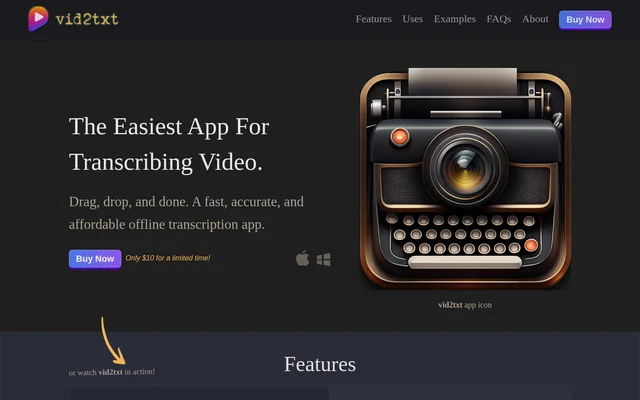
Vid2Txt is an offline audio and video transcription application for macOS and Windows. Vid2Txt converts recorded speech into text and subtitle files for creators, journalists, students, business professionals, researchers and people with hearing impairments. The application focuses on transcription rather than a broader collection of content tools.
Vid2Txt generates and stores transcripts locally, and the website states that the app collects no data. This local workflow supports people who want to turn recordings into readable material without sharing their content for transcription. Access is through a one-time purchase rather than a recurring subscription.
What Vid2Txt can do
Vid2Txt accepts audio and video files and produces text alongside subtitle formats. The supported inputs cover recordings such as videos, podcasts and voice memos. Vid2Txt also turns recorded lectures, meetings and webinars into searchable, editable text, while the subtitle output supports closed-captioning use cases.
- Vid2Txt transcribes video files in MP4, MOV, WMV, MKV, AVI and FLV formats.
- Vid2Txt transcribes audio files in WAV, MP3 and M4A formats.
- Vid2Txt generates TXT, SRT and VTT files.
- Vid2Txt processes recordings offline and stores transcripts locally.
- Vid2Txt provides unlimited transcriptions without quotas.
How Vid2Txt works
Vid2Txt uses a drag-and-drop workflow: a user drops an audio or video recording into the app for transcription. Vid2Txt generates TXT, SRT and VTT files locally rather than relying on shared content for processing. The supported operating systems are macOS 13+ and Windows 10+, and transcription currently supports English only.
Vid2Txt publishes raw transcription examples that the website describes as unedited and unformatted, including errors. These examples show the type of text the app produces rather than guaranteeing error-free output. Users preparing transcripts for publication or captions should account for the possibility that generated wording needs review.
Who Vid2Txt is for
Vid2Txt addresses several audiences that work with recorded speech. Content creators can produce transcripts for search engine optimization and closed captioning, while journalists can transcribe voice memos. Students and business professionals can turn recordings into editable reference material. Vid2Txt also presents readable entertainment transcripts and text-based research analysis as uses.
- Vid2Txt helps creators transcribe videos and podcasts.
- Vid2Txt turns recorded lectures into editable transcripts for students.
- Vid2Txt converts meetings and webinars into searchable text.
- Vid2Txt provides transcripts of shows, movies and podcasts for people with hearing impairments.
- Vid2Txt makes video content available as text for researchers to search and analyze.
Vid2Txt pricing and plans
Vid2Txt is offered through the website's purchase links as a one-time purchase, with a limited-time advertised price of $10. The website states that transcriptions are unlimited and do not involve subscriptions, quotas or hidden fees. Vid2Txt therefore uses a paid purchase model rather than recurring transcription billing.
Vid2Txt does not promise that future features will be included without further payment. The website says upgrades are still being worked out and that customers would receive a 50% discount on the sale price if new features are developed. If Vid2Txt does not transcribe, the stated policy is to work to resolve the problem and/or refund the purchase price.
Vid2Txt strengths and limitations
Vid2Txt combines local processing, local transcript storage and text and subtitle output in a focused transcription app. Unlimited use under a one-time purchase is another stated benefit. The main constraints concern language and operating-system support, while the published raw examples establish that transcription results can include mistakes.
- Vid2Txt currently supports English transcription only.
- Vid2Txt requires macOS 13+ or Windows 10+; Linux, iOS and Android support is only discussed as a possibility.
- Vid2Txt output can contain transcription errors.
- Vid2Txt future upgrades may involve an additional purchase.
Vid2Txt FAQ
What is Vid2Txt?
Vid2Txt is an offline audio and video transcription app that produces TXT, SRT and VTT files. Vid2Txt uses a drag-and-drop workflow and generates and stores transcripts locally for uses such as captions, lecture transcripts and meeting records.
Is Vid2Txt free?
Vid2Txt is a paid app sold through a one-time purchase, with a limited-time advertised price of $10. Vid2Txt includes unlimited transcriptions without subscriptions, quotas or hidden fees. The website does not promise free future upgrades.
Which operating systems does Vid2Txt support?
Vid2Txt supports macOS 13+ and Windows 10+. Vid2Txt does not currently list Linux, iOS or Android as supported operating systems; the website discusses those options only as possible future additions depending on demand.
Which languages does Vid2Txt transcribe?
Vid2Txt currently transcribes English only. Vid2Txt may add other languages if users request them, according to the website, but the page does not confirm any additional supported languages or a release schedule.
Does Vid2Txt upload recordings or collect data?
Vid2Txt performs transcription offline, generates transcripts locally and stores transcripts locally. Vid2Txt states that no data is collected, positioning local processing and storage as part of the app's approach to keeping users' content private.
What file formats does Vid2Txt support?
Vid2Txt lists MP4, MOV, WMV, MKV, AVI, FLV, WAV, MP3 and M4A as supported input formats. Vid2Txt generates TXT, SRT and VTT files, providing plain-text transcripts and subtitle files from audio and video recordings.
From the community
No reviews yet
Be the first to review this tool. What you write helps the next person choose.