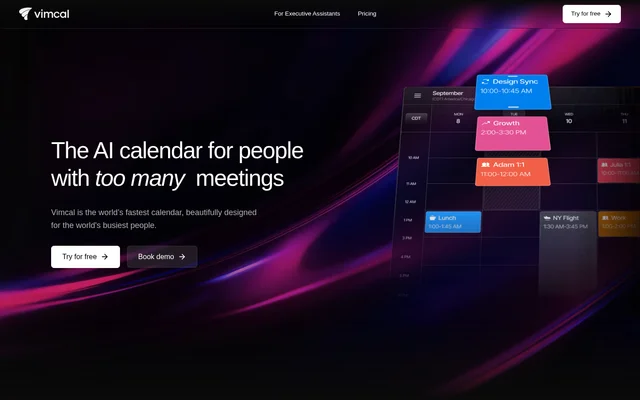
What is Vimcal?
Vimcal is an AI calendar for people who manage frequent meetings and complex schedules. Vimcal serves founders, executives, individual contributors, venture capitalists, and teams coordinating internal and external meetings. Google Calendar and Outlook synchronization brings multiple work and personal accounts into a unified calendar view, reducing the need to switch between separate calendars.
Vimcal is available through a browser, desktop apps for Mac and PC, and an iOS app. The product combines scheduling, availability sharing, time-zone coordination, and calendar analysis. Vimcal EA extends the calendar with delegated scheduling capabilities specifically for Executive Assistants who manage meetings on behalf of executives.
What Vimcal can do
Vimcal combines AI-assisted meeting creation with tools for finding suitable times, sharing availability, and understanding calendar activity. Calendar shortcuts support frequent scheduling actions, while time-zone tools show overlapping working hours. Additional features help users prepare for attendees, organize events by keyword, and create a focused working environment.
- Vimcal schedules meetings from typed input using AI.
- Vimcal shares availability and offers personal booking links on paid plans.
- Vimcal shows overlapping work hours across time zones.
- Vimcal supports group scheduling through polls.
- Vimcal automatically color codes events based on keywords and reports time allocation.
- Vimcal displays attendee social profiles and company dossiers.
- Vimcal provides Focus Mode with a backdrop, pomodoro timer, and ambient sounds.
How Vimcal works
Vimcal works on top of Google Calendar and Outlook and synchronizes both services into a shared view. Users can coordinate work and personal accounts, type scheduling requests, compare working hours across time zones, and share available times. Browser access is available without downloading an app, alongside desktop and mobile options.
Vimcal adds organizational controls through its Enterprise plan. SAML SSO, SCIM integration, advanced security controls, and dedicated support are listed alongside custom billing and contractual options. Vimcal also states support for security questionnaires, custom MSAs and DPAs, and compliance standards including SOC 2 Type II, ISO 27001, GDPR, and HIPAA.
Who Vimcal is for
Vimcal targets professionals whose calendars contain a high volume of meetings, including founders, executives, venture capitalists, and individual contributors. Teams can use collaborative scheduling features for internal and external coordination. Executive Assistants have a dedicated advanced tier, Vimcal EA, with additional tools for delegated scheduling and executive-specific preferences.
- Vimcal helps professionals coordinate meetings across work and personal accounts.
- Vimcal helps distributed teams compare availability across time zones.
- Vimcal supports group meeting coordination through scheduling polls.
- Vimcal provides tags and metrics for reviewing how calendar time is spent.
Vimcal pricing and plans
Vimcal offers a free iOS Only plan with an iOS calendar, drag-and-copy availability sharing, multi-time-zone conversion, duplicate-event merging, and dark mode. The iOS & Desktop plan costs $35/month or $300/year and adds desktop access, unlimited personal booking links, group scheduling polls, team scheduling, and a custom Mac menu bar app.
Vimcal offers a free trial before subscribing. Enterprise pricing requires contacting the company and includes additional security, administrative, contractual, and support options. Vimcal EA is a separate advanced tier for Executive Assistants, adding calendar holds, previously offered time-slot history, calendar audits, executive preferences, and account handoff to another assistant.
Vimcal strengths and limitations
Vimcal combines calendar synchronization, availability sharing, time-zone coordination, and scheduling tools in a single product. Browser, desktop, and iOS access provide several ways to use the calendar, while enterprise options address organizational access and procurement requirements. The main plan constraints concern free access, desktop functionality, and the separation of advanced assistant workflows.
- Vimcal limits the free plan to iOS.
- Vimcal reserves desktop access, booking links, and group scheduling polls for paid plans.
- Vimcal offers advanced delegated scheduling through the separate Vimcal EA tier.
Vimcal FAQ
What is Vimcal?
Vimcal is an AI calendar for professionals with frequent meetings. Vimcal combines meeting scheduling, availability sharing, time-zone coordination, and a unified view of Google Calendar and Outlook accounts, with access through a browser, desktop apps, and an iOS app.
Is Vimcal free?
Vimcal offers a free iOS-only plan with availability sharing, multi-time-zone conversion, duplicate-event merging, and dark mode. Vimcal also offers a free trial of paid access. The iOS & Desktop plan costs $35/month or $300/year.
Does Vimcal work with Google Calendar and Outlook?
Vimcal syncs with both Google Calendar and Outlook. Vimcal can display calendars from both services in a unified view, helping users coordinate across work and personal accounts without switching between separate calendar tabs.
Does Vimcal require a download?
Vimcal can be used directly in a browser without downloading an app. Vimcal also offers desktop apps for Mac and PC and an iOS app, with desktop access included in the paid iOS & Desktop plan.
What is the difference between Vimcal and Vimcal EA?
Vimcal is a personal and team calendar for founders, executives, and individual contributors, while Vimcal EA is an advanced tier for Executive Assistants. Vimcal EA adds delegated scheduling capabilities such as calendar holds, executive preferences, calendar audits, and account handoff to another assistant.
What enterprise security features does Vimcal offer?
Vimcal lists SAML SSO, SCIM provisioning, advanced admin controls, and enterprise support options. Vimcal also states compliance with SOC 2 Type II, ISO 27001, GDPR, and HIPAA, and offers custom MSAs and DPAs, security questionnaires, and custom billing.
From the community
No reviews yet
Be the first to review this tool. What you write helps the next person choose.