What is Vizcom?
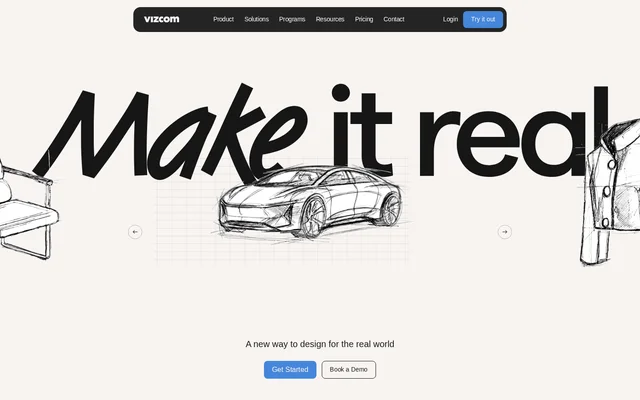
Vizcom is a web-based AI design tool for product designers and teams working from initial sketches toward product concepts. Vizcom converts sketches into photorealistic 3D renders and supports iteration across images, models, and animation. The website positions Vizcom as an ideation toolkit that complements existing design workflows and helps designers explore ideas intended for physical products or virtual presentation.
Vizcom also supports collaborative design work through real-time collaboration and workspace roles. The website presents examples involving industrial design, footwear, extreme sports gear, automotive design, and design education. These examples show the product’s focus on visual concept development across design disciplines rather than a single type of product.
What Vizcom can do
Vizcom combines rendering, editing, visualization, and motion tools for developing product ideas. Designers can describe changes in natural language, compare variations, and refine visual details. Vizcom also supports imported 3D models, allowing designers to change how a model looks within a scene rather than relying only on sketch-based inputs.
- Vizcom converts sketches into photorealistic 3D renders.
- Vizcom edits images through natural-language instructions.
- Vizcom generates variations in product form and color.
- Vizcom changes colors, materials, and scenes for imported 3D models.
- Vizcom animates concepts as short clips or a series of clips.
- Vizcom Enhance brings out details in renderings.
How Vizcom works
Vizcom presents a sketch, render, and iterate workflow in a web application. The design interface includes layers, assets, a canvas, and a prompt field for describing form, proportions, colors, and materials. Designers can request changes, explore new views, or import a model to visualize alternative materials and scenes. Animation tools accept descriptions of the desired motion.
Vizcom measures usage through credits drawn from a shared balance within each plan. Every action consumes credits, and the included balance resets monthly. Purchased add-on credits roll over between months. For team access, Vizcom distinguishes Admins who manage workspace settings and billing, Editors who edit files, and Viewers who only read files.
Who Vizcom is for
Vizcom serves creators, professional product designers, organizations, and qualified educators and students. The website’s customer stories cover both individual design practices and team workflows, including a studio using Vizcom to communicate product ideas before the product exists. Vizcom’s Education plan specifically supports teaching, learning, and exploration with AI-assisted design tools.
- Vizcom helps product designers explore alternative forms, colors, and materials.
- Vizcom helps design teams present rendered and animated product concepts.
- Vizcom supports educators and students exploring AI-assisted design.
- Vizcom supports industrial and footwear design workflows featured in its customer stories.
Vizcom pricing and plans
Vizcom offers a free Starter plan with 800 monthly credits, basic AI creation tools, standard render speeds, and unlimited file viewers. No credit card is required. Professional is listed at $49 per user/month and includes 20,000 credits, credit add-on purchases, a priority render queue, multi-image generation, 4k exports, Live Render, and full design privacy.
Vizcom Enterprise requires contacting sales and includes unlimited seats and teams, dedicated onboarding, team management, custom or centralized billing, audit and access logs, and Single Sign-On. The free Education plan requires qualification and an access application. Education includes 15,000 credits, credit add-on purchases, a priority render queue, and exclusive community access.
Vizcom strengths and limitations
Vizcom brings several stages of visual ideation into a shared toolset, including sketch rendering, image adjustments, model visualization, and animation. Users retain ownership of the content they create. Vizcom states that paid users’ images and designs remain private and that paid users’ data is not used to train AI models. Free access has different data-use terms and tighter usage limits.
- Vizcom may use generated images from free users to improve its services.
- Vizcom Starter limits users to 10 files and standard rendering speeds.
- Vizcom consumes credits for every action, so included usage is limited by the plan balance.
- Vizcom Viewers cannot edit files, while Admin and Editor roles require paid seats.
Vizcom FAQ
What is Vizcom?
Vizcom is a web-based AI design tool for product designers and teams. Vizcom turns sketches into photorealistic renders and supports natural-language image editing, design variation, 3D model visualization, animation, and real-time collaboration.
Is Vizcom free?
Vizcom offers a free Starter plan with no credit card required. Starter includes 800 monthly credits, basic AI creation tools, standard render speeds, and unlimited file viewers. Vizcom also offers free Education access for qualified educators and students, alongside paid Professional and Enterprise options.
How much does Vizcom Professional cost?
Vizcom Professional is listed at $49 per user/month. Vizcom Professional includes 20,000 credits, credit add-on purchases, priority rendering, multi-image generation, 4k exports, Live Render, and full design privacy. The pricing page also offers monthly and annual billing options.
Does Vizcom use my designs to train AI models?
Vizcom does not use paid users’ data to train AI models, and paid users’ work remains private. Vizcom may include free users’ generated images to help improve its services. Users retain ownership of their designs, concepts, and original ideas.
Can Vizcom visualize 3D models and create animations?
Vizcom supports importing 3D models and changing their colors, materials, and scenes. Vizcom also provides animation tools for directing motion in short clips or a series of clips, and the interface supports describing the desired animation.
How do Vizcom credits work?
Vizcom credits measure usage across the application, with every action drawing from a single balance included in the selected plan. Included credits reset monthly. Vizcom offers credit add-ons, and unused purchased add-on credits roll over each month.
From the community
No reviews yet
Be the first to review this tool. What you write helps the next person choose.