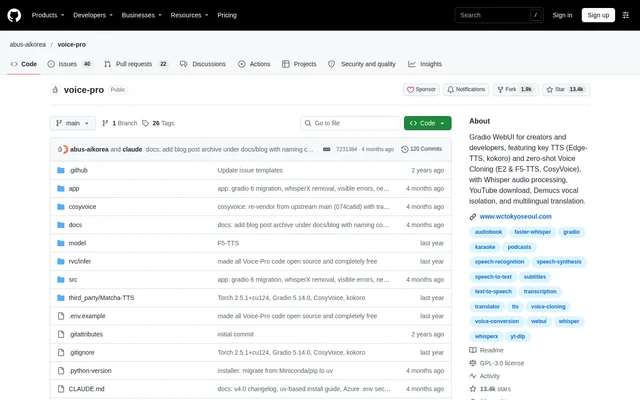
What is voice-pro?
voice-pro is an open-source speech recognition, translation and dubbing application built around a Gradio WebUI. The project brings multimedia processing and speech generation into a shared interface for creators, researchers, developers and multilingual professionals. The repository provides the code under the GPL-3.0 license and states that the application is completely free.
voice-pro combines tools that handle different stages of a media workflow, from downloading a YouTube video to separating its audio, recognizing speech, translating text and generating spoken output. The interface organizes these tasks into dedicated tabs rather than presenting transcription, subtitles and speech synthesis as separate applications.
What voice-pro can do
voice-pro supports both media-processing workflows and direct speech-generation tasks. The Dubbing Studio brings downloads, noise removal, subtitles, translation and text-to-speech together, while other tabs focus on captions, translation and voice generation. The listed speech recognition engines are Whisper, Faster-Whisper and Whisper-Timestamped, with several synthesis and voice-cloning models available.
- voice-pro downloads YouTube videos and extracts audio with yt-dlp.
- voice-pro separates vocals with Demucs.
- voice-pro generates subtitles with word-level highlighting and denoise options.
- voice-pro translates text and subtitle files across 100+ languages.
- voice-pro provides zero-shot voice cloning through F5-TTS, E2-TTS and CosyVoice.
- voice-pro generates speech with speed, volume and pitch controls.
- voice-pro exports audio as WAV, FLAC or MP3.
How voice-pro works
voice-pro runs from a downloaded or cloned GitHub repository. On Windows, start.bat launches the WebUI and downloads the runtime, dependencies and AI models during initial setup. The installer detects GPU or CPU operation automatically and can download a portable ffmpeg installation when needed. The optional configure.bat script performs system-wide setup and requires administrator rights.
voice-pro uses Deep-Translator with Google's free web endpoint for translation and Edge-TTS for speech synthesis by default. Users with a Microsoft Azure subscription can add credentials to a local .env file. Valid credentials are detected at startup, switching translation to Azure Translator and the first Speech Generation tab to Azure-TTS.
Who voice-pro is for
voice-pro serves creators, podcasters, developers, researchers and multilingual professionals who work with speech or multimedia content. The repository describes use cases spanning subtitle production, real-time recognition and translation, voice cloning and multilingual dubbing. Customizable audio inputs support live translation workflows, while subtitle-file support provides a route for translating existing captions.
- Creators can prepare translated subtitles and dubbed speech for video content.
- Podcasters can use speech generation and vocal separation in audio workflows.
- Multilingual professionals can recognize and translate speech in real time.
- Developers can modify and redistribute the open-source code.
voice-pro pricing and plans
voice-pro is currently offered as completely free, open-source code that users can download, modify and redistribute under GPL-3.0. The repository's current notice supersedes older release notes describing trials and subscriptions. Default translation and speech synthesis use free services; optional Microsoft Azure services require the user's own Azure subscription and credentials.
voice-pro strengths and limitations
voice-pro brings transcription, subtitle handling, translation, voice separation and speech generation into one locally installed WebUI. The Windows installer no longer requires CUDA Toolkit or Visual Studio Build Tools, and normal startup does not require administrator rights. However, the repository also identifies maintenance, hardware, download and service-access constraints that matter when planning a deployment.
- voice-pro development and updates are paused because of WeConnect development work.
- voice-pro is reported to work well on Windows with an NVIDIA GPU, but Mac and Linux operation is unverified.
- voice-pro requires internet access, local storage and substantial initial AI-model downloads.
- voice-pro's default Google translation endpoint can be blocked or rate-limited; failed lines retain their original text.
voice-pro FAQ
What is voice-pro?
voice-pro is a free, open-source Gradio web application for speech recognition, translation and multilingual dubbing. The project combines YouTube downloading, vocal separation, subtitle generation, text-to-speech and zero-shot voice cloning for creators, developers, researchers and multilingual professionals.
Is voice-pro free?
voice-pro is completely free and open source under the GPL-3.0 license. Default translation and speech synthesis use free services. Optional Azure Translator and Azure TTS support requires the user's own Microsoft Azure subscription and credentials.
Does voice-pro support voice cloning?
voice-pro supports zero-shot voice cloning with F5-TTS, E2-TTS and CosyVoice. The repository also lists support for fine-tuned F5-TTS models and an optional Fun-CosyVoice3 model that downloads from the official Hugging Face repository on first use.
Does voice-pro work on Mac and Linux?
voice-pro includes Mac and Linux installation scripts, but the current repository notice says operation on those systems has not been verified. The same notice reports that voice-pro works well on Windows with an NVIDIA GPU.
How do you install voice-pro?
voice-pro is installed by cloning the GitHub repository or downloading its source package, then running start.bat on Windows. Initial startup downloads the runtime, dependencies and AI models. The repository provides configure.sh and start.sh for Mac and Linux, whose operation remains unverified.
Can voice-pro translate subtitle files?
voice-pro supports subtitle translation for formats including ASS, SSA and SRT, with translation available for 100+ languages. The Translate tab also supports real-time voice recognition and translation, while the caption interface displays subtitles directly in video players.
From the community
No reviews yet
Be the first to review this tool. What you write helps the next person choose.