What is Wave.Video?
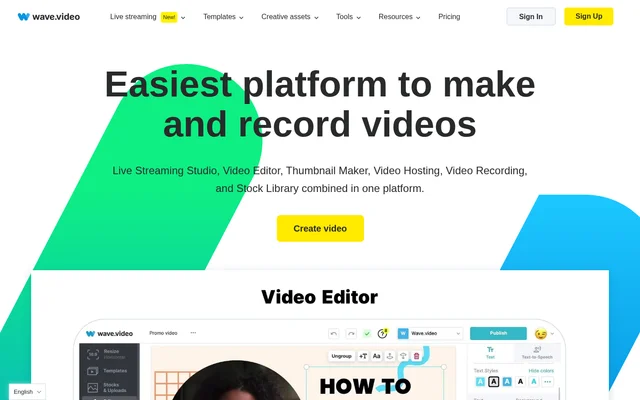
Wave.Video is an online video creation and hosting tool for creators, businesses, and agencies. Wave.Video brings video editing, live streaming, recording, thumbnail design, and stock media into a shared workflow. The website also provides options to generate videos with AI from text or blog posts, alongside starting from templates, uploading media, or creating a blank video.
Wave.Video covers both video production and distribution. Creators can edit clips and captions, record shows with guests, broadcast to multiple channels, and host finished videos for website embedding. Agencies can use brand management features to retain client colors, fonts, and logos rather than setting those details again for each project.
What Wave.Video can do
Wave.Video provides tools for preparing video content, broadcasting shows, and presenting finished work online. The editor supports changes to clip structure and visual presentation, while hosting tools provide control over players and landing pages. Streaming and recording features support guest participation, scene planning, and sharing material from a laptop.
- Wave.Video resizes and trims videos, combines clips, and changes layouts.
- Wave.Video adds animated text, stickers, transitions, and editable automatic captions.
- Wave.Video generates videos with AI from text or blog posts.
- Wave.Video streams live or prerecorded videos to multiple channels.
- Wave.Video records guest sessions with customizable layouts and scene management.
- Wave.Video creates thumbnails with photo background removal and title layouts.
- Wave.Video hosts videos with customizable players, landing pages, and analytics.
How Wave.Video works
Wave.Video offers a free account sign-up path on its website. Creation options include a blank video, blank image, video recording, upload, templates, stock assets, and imports from YouTube or Instagram. Users can edit video content, add captions and visual elements, then publish directly to social platforms. Paid subscribers can also download finished videos in MP4 format.
Wave.Video supports separate workflows for broadcasts and hosted content. A broadcast can use live footage or prerecorded video, include invited guests, and reach multiple channels simultaneously. Hosted videos can be placed on editable landing pages or embedded on blogs and websites. The online recorder supports scene management and sharing tabs or videos from a laptop.
Who Wave.Video is for
Wave.Video serves creators growing a business, agencies producing client content, and teams collaborating on videos. The source specifically describes agency workflows involving brand guidelines, client collaboration, and expanded video marketing services. Recording and streaming tools also support podcasts, live shows, webinars, presentations, and videos intended for a creator’s community.
- Wave.Video helps creators prepare captioned videos for social publishing.
- Wave.Video supports agencies managing client branding across video projects.
- Wave.Video enables hosts to record podcasts or broadcast guest-based shows.
- Wave.Video helps businesses embed videos and review video analytics.
Wave.Video pricing and plans
Wave.Video offers Free, Streamer, Creator, and Business plans, with monthly and annual billing options shown on the pricing page. Enterprise customers can contact the company about custom options and pricing. Plan allowances differ for editing, streaming, recording, stock assets, embeds, traffic, and storage. Payments use major credit and debit cards through Stripe, and subscribers can upgrade with a prorated charge.
Wave.Video strengths and limitations
Wave.Video combines production, broadcasting, and hosting capabilities that can otherwise require separate tools. Shared stock assets, templates, branded broadcasts, and customizable players support a range of content workflows. However, access and usage limits depend on the subscription. The pricing table and FAQ also disagree on some allowances, including Free-plan editing length and Business storage, so the supplied page does not establish a consistent limit for those items.
- Wave.Video adds watermarks to Free-plan streaming, recording, and hosting.
- Wave.Video reserves MP4 downloads for paid plans.
- Wave.Video does not allow Free subscribers to purchase additional bandwidth.
- Wave.Video does not allow Free or Creator subscribers to purchase additional storage.
Wave.Video FAQ
What is Wave.Video?
Wave.Video is an online video creation and hosting tool combining a video editor, live streaming studio, recorder, thumbnail maker, and stock library. Wave.Video supports creators, businesses, and agencies producing, broadcasting, and sharing video content.
Is Wave.Video free?
Wave.Video offers a Free plan alongside paid Streamer, Creator, and Business subscriptions. The Free plan includes watermarked streaming, recording, and hosting, while paid plans enable MP4 downloads. Enterprise customers can request custom options and pricing.
Can Wave.Video generate videos with AI?
Wave.Video offers AI video generation starting from text or a blog post. The website also provides creation paths using templates, stock assets, uploads, recordings, and blank videos, plus video imports from YouTube and Instagram.
Can Wave.Video stream to multiple channels?
Wave.Video supports simultaneous streaming to multiple channels using live or prerecorded video. The streaming studio includes guest invitations and branded broadcasts, while channel allowances, guest limits, broadcast duration, and available sharing features vary by subscription.
Can you download videos from Wave.Video?
Wave.Video allows subscribers on any paid plan to download videos directly to a computer in MP4 format. Wave.Video also states that every plan supports creating an unlimited number of videos and publishing directly to social platforms.
Does Wave.Video support teams and agencies?
Wave.Video supports multiple user logins and describes sharing login credentials across an organization to access common videos. Wave.Video also offers folders for organization and an agency-focused brand manager for retaining client colors, fonts, and logos.
From the community
No reviews yet
Be the first to review this tool. What you write helps the next person choose.