What is Agent Browser?
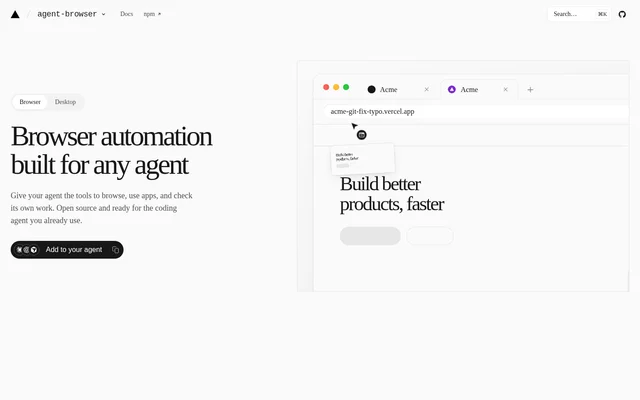
Agent Browser is an open-source browser automation tool that gives coding agents a way to use web apps and check the results of their work. For developers, that means an agent can move from editing code to checking the rendered page, rather than stopping once the change is written. The product page illustrates this with a typo fix that an agent compares across production and a preview deployment.
What Agent Browser can do
Agent Browser supports both direct interaction with a site and checks that go beyond what is visible on the page. An agent can click a control, fill in a form, and read the resulting confirmation. For frontend diagnostics, Agent Browser can profile a reload to investigate a slowdown, then measure again after a fix. Network controls let an agent test app behavior by changing the responses a page receives.
- Agents can click controls and type into form fields.
- Agents can read compact snapshots of page controls.
- Agents can capture screenshots and record video at up to 60 fps.
- Agents can measure Core Web Vitals and profile page reloads.
- Agents can work in separate browser sessions.
- Agents can inspect requests, block scripts, and mock API responses.
How Agent Browser works
Agent Browser is presented as a command-line tool for the coding agent a developer already uses. The product page offers an Add to your agent prompt to paste into that agent and links to documentation. During browser tasks, compact snapshots provide a view of page controls, while screenshots or recordings show the rendered interface. With the companion agent-desktop tool, an agent can map a native window and inspect only the region relevant to its task.
Who Agent Browser is for
Agent Browser is for developers who want coding agents to verify frontend work in the browser. In the site's pull request example, an agent screenshots the original headline on the production site, opens the preview deployment, and captures the corrected version. The agent then adds both images to the pull request description as a before-and-after comparison. This gives reviewers a visual record of the change.
- Check a bug fix on a preview deployment.
- Verify that submitting a form produces a save confirmation.
- Add before-and-after screenshots to a pull request.
- Compare page performance before and after a fix.
Agent Browser pricing and plans
Agent Browser is offered as an open-source project. The product page does not list prices, describe a paid plan, or specify which features would belong to a particular tier. The access path shown on the site is to add Agent Browser to an existing coding agent using the provided setup prompt, with documentation available separately.
Agent Browser strengths and limitations
Agent Browser lets agents use compact snapshots to find controls and capture screenshots or video when the visual result matters. Separate browser sessions let agents work side by side in the browser. Native application workflows use agent-desktop rather than browser controls. The same companion tool is used when agents share a desktop and each needs its own cursor.
Agent Browser FAQ
What is Agent Browser?
Agent Browser is an open-source browser automation tool for coding agents. Agent Browser lets agents interact with web apps, read compact snapshots of controls, and collect screenshots or video to verify the results of their work.
Is Agent Browser free?
Agent Browser is offered as an open-source project, and the product page does not list prices or paid plans. The site provides an Add to your agent setup prompt and links to documentation.
Can Agent Browser take before-and-after screenshots for pull requests?
Agent Browser can capture screenshots to document a change in a pull request. In the product demo, an agent screenshots the production page and the corrected preview deployment, then places both images side by side in the pull request description.
Can Agent Browser test web performance and mock API responses?
Agent Browser can measure Core Web Vitals, profile a page reload, and mock API responses. Agent Browser also lets agents inspect network requests or block scripts, which helps them test app states that are difficult to reach.
Can Agent Browser control desktop apps?
Agent Browser supports native desktop app workflows through the companion agent-desktop tool. Agents can use agent-desktop to map a window and inspect a specific region, or work on a shared desktop with separate cursors.
From the community
No reviews yet
Be the first to review this tool. What you write helps the next person choose.