What is AIEase Video Watermark Remover?
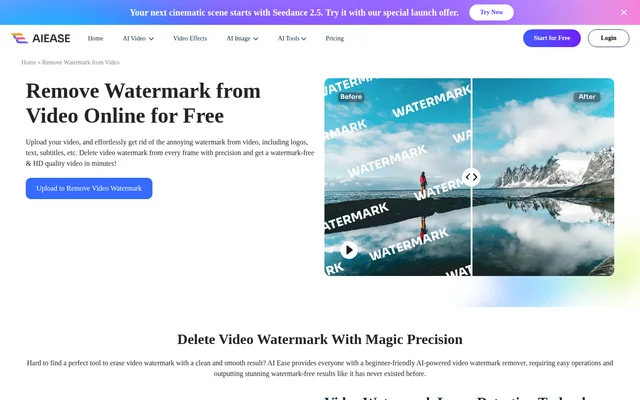
AIEase Video Watermark Remover is an online AI video editing tool that removes watermarks such as logos, text, subtitles and icons. The website presents a beginner-friendly workflow for people who want to remove unwanted marks without a complicated editing process. Supported examples include TikTok videos, Instagram reels and YouTube shorts, alongside videos containing full-screen text or logo watermarks.
AIEase Video Watermark Remover uses watermark layer detection to detect, separate and erase text or logo layers across the uploaded video's frames. The page describes attention to removal edges and scene continuity, while the export retains the original video resolution. Free trials let users preview the removal effect.
What AIEase Video Watermark Remover can do
AIEase Video Watermark Remover combines automatic watermark detection with manual selection controls. Users can brush over a watermark and inspect the marked area along the video track. For videos requiring different selections in different portions, the clip-splitting feature allows separate watermark areas to be marked rather than relying on a single selection throughout.
- AIEase Video Watermark Remover detects and erases watermark layers across video frames.
- AIEase Video Watermark Remover removes logos, text, subtitles and icons.
- AIEase Video Watermark Remover handles full-screen text and logo watermarks.
- AIEase Video Watermark Remover splits videos into clips for separate watermark selections.
- AIEase Video Watermark Remover exports videos at their original resolution.
How AIEase Video Watermark Remover works
AIEase Video Watermark Remover starts with an upload or drag-and-drop action in the online tool. Users brush over the watermark, slide along the video track to check the area and split the video into clips when different regions need marking. Selecting Remove starts processing, after which the video can be downloaded. Processing time depends on the uploaded video's length.
Who AIEase Video Watermark Remover is for
AIEase Video Watermark Remover is presented as a beginner-friendly tool for people removing unwanted marks from video footage. The page specifically mentions recreating work from TikTok videos, Instagram reels and YouTube shorts. The supported use cases also include videos with subtitles, icons or full-screen watermarks, rather than only a logo in a fixed corner.
- AIEase Video Watermark Remover removes logos from social video content.
- AIEase Video Watermark Remover erases unwanted subtitles or text overlays.
- AIEase Video Watermark Remover supports different marked areas in separate clips.
AIEase Video Watermark Remover pricing and access
AIEase Video Watermark Remover offers free trials to preview the watermark removal effect, according to the page's frequently asked questions. Although the headline describes online removal for free, the more specific access statement refers to trials. The page does not list paid plans, prices or detailed trial allowances. Access begins through the online video upload workflow.
AIEase Video Watermark Remover strengths and limitations
AIEase Video Watermark Remover provides a direct upload, selection and removal workflow, with clip-specific marking for videos that need different watermark areas selected. Original-resolution export is another stated capability. However, preserving resolution is distinct from enhancing clarity: the page points users to a separate video enhancer for that purpose. Format support and trial-based preview access are practical constraints.
- AIEase Video Watermark Remover supports MP4 and MOV files.
- AIEase Video Watermark Remover describes free access as trials for previewing results.
- AIEase Video Watermark Remover processing time varies with video length.
AIEase Video Watermark Remover FAQ
What is AIEase Video Watermark Remover?
AIEase Video Watermark Remover is an online AI tool for removing logos, text, subtitles, icons and other watermarks from videos. The tool combines watermark layer detection with brush-based selection and clip splitting to mark different watermark areas.
Is AIEase Video Watermark Remover free?
AIEase Video Watermark Remover offers free trials to preview the watermark removal effect. The page describes the tool as free online, but the detailed FAQ specifies trial access and does not provide paid plan prices or trial allowances.
What video formats does AIEase Video Watermark Remover support?
AIEase Video Watermark Remover supports MP4 and MOV video files. Users can upload or drag and drop a supported video into the online tool, then brush over the watermark before starting removal.
Does AIEase Video Watermark Remover preserve video resolution?
AIEase Video Watermark Remover keeps the original video resolution when exporting. The page separately suggests an online video enhancer for increasing clarity and quality, so the stated export capability is resolution preservation rather than automatic enhancement.
How do you remove a watermark with AIEase Video Watermark Remover?
AIEase Video Watermark Remover uses an upload, mark and remove workflow. Users upload a video, brush over the watermark and inspect the selection along the timeline. Users can split clips to mark different areas, then select Remove and download the processed video.
How long does AIEase Video Watermark Remover take?
AIEase Video Watermark Remover processing time depends on the length of the uploaded video. The page describes removal in minutes but does not give a fixed processing duration for a particular video length.
From the community
No reviews yet
Be the first to review this tool. What you write helps the next person choose.