What is Aiseesoft Watermark Remover Online?
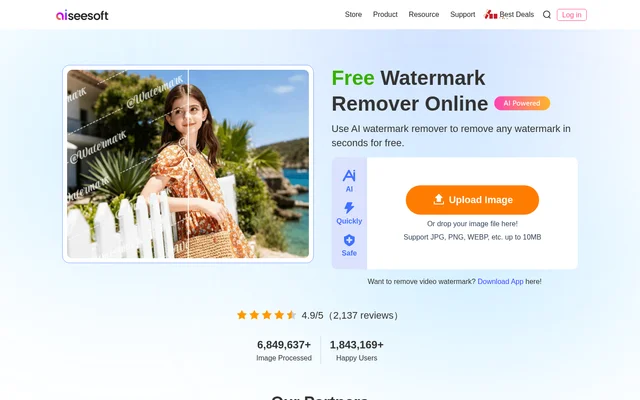
Aiseesoft Watermark Remover Online is a web-based AI tool for removing watermarks and unwanted objects from photographs. Aiseesoft Watermark Remover Online is intended for people who want to clean up images without mastering technical editing skills. The page describes support for text watermarks, graphic logos, camera date stamps, and other unwanted elements.
Aiseesoft Watermark Remover Online works in a browser rather than requiring an installed image editor. The page lists Windows and Mac support and says the tool is compatible with almost all browsers. The online editor is specifically for still images; video watermark removal is handled through a separate application.
What Aiseesoft Watermark Remover Online can do
Aiseesoft Watermark Remover Online combines AI processing with user-selected removal areas. The page describes handling simple watermarks as well as more complicated marks with multiple layers and detailed elements. Aiseesoft Watermark Remover Online also generates replacement image elements intended to match the surrounding picture, while allowing users to preview changes and continue editing.
- Aiseesoft Watermark Remover Online removes text, logos, and camera date stamps.
- Aiseesoft Watermark Remover Online can remove unwanted background people in most circumstances.
- Aiseesoft Watermark Remover Online provides Brush, Lasso, and Polygonal selection tools.
- Aiseesoft Watermark Remover Online supports repeated removal using the changed image.
- Aiseesoft Watermark Remover Online includes cropping and image downloads.
How Aiseesoft Watermark Remover Online works
Aiseesoft Watermark Remover Online starts with an image upload or a file dropped into the browser's upload area. Users highlight the watermark, then apply the removal action. Brush selection allows targeted marking, Lasso outlines an area, and Polygonal selection defines points around a shape. The Eraser removes unnecessary parts of the selection before processing.
Aiseesoft Watermark Remover Online lets users inspect the result and select additional elements for removal. The page also describes cropping an image before saving or downloading the current version directly. Supported image formats include JPG, JPEG, PNG, WEBP, BMP, and TIFF, while the upload area states a maximum file size of 10MB.
Who Aiseesoft Watermark Remover Online is for
Aiseesoft Watermark Remover Online serves people making targeted changes to photos without using a more technical editing workflow. The page gives examples involving presentation images, personal photographs with date stamps, and unwanted people in the background. Manual selection and repeated processing support situations where more than one element needs attention.
- Aiseesoft Watermark Remover Online can clean date stamps from personal photos.
- Aiseesoft Watermark Remover Online can remove selected background distractions.
- Aiseesoft Watermark Remover Online can erase text or graphic marks from images.
Aiseesoft Watermark Remover Online pricing and access
Aiseesoft Watermark Remover Online is advertised as free, and the page's structured product data also lists a zero-price offer. However, the editor interface states that users can process up to 10 pictures per day. The same interface includes upgrade prompts and a low-quality image download option, without explaining a complete paid-plan structure or upgrade price.
Aiseesoft Watermark Remover Online strengths and limitations
Aiseesoft Watermark Remover Online combines browser access, manual selection, and previews in a workflow that does not require installation. The page emphasizes retaining image detail, although its FAQ describes reducing quality loss rather than guaranteeing unchanged output. Practical constraints include the upload size, daily processing allowance, and the online editor's restriction to images.
- Aiseesoft Watermark Remover Online accepts uploads up to 10MB.
- Aiseesoft Watermark Remover Online states a daily limit of 10 pictures.
- Aiseesoft Watermark Remover Online does not remove watermarks from videos.
Aiseesoft Watermark Remover Online FAQ
What is Aiseesoft Watermark Remover Online?
Aiseesoft Watermark Remover Online is a browser-based AI image editor for removing watermarks, text, logos, date stamps, and unwanted objects. Users upload a photo, select the unwanted area, apply removal, and download the edited image.
Is Aiseesoft Watermark Remover Online free?
Aiseesoft Watermark Remover Online is advertised as free, and its structured product data lists a zero-price offer. The editor also states a limit of 10 pictures per day and displays upgrade prompts and a low-quality download option.
How do you remove a watermark with Aiseesoft Watermark Remover Online?
Aiseesoft Watermark Remover Online removes selected areas after users upload an image, highlight the watermark, and apply removal. Brush, Lasso, and Polygonal tools define the selection, while the Eraser refines selected areas. Users can preview results, repeat edits, crop, and download.
Does Aiseesoft Watermark Remover Online work on Mac?
Aiseesoft Watermark Remover Online works on Mac through compatible browsers, according to the page. The tool is web-based and requires no software installation. The structured product information also lists Windows support.
Can Aiseesoft Watermark Remover Online remove video watermarks?
Aiseesoft Watermark Remover Online cannot remove video watermarks because the online tool only processes images. The page directs users who need video watermark removal to the separate Aiseesoft Video Converter Ultimate application and its Watermark Remover toolbox feature.
Can Aiseesoft Watermark Remover Online remove people from photos?
Aiseesoft Watermark Remover Online can remove unwanted objects, including people in photo backgrounds, in most circumstances according to the page. Users select the relevant area and apply the watermark removal action to process that part of the image.
From the community
No reviews yet
Be the first to review this tool. What you write helps the next person choose.