What is BaoCut?
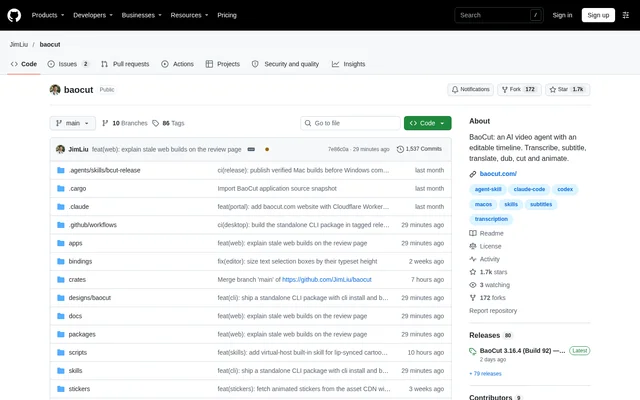
BaoCut is an open-source AI video agent centered on an editable video project. BaoCut handles transcription, subtitles, translation, dubbing, cutting and animation while keeping the results available for further editing. The project serves people working with existing recordings as well as people building videos from a written brief.
BaoCut treats the video project as the source of truth rather than treating an exported file as the final working document. Transcripts, chapters, subtitle layers, translations, voice-overs and motion graphics live together. People can take over from the agent, revise individual elements and continue working within the same editor.
What BaoCut can do
BaoCut combines speech processing, editing and video production within the same project. BaoCut can derive subtitles and written material from timed transcripts, prepare existing footage or build scenes from prompts. Local models and online providers supply capabilities such as transcription, speech synthesis, image generation and audio separation.
- BaoCut transcribes speech with word-level timing and streams segments into the timeline.
- BaoCut creates original-language, translated or bilingual subtitles.
- BaoCut separates vocals and synthesizes dubbed speech with cloned or preset voices.
- BaoCut removes filler words, pauses, retakes and false starts from recordings.
- BaoCut stabilizes, upscales and prepares footage while preserving the original files.
- BaoCut creates prompt-based videos and imports HTML motion graphics as code bundles.
- BaoCut exports MP4, SRT, WebVTT, transcripts, audio stems and portable project bundles.
How BaoCut works
BaoCut connects its desktop application, CLI, MCP service and browser editor to the same local Runtime. Each interface uses the same protocol and edits the same video. Human edits and agent actions pass through a shared command gateway, transactions and undo stack, so either participant can continue the work.
BaoCut supports external agent engines, with Claude Code and Codex CLI validated end to end. Agent features require a signed-in engine, but opening the application does not require an agent login. Model capabilities can run locally or connect to providers and OpenAI-compatible endpoints, while a usage ledger tracks cost per job.
Who BaoCut is for
BaoCut supports video creators and editors who need to revise AI-generated work rather than accept a single rendered result. BaoCut also supports developers and agent users who want scripted or MCP-driven editing. Concrete workflows include adapting recordings for another language, cleaning spoken presentations and producing narrated visual content.
- BaoCut helps editors clean talking-head recordings without modifying original media.
- BaoCut helps creators translate subtitles and produce dubbed versions of footage.
- BaoCut turns timed transcripts into chapters, summaries, titles, blog posts and shorts.
- BaoCut supports explainers, product launches, trailers, tutorials and data stories.
- BaoCut lets external agents perform editing through the CLI or MCP service.
BaoCut access and installation
BaoCut is distributed through downloadable macOS and Windows packages, with source-development instructions also available. Packaged applications include the Runtime and native workers, so ordinary installation does not require Node.js, Rust or a compiler. Release pages provide version information, checksums and verification details, and the application checks GitHub Releases for updates.
BaoCut installation on macOS involves opening the DMG and dragging the application into Applications. Windows installation requires the Microsoft Visual C++ Redistributable before running the installer or extracting the ZIP. Media analysis, transcription preparation and export additionally need ffmpeg and ffprobe, which are external tools rather than bundled components.
BaoCut strengths and limitations
BaoCut emphasizes targeted revisions: an agent can change a subtitle line, replace a shot or redo a voice-over sentence without re-rendering unrelated work. BaoCut also reports changes and failed checks, uses explicit agent scope and budgets, and asks before destructive actions. Local processing and provider choice offer alternative ways to supply model capabilities.
- BaoCut requires a signed-in agent engine for agent features.
- BaoCut Windows packages are unsigned, and GPU builds need compatible drivers.
- BaoCut published macOS packages target Apple Silicon.
- BaoCut portable bundles omit the original video's complete transaction and undo history.
- BaoCut includes a Fish Audio speech option with a research/non-commercial license.
BaoCut FAQ
What is BaoCut?
BaoCut is an open-source AI video agent with an editable timeline. BaoCut transcribes, subtitles, translates, dubs, cuts and animates videos while keeping transcripts, voice-overs, subtitle layers and motion graphics available for continued editing.
Which operating systems does BaoCut support?
BaoCut provides packaged applications for macOS on Apple Silicon and Windows x64. BaoCut offers Windows CPU, CUDA and Vulkan variants. Windows packages are unsigned, and GPU variants require compatible graphics drivers.
Can BaoCut use local AI models?
BaoCut supports local models for capabilities including transcription, speech and image generation, alongside online providers. BaoCut downloads local models from Hugging Face by default, with ModelScope and custom mirror options available through model download settings.
Does BaoCut work with Claude Code or Codex?
BaoCut supports Claude Code and Codex CLI, which are validated end to end. BaoCut also provides a CLI, an MCP service and an agent skill for external agents. Agent features require an installed, signed-in agent engine.
What does BaoCut require before editing and exporting?
BaoCut requires separately installed ffmpeg and ffprobe for media analysis, transcription preparation and export. BaoCut packaged applications already include the Runtime and native workers, so normal use does not require Node.js, Rust or a compiler.
Can BaoCut projects be edited on another computer?
BaoCut exports a portable .baocut bundle that reopens on another machine for continued editing. BaoCut bundles include a video snapshot and all document and asset versions, but exclude the original video's complete transaction or undo history.
From the community
No reviews yet
Be the first to review this tool. What you write helps the next person choose.