What is Benchmark Email?
Benchmark Email is an email marketing tool that combines campaign creation with AI-assisted writing. Benchmark Email serves people who need to draft emails, refresh existing messages, and personalize content for subscriber lists. Smart Content focuses on generating email copy, while the broader product includes email design, signup forms, contact management, and reporting.
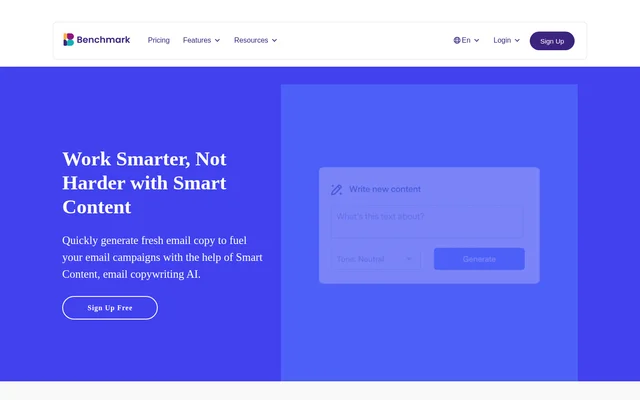
Benchmark Email presents Smart Content as a way to start from a few ideas rather than a blank page. Generated copy can then be shaped into an email campaign. The source also describes creating fresh takes on evergreen topics and adapting previously sent copy into new content.
What Benchmark Email can do
Benchmark Email supports both content generation and the practical work of preparing email campaigns. Smart Content handles drafting and rewriting, while Smart Subject Lines addresses email openers. The pricing page also describes an AI Assistant that creates copy and images inside the builder, alongside editing, personalization, and reporting tools.
- Benchmark Email generates email copy from a few ideas.
- Benchmark Email turns existing email copy into new content.
- Benchmark Email helps create subject lines with Smart Subject Lines.
- Benchmark Email adapts content themes for different subscriber segments.
- Benchmark Email creates copy variations for a/b testing.
- Benchmark Email provides drag-and-drop layouts, templates, and an HTML editor.
- Benchmark Email reports on email engagement and link activity.
How Benchmark Email works
Benchmark Email offers free account signup to try Smart Content. The described writing workflow begins with a few ideas, generates email copy, and leaves room to edit the draft. Existing email text can also become the starting point for new content. Within the builder, the AI Assistant responds to requests for copy and images.
Benchmark Email connects campaign content with subscriber data through lists, tags, custom fields, and merge fields. The API can synchronize contacts with a CRM, store, or booking tool and pull campaign results into dashboards. Zapier provides no-code connections, while subscriber forms can be embedded on websites that accept HTML.
Who Benchmark Email is for
Benchmark Email is suited to email marketers managing ongoing communication with subscribers. The stated use cases include finding new reasons to contact an audience, reusing existing messaging, and personalizing a campaign theme for different list segments. The broader tools also support collecting subscribers, organizing contact details, and reviewing campaign engagement.
- Benchmark Email helps campaign writers develop drafts and subject lines.
- Benchmark Email helps marketers refresh evergreen or previously sent content.
- Benchmark Email supports segment-specific messaging and copy variations for testing.
- Benchmark Email supports subscriber collection through embedded, popup, and hosted forms.
Benchmark Email pricing and plans
Benchmark Email offers Free, Pro, and Enterprise plans, with every feature included across plans and different usage allowances. Free includes up to 500 contacts, 1,000 email sends per month, and 150 monthly AI credits. Pro for 500 contacts costs $12 per month or $10 per month when billed annually.
Benchmark Email paid plans include 1,000 monthly AI credits, list verification, and removable branding. Pro at 500 contacts allows up to 5,000 monthly sends. Enterprise plans are customized for senders with more than 100,000 contacts and require contacting sales for pricing. AI credits refresh at the start of each billing cycle.
Benchmark Email strengths and limitations
Benchmark Email brings AI drafting, email design, subscriber management, and campaign reporting into the same product. Access to every feature on Free allows users to try these capabilities within defined allowances. API access and Zapier support connecting subscriber data with other tools, but free access does not remove sending, staffing, branding, or AI usage restrictions.
- Benchmark Email limits Free accounts to 500 contacts and 1,000 monthly sends.
- Benchmark Email includes 150 monthly AI credits on Free and 1,000 on paid plans.
- Benchmark Email retains branding on Free emails and forms.
- Benchmark Email requires a paid plan before teammates can be invited.
- Benchmark Email charges $15 per month for each additional user on paid plans.
Benchmark Email FAQ
What is Benchmark Email?
Benchmark Email is an email marketing tool with AI-assisted copywriting, email design, contact management, signup forms, and reporting. Smart Content generates new email drafts, refreshes existing copy, and helps tailor messages to subscriber segments.
Is Benchmark Email free?
Benchmark Email offers a Free plan with up to 500 contacts, 1,000 email sends per month, and 150 monthly AI credits. Every feature is included, but Free emails and forms display Benchmark branding, and inviting teammates requires a paid plan.
What can Benchmark Email Smart Content do?
Benchmark Email Smart Content generates email copy from a few ideas, refreshes evergreen topics, and turns existing emails into new content. Benchmark Email also describes using Smart Content for segment-specific personalization and copy variations for a/b testing.
How much does Benchmark Email Pro cost?
Benchmark Email Pro for 500 contacts costs $12 per month or $10 per month billed annually. That plan includes up to 5,000 monthly email sends, 1,000 monthly AI credits, list verification, and the option to remove Benchmark branding.
Does Benchmark Email have an API or integrations?
Benchmark Email provides an API for synchronizing contacts with a CRM, store, or booking tool and retrieving campaign results for dashboards. Benchmark Email also connects through Zapier, and subscriber forms can be embedded on websites that accept HTML.
How do Benchmark Email AI credits work?
Benchmark Email AI credits power the AI Assistant in the email and form builders, with larger requests consuming more credits. Free plans include 150 credits per month, and paid plans include 1,000. Credits refresh at the start of each billing cycle.
From the community
No reviews yet
Be the first to review this tool. What you write helps the next person choose.