What is Bigjpg?
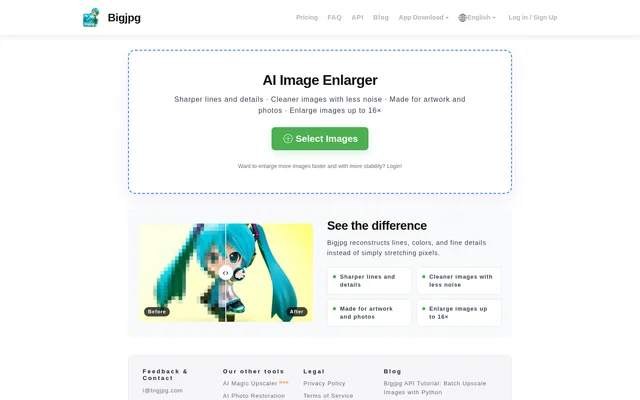
Bigjpg is an AI image enlarger for people working with artwork and photos. Bigjpg describes its approach as reconstructing lines, colors, and fine details instead of simply stretching pixels. The stated results include sharper lines and details and cleaner images with less noise. Bigjpg is available through its website and through iOS and Android apps, with a free plan and paid account upgrades.
What Bigjpg can do
Bigjpg combines image enlargement with reconstruction of visual details and noise reduction. Bigjpg supports artwork and photos, while processing limits depend on the selected plan. The free plan supports smaller uploads and lower enlargement ratios; paid plans add larger uploads, higher enlargement ratios, and tools for processing multiple images. The pricing table also lists offline enlarging across both free and paid plans.
- Bigjpg reconstructs lines, colors, and fine details during enlargement.
- Bigjpg reduces noise in artwork and photos.
- Bigjpg enlarges images up to 16x on paid plans.
- Bigjpg accepts uploads up to 50MB on paid plans.
- Bigjpg supports parallel enlarging and batch mode on paid plans.
- Bigjpg provides offline enlarging on free and paid plans.
How Bigjpg works
Bigjpg presents a Select Images control followed by task actions for starting, deleting, retrying, and downloading image enlargements. Bigjpg also provides login and sign-up options, account settings, and an enlarging history view. The history interface includes download and retry controls, but only records from the last day are shown. Account information displays available image quota, plan validity, and quota reset time, with each plan following its own quota cycle.
Who Bigjpg is for
Bigjpg is intended for people who need to enlarge artwork or photos while addressing image noise and detail quality. Bigjpg explicitly supports both image types rather than describing a workflow limited to one. People processing multiple images can use the parallel enlarging and batch capabilities included with paid plans, while the free plan provides a smaller monthly allowance for image enlargement.
- Bigjpg can enlarge artwork while reconstructing lines and colors.
- Bigjpg can enlarge photos while reducing noise.
- Bigjpg can process multiple images simultaneously through paid parallel enlarging.
- Bigjpg can provide downloads of recently enlarged images through its history view.
Bigjpg pricing and plans
Bigjpg offers a Free Plan with 20 pictures per month, shared-server processing, a 5MB upload limit, and a maximum enlargement ratio of 4x. Bigjpg lists Basic at $6 USD for 2 months with 500 images per month, Standard at $12 USD for 6 months with 1000 images per month, and Premium at $22 USD for 12 months with 2000 images per month.
Bigjpg gives paid plans top-priority processing on high-performance servers, uploads up to 50MB, and enlargement up to 16x. Bigjpg also includes parallel enlarging and batch mode with paid plans. The page lists Stripe, WeChat Pay, and Alipay payment options. Bigjpg additionally directs app users to Apple Pay or Google Wallet and provides an email contact for information about cryptocurrency payments.
Bigjpg strengths and limitations
Bigjpg combines support for artwork and photos with detail reconstruction, noise reduction, and a free access option. Bigjpg makes its upload limits, monthly image allowances, and enlargement ratios explicit in the pricing table. Paid plans add processing priority and multiple-image workflows, but the free plan uses shared servers and excludes those batch capabilities. Recent processing records are accessible through history, subject to a short visibility window.
- Bigjpg limits free uploads to 5MB and free enlargement to 4x.
- Bigjpg does not include parallel enlarging or batch mode in the free plan.
- Bigjpg shows only enlarging records from the last day.
Bigjpg FAQ
What is Bigjpg?
Bigjpg is an AI image enlarger for artwork and photos. Bigjpg reconstructs lines, colors, and fine details instead of simply stretching pixels, with stated capabilities for sharper details and cleaner images with less noise.
Is Bigjpg free?
Bigjpg offers a free plan with 20 images per month, uploads up to 5MB, and enlargement up to 4x. Bigjpg also offers paid Basic, Standard, and Premium plans with higher allowances, larger uploads, and additional processing capabilities.
How much do Bigjpg paid plans cost?
Bigjpg lists Basic at $6 USD for 2 months, Standard at $12 USD for 6 months, and Premium at $22 USD for 12 months. Monthly image allowances are 500, 1000, and 2000 respectively.
Can Bigjpg enlarge multiple images at once?
Bigjpg supports parallel enlarging and batch mode on paid plans. Bigjpg lists both capabilities as unavailable on the free plan, while paid plans also receive top-priority processing and support uploads up to 50MB.
Does Bigjpg have mobile apps?
Bigjpg offers iOS and Android apps through the App Store and Google Play. Bigjpg states that app users can make payments with Apple Pay or Google Wallet as alternatives to the payment options listed on the website.
How long does Bigjpg show enlarging history?
Bigjpg shows enlarging records only from the last day. Bigjpg provides download, retry, and delete controls in the history interface, along with details such as image dimensions, enlargement settings, and processing status.
From the community
No reviews yet
Be the first to review this tool. What you write helps the next person choose.