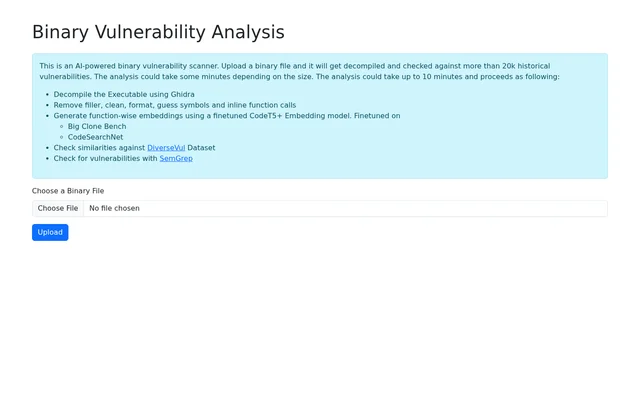
What is BinAnalysis?
BinAnalysis is an AI-powered vulnerability scanner that analyzes uploaded binary files. BinAnalysis takes an executable as input and uses Ghidra to turn the binary into decompiled code for analysis. The scanner is suited to developers and security reviewers who want to check a compiled file for potential vulnerabilities. The page describes the scan as checking against more than 20k historical vulnerabilities and identifies similarity matching and SemGrep checks as separate stages of the analysis.
What BinAnalysis can do
BinAnalysis prepares decompiled code before checking it. That preparation includes removing filler, cleaning and formatting the code, guessing symbols, and inlining function calls. BinAnalysis then works at the function level: the embedding model creates a representation of each function for similarity analysis. The page distinguishes the similarity check against DiverseVul from the vulnerability check performed with SemGrep.
- BinAnalysis accepts binary file uploads.
- BinAnalysis decompiles executables using Ghidra.
- BinAnalysis creates function embeddings with CodeT5+.
- BinAnalysis compares functions against the DiverseVul dataset.
- BinAnalysis checks for vulnerabilities with SemGrep.
How BinAnalysis works
BinAnalysis starts with a binary file uploaded through its website. Ghidra decompiles the executable, and the scanner processes the decompiled code before sending individual functions through a fine-tuned CodeT5+ embedding model. The page names Big Clone Bench and CodeSearchNet as the datasets used to fine-tune that model. DiverseVul has a different role in the workflow: BinAnalysis uses it for similarity checks during the scan. The page lists SemGrep vulnerability checks after the similarity stage.
Who BinAnalysis is for
BinAnalysis is relevant to people whose starting point for a security review is a compiled executable rather than source code. Developers and security reviewers can submit the binary itself because decompilation is part of the workflow. BinAnalysis covers both comparisons between decompiled functions and entries in a vulnerability dataset and checks performed with SemGrep. The page describes an upload-based scanner, so these use cases are centered on analyzing a submitted file.
- Review a compiled executable for potential vulnerabilities.
- Check decompiled functions for similarities against DiverseVul.
- Include SemGrep checks in an executable review.
BinAnalysis strengths and limitations
BinAnalysis handles decompilation and code preparation within the scanning workflow, so the input is a binary file rather than code that the reviewer has already decompiled and cleaned. BinAnalysis also includes both similarity checks and SemGrep checks. The practical trade-off is turnaround time: the page says processing depends on the size of the binary and can take up to 10 minutes. The page does not state pricing or describe any plans.
- The workflow requires a file upload.
- Processing time varies with binary size.
- A scan can take up to 10 minutes.
BinAnalysis FAQ
What is BinAnalysis?
BinAnalysis is an AI-powered binary vulnerability scanner that analyzes uploaded executable files. BinAnalysis uses Ghidra for decompilation, checks decompiled functions for similarities against the DiverseVul dataset, and runs vulnerability checks with SemGrep.
How do you scan a binary with BinAnalysis?
BinAnalysis starts a scan from a binary file uploaded on its website. After upload, BinAnalysis decompiles the executable, prepares the decompiled code, generates function embeddings, and runs similarity and vulnerability checks.
How long does a BinAnalysis scan take?
BinAnalysis can take up to 10 minutes to analyze an uploaded binary, depending on the file size. The stated processing time covers a workflow that includes decompilation, code preparation, function embeddings, similarity checks, and SemGrep checks.
What does BinAnalysis compare decompiled functions against?
BinAnalysis checks decompiled functions for similarities against the DiverseVul dataset. BinAnalysis generates function-level embeddings with a fine-tuned CodeT5+ model before the similarity check, and the page lists SemGrep as a separate vulnerability check.
Does BinAnalysis publish pricing?
BinAnalysis does not state pricing or plan details on its product page. The page explains how to submit a binary file for analysis, but it does not say whether the upload or scan is free or paid.
From the community
No reviews yet
Be the first to review this tool. What you write helps the next person choose.