What is ComfyUI Web?
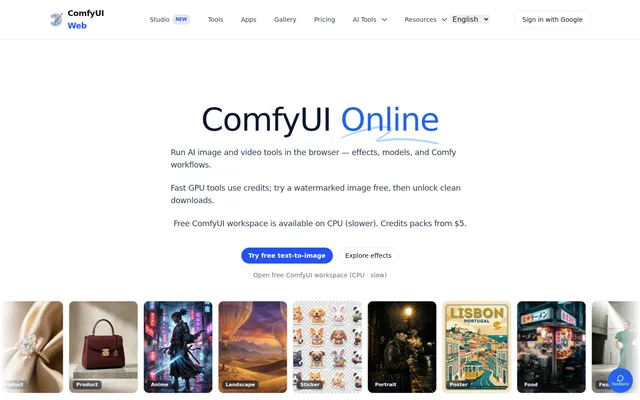
ComfyUI Web is an online AI creation platform for people who want to make images or videos in a browser and for ComfyUI users who want to run workflows without setting up a local installation. ComfyUI Web includes ready-to-use generators and effects as well as a full ComfyUI workspace. Processing takes place on cloud servers, so users do not need a local GPU.
What ComfyUI Web can do
ComfyUI Web offers separate tools for generating content from scratch and changing existing media. Image tools include models such as Flux, Nano Banana 2, and Seedream, while video tools include Wan and Seedance. Users can choose a generator based on whether they are starting with text, a reference image, or a photo they want to place into an effect template.
- ComfyUI Web generates images from text prompts.
- ComfyUI Web edits, upscales, and restyles existing images.
- ComfyUI Web generates video from text or still images.
- ComfyUI Web creates short video effects from uploaded photos.
- ComfyUI Web offers tools for music and audio synthesis.
How ComfyUI Web works
ComfyUI Web is accessible from a browser on a desktop, laptop, tablet, or phone. In the featured text-to-image tool, selecting a style replaces the prompt with an example that can be edited before choosing an aspect ratio and generating an image. Photo effects instead take an uploaded image, while the remote CPU workspace provides the full ComfyUI interface for workflow experiments.
Who ComfyUI Web is for
ComfyUI Web serves casual users who want to generate an image from a prompt and ComfyUI users who want to experiment with workflows in the browser. The poster and quote card tools suit people drafting shareable graphics without uploading a photo, while the photo-based video templates are designed for short clips on TikTok, Reels, and Shorts.
- Draft a poster with a headline, subtitle, and specified mood.
- Create a social quote card with optional attribution.
- Generate product visuals or concept art from a prompt.
- Turn a reference image into a video.
- Experiment with ComfyUI workflows on a remote CPU.
ComfyUI Web pricing and plans
ComfyUI Web combines free access with credit-based generation. The featured text-to-image tool offers a free first try with a watermark, and the result can be unlocked for a clean download. Fast GPU tools use credits, with different credit costs listed for individual models. The full ComfyUI workspace is available at no charge on a remote CPU.
Strengths and limitations
ComfyUI Web gives users a choice between dedicated tools for a specific result and a full workspace for experimenting with workflows. A creator can select a model or an effect without installing software, while a workflow user can try the free CPU option. The trade-off is that the CPU workspace is slower than the fast tools, and the featured free image output comes with a watermark.
- The free CPU workspace typically takes minutes per image.
- Fast GPU tools consume credits.
- The featured free image trial adds a watermark.
Getting started with ComfyUI Web
ComfyUI Web provides a text-to-image demo on its home page. A user can select a preset such as Poster, Product, or Landscape, edit the example prompt, choose an aspect ratio, and generate a preview. For a photo effect, the starting point is an upload instead of a text prompt. For workflow testing, the page links to the free CPU workspace and offers an SDXL Turbo workflow as a JSON download.
ComfyUI Web FAQ
What is ComfyUI Web?
ComfyUI Web is a browser-based platform for AI image generation, image editing, video creation, and audio synthesis. ComfyUI Web also provides a full ComfyUI workspace on a remote CPU for users who want to run workflows rather than use a ready-made generator.
Is ComfyUI Web free?
ComfyUI Web offers a free remote CPU workspace and a free watermarked first try on the featured text-to-image generator. Fast GPU tools use credits, and users can unlock a clean download from the featured generator. The free workspace typically takes minutes per image.
Do I need a GPU to use ComfyUI Web?
ComfyUI Web does not require a local GPU because processing runs on cloud servers. Users need a browser and an internet connection, and the site supports desktops, laptops, tablets, and phones without requiring them to install ComfyUI locally.
Can ComfyUI Web turn an image into a video?
ComfyUI Web can turn a still image into a video using image-to-video tools such as Veo, Wan, and Seedance. ComfyUI Web also offers template-based effects that use uploaded photos to place people into short clips.
How is ComfyUI Web different from local ComfyUI?
ComfyUI Web offers cloud-hosted generators, effects, and a remote ComfyUI workspace through a browser. The site describes local ComfyUI as a node-based desktop application that requires a GPU and technical setup, while ComfyUI Web requires no local installation.
From the community
No reviews yet
Be the first to review this tool. What you write helps the next person choose.